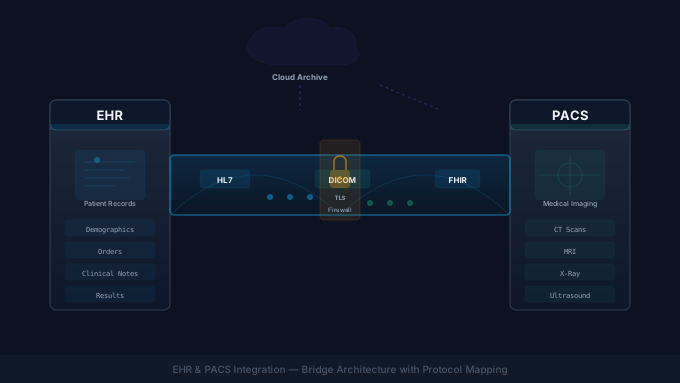
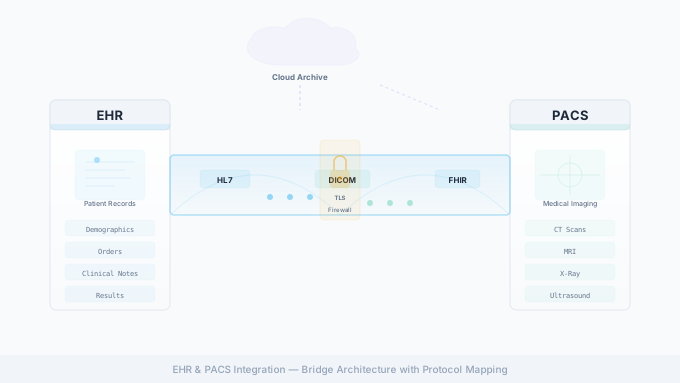
What is EHR & PACS Integration?
Healthcare interoperability (the ability for separate clinical systems to exchange data) is a long-running industry initiative. For a third-party vendor with a cloud product, that data lives behind two systems at every hospital partner: the EHR (Electronic Health Record) and the PACS (Picture Archiving and Communication System). Integrating with both is the difference between a product that demos well and one that ships in production. This guide walks through the four connectivity patterns vendors actually use (HL7 v2 over VPN, FHIR R4, cloud PACS gateways, and SFTP), plus the interface-engine layer that ties them together, and how to pick among them for a given hospital.
If you’re new to the broader EHR landscape, our EHR integration guide covers the basics; for the imaging side, see medical imaging integration.
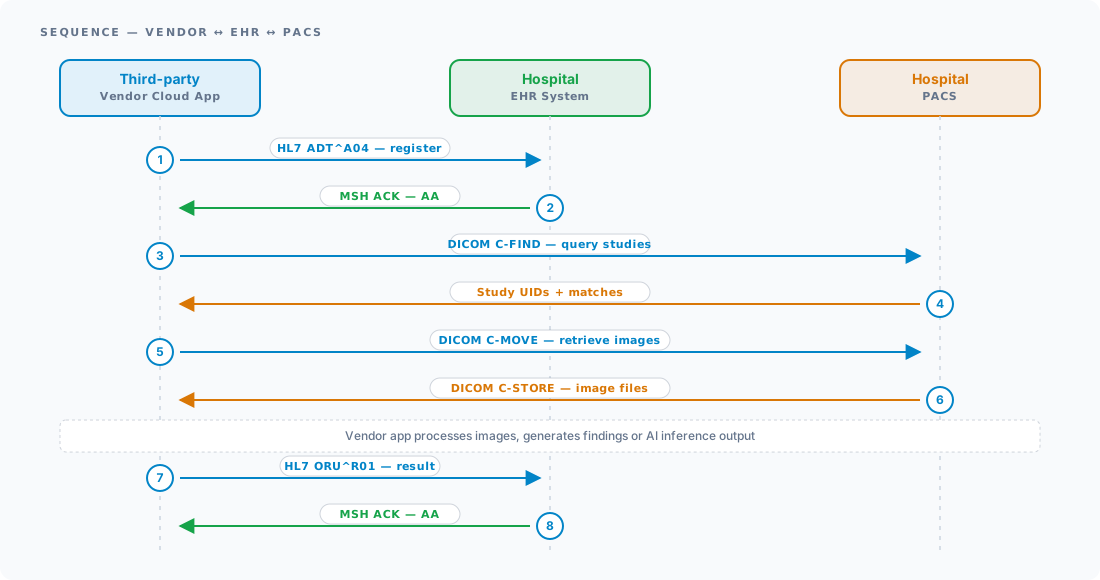
EHR & PACS Integration Challenges
At any large healthcare organization, connecting on-premise health IT systems requires coordination across clinical informatics, network security, and EHR analyst teams. Pushing that data outside the network to a vendor cloud adds two more layers: connectivity options the hospital is willing to support, and the cybersecurity review that gates each one.
To complicate matters, most engineering teams new to healthcare aren’t familiar with the technical and operational quirks of HL7, FHIR, and DICOM exchange. Three challenges dominate every vendor-to-provider integration:
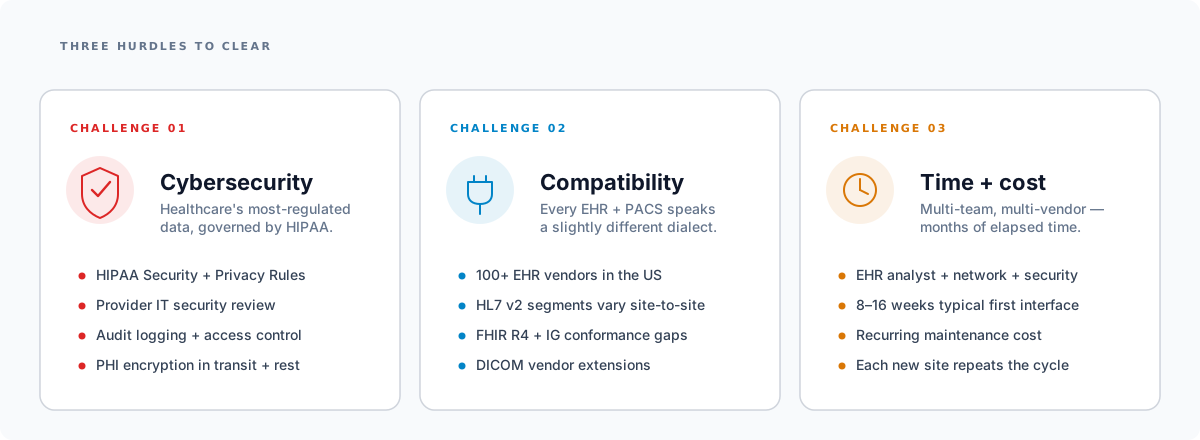
- Cybersecurity in healthcare. Healthcare is the most-regulated data class in the US, governed by the HIPAA Security + Privacy Rules and a layer of provider-specific IT security review. Identifying and implementing the correct controls (encryption at rest and in transit, audit logging, access control, BAAs) takes time before any data starts flowing.
- Compatibility. Different healthcare providers run different EHRs and PACS, and even within the same vendor product, two implementations are rarely identical. HL7 v2 segments vary site-to-site, FHIR R4 implementation guides have conformance gaps, and DICOM tag-level differences can break a perfectly-tested integration the moment you go live.
- Integration time + cost. Standing up a single hospital interface routinely takes 8–16 weeks from kickoff to production, and every new site repeats most of the cycle. Multi-vendor coordination (your team, the hospital’s EHR analyst, their network team, their security team) is the rate-limiting factor.
Solutions for Healthcare Data Integration
A handful of patterns and products handle the heavy lifting for everyone in this space. The most important is the interface engine: without one, you’ll end up rebuilding the same set of transformation, routing, security, and monitoring primitives by hand.
Interface engines
An interface engine is a software platform that brokers data between different healthcare systems. Think of it as an interpreter: it speaks HL7 v2, FHIR R4, DICOM, X12, CSV, and a long list of vendor-specific dialects, and exposes a normalized internal model your application can consume.
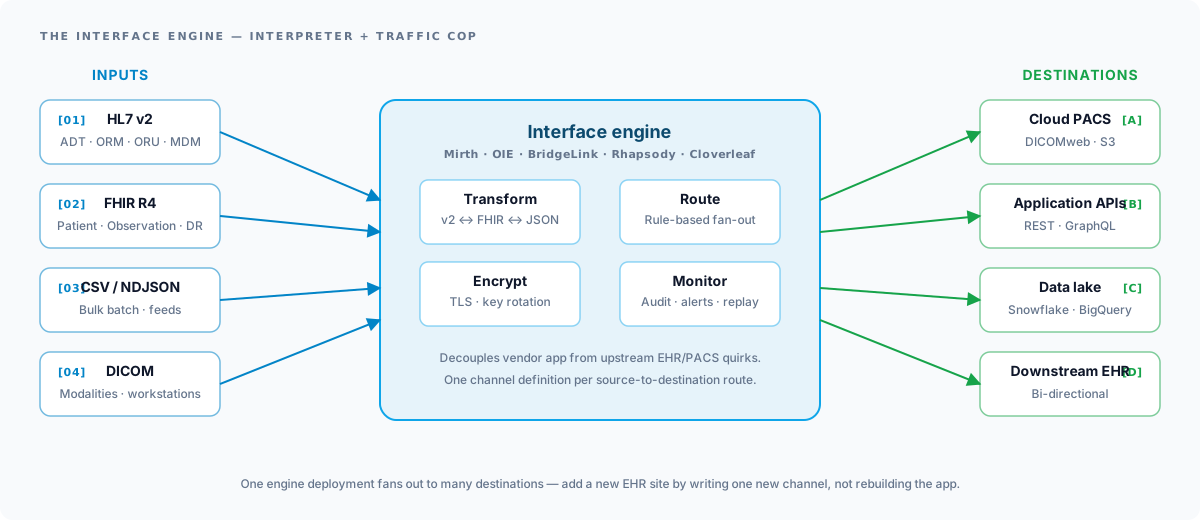
A production-grade engine gives you four primitives out of the box:
- Data transformation: convert HL7 v2 to FHIR, JSON, CSV, or any application-internal model.
- Message routing: rule-based fan-out to downstream destinations (PACS, data lake, REST API, etc.).
- Data encryption + security: built-in TLS, certificate management, audit trails, and HIPAA-aligned controls.
- Monitoring + logging: message-level audit trail, error queues, and replay for ops staff.
A practical example: Mirth Connect (and its open-source forks)
Mirth Connect is one of the most widely deployed healthcare integration engines. NextGen Healthcare moved Mirth Connect to a commercial-only license in early 2025, and version 4.6 was the first commercial-only release (mid-2025). Two MPL 2.0 open-source forks continue the lineage from version 4.5.2: the Open Integration Engine (OIE), a non-profit-stewarded community fork, and BridgeLink, led by Innovar Healthcare.
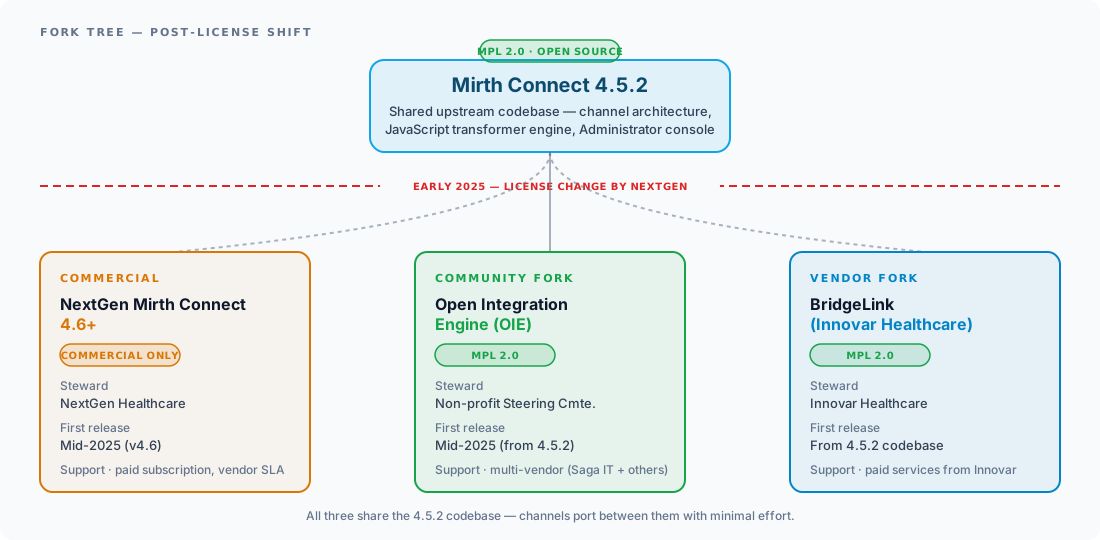
| Platform | License | Steward | Support model |
|---|---|---|---|
| Mirth Connect 4.6+ | Commercial | NextGen Healthcare | Paid subscription, vendor SLA |
| Open Integration Engine | MPL 2.0 | Eclipse Foundation | Multi-vendor (Saga IT + others) |
| BridgeLink | MPL 2.0 | Innovar Healthcare | Paid services from Innovar Healthcare |
All three share the 4.5.2 codebase, so channel definitions port between them with minimal effort. For a side-by-side feature, licensing, and TCO comparison, see OIE vs BridgeLink vs Commercial Mirth Connect.
How Interface Engines Connect to EHR, PACS, and HIEs
Healthcare organizations each have their own preferences and technical capabilities. The diagram below shows the four most common connectivity methods used to bridge a third-party vendor cloud and one or more hospital partners. A vendor product typically supports more than one. Different hospitals will insist on different paths.
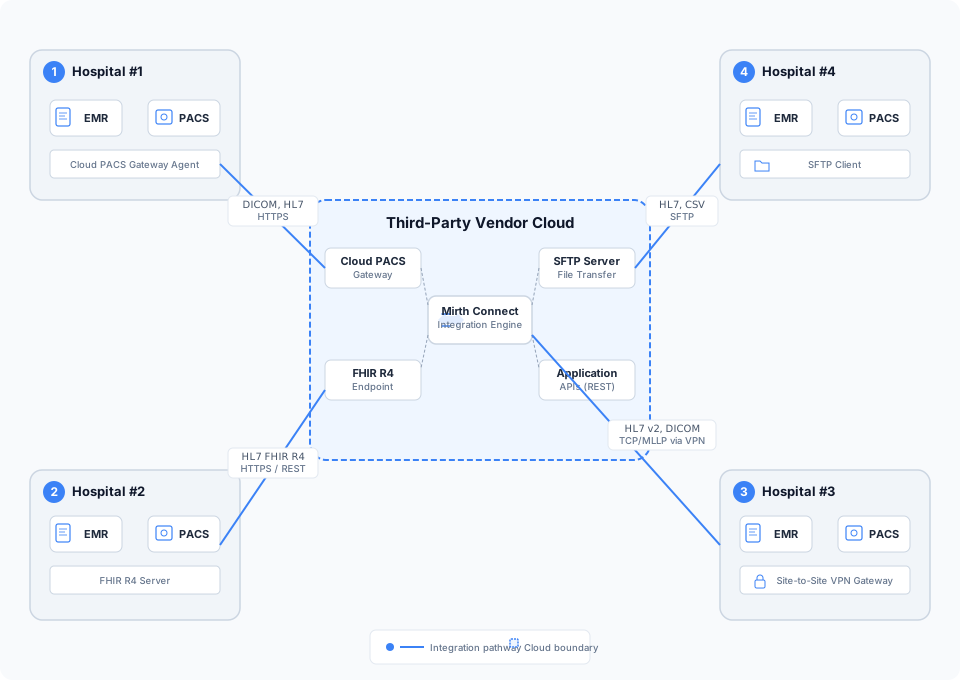
Four Connectivity Patterns
1. Site-to-site VPN with HL7 v2 & DICOM
Site-to-site VPNs are still the workhorse of vendor-to-hospital connectivity. They wrap the plaintext clinical protocols (HL7 v2, DICOM DIMSE) in IPsec so PHI stays encrypted on the wire.
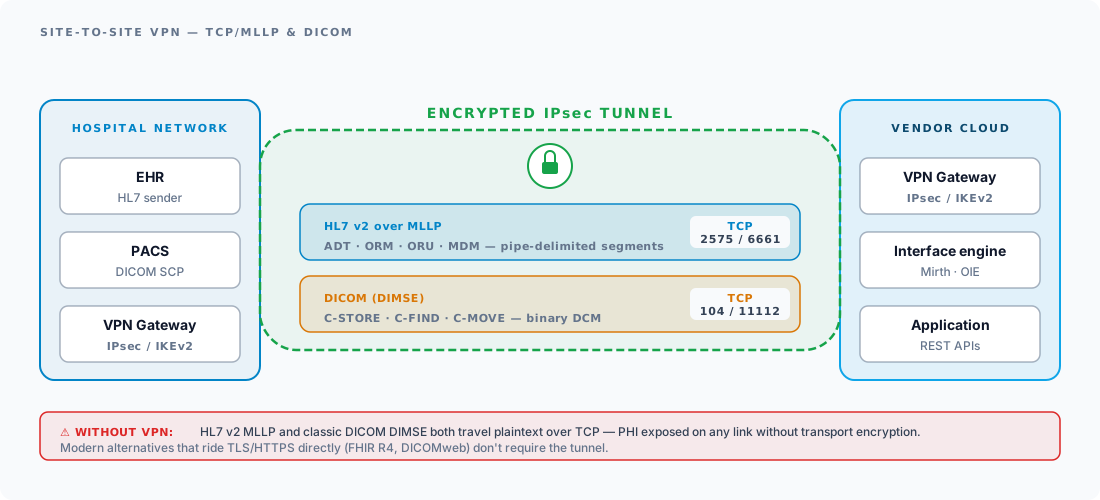
HL7 v2 (Health Level Seven Version 2) is the dominant messaging standard for clinical data exchange. Its strengths:
- Wide adoption. HL7 v2 has been in production at nearly every US hospital for decades. It’s the lowest-common-denominator interface every EHR speaks.
- Scalable. Used at national-scale clearinghouses and HIEs, the pipe-delimited format is light enough to carry high message rates without strain.
- Rich data model. Covers ADT, ORM, ORU, MDM, SIU, and a long tail of message types spanning demographics, orders, results, documents, and scheduling.
DICOM (Digital Imaging and Communications in Medicine) is the universal format for medical imaging. The classic network protocol is DIMSE (DICOM Message Service Element), which carries the C-STORE, C-FIND, C-MOVE, and C-ECHO primitives between modalities, PACS, and viewers. For more on the wire protocol layers, see our DICOM protocol primer. DICOM’s advantages:
- Wide adoption. DICOM is the established universal standard in medical imaging, unlike the rest of healthcare data, which still fragments across vendors.
- Large-image support. Designed for multi-GB CT, MR, and pathology studies, with chunked transfer and on-the-wire compression.
- Multi-modality. A single protocol handles X-ray, MRI, CT, PET, ultrasound, mammography, and nuclear medicine.
Why ride VPN? Both HL7 v2 MLLP and classic DICOM DIMSE transmit in plaintext. Without the tunnel, PHI is exposed on any link they cross.
2. Connecting with HL7 FHIR
FHIR (Fast Healthcare Interoperability Resources) is HL7’s modern standard for healthcare data exchange, and the path most new integrations are taking when the EHR exposes an endpoint. For implementation depth, see our FHIR R4 implementation guide and the broader HL7 v2 vs FHIR comparison.
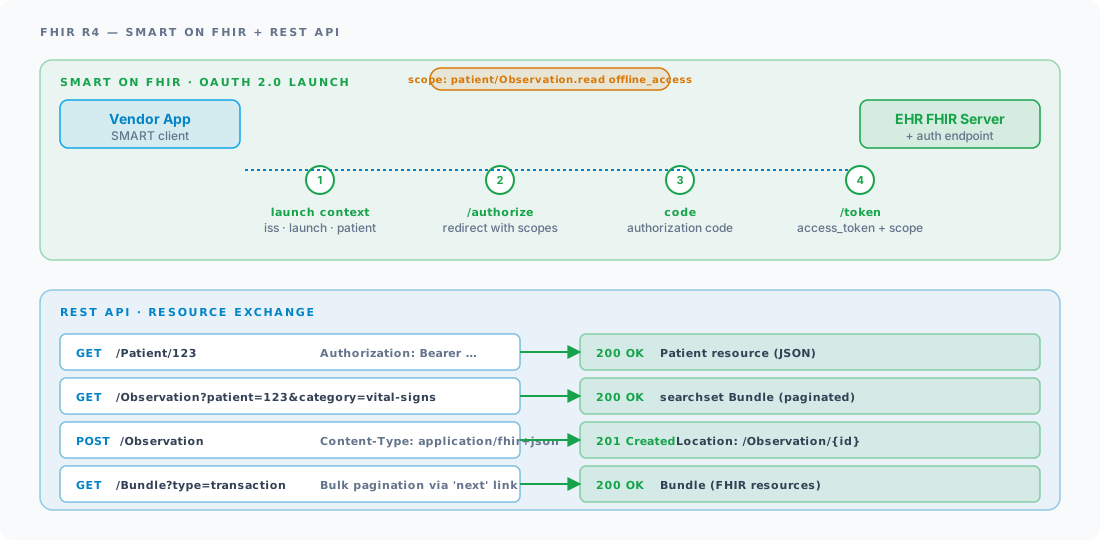
What you get with FHIR:
- Web-native. FHIR is HTTP + REST + JSON as its primary paradigm: no pipe-delimited parsing, no MLLP framing, just standard web requests.
- Encrypted by default. HTTPS (TLS) is the baseline transport, so you skip the VPN layer that HL7 v2 needs.
- SMART on FHIR. An OAuth 2.0 + OpenID Connect profile that standardizes how third-party apps launch from inside an EHR and request scoped access to a patient’s data.
- Bulk Data Access. For population-health and reporting workloads, CMS Patient Access + Provider Access APIs are FHIR Bulk Export under the hood.
- Cost-effectiveness. Modern web tooling, mature client libraries, and skip-the-VPN deployment typically cut integration cost vs. a comparable HL7 v2 + VPN buildout.
3. Cloud PACS Gateway
A cloud PACS gateway is the modern path for imaging data. A small agent (often a vendor-neutral archive component) sits in the hospital DMZ, receives DICOM C-STORE from the local PACS, and pushes studies to cloud object storage where the vendor app reads them via HTTPS or DICOMweb (QIDO-RS, WADO-RS, STOW-RS).
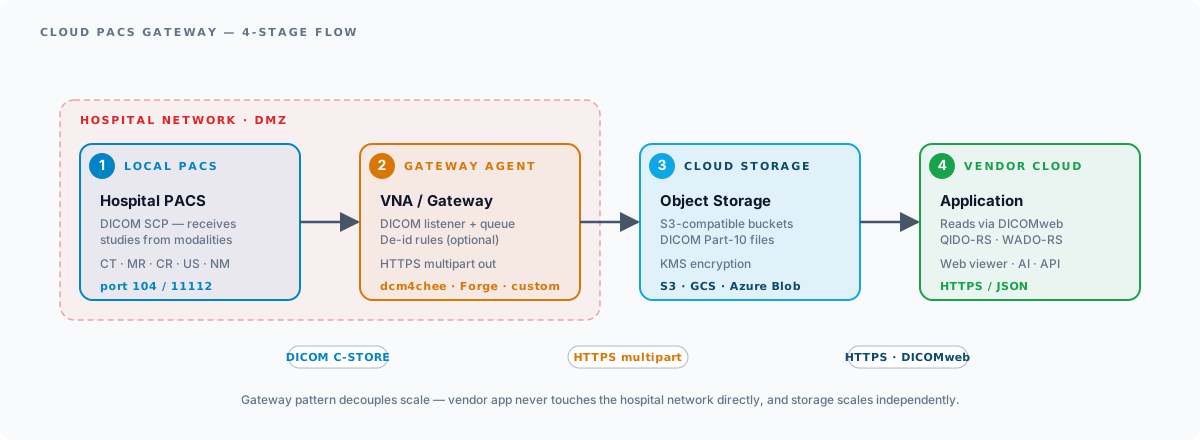
The gateway pattern decouples scale: the vendor app never touches the hospital network directly, storage scales independently, and adding a second hospital is a matter of dropping a second gateway agent. For the open-source DICOM stack powering many of these gateways, see our deep dive on OIE’s dcm4che5 backend.
4. SFTP
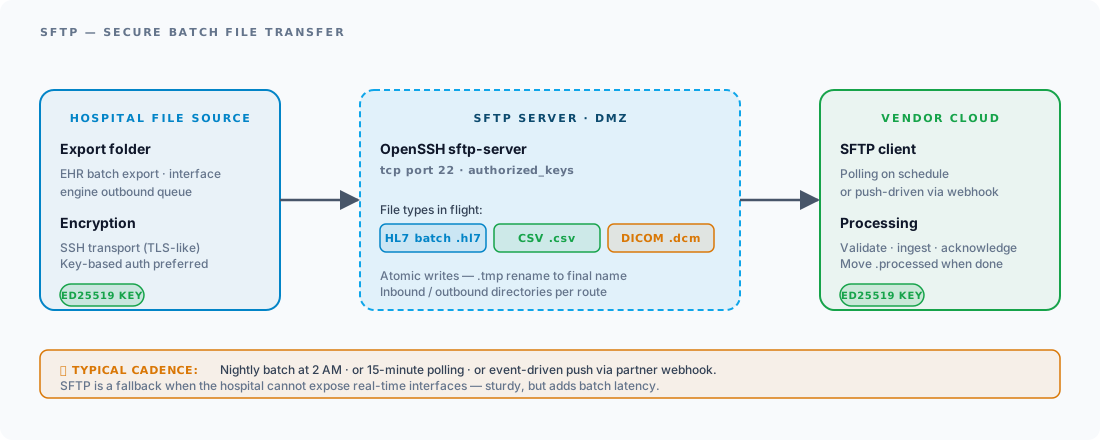
SFTP remains the fallback when the hospital can’t (or won’t) expose real-time interfaces. SSH-tunnelled file transfer is sturdy, well-understood by every hospital IT team, and works for batch payloads: HL7 batch files, CSV demographics, and DICOM .dcm bundles. The trade-off is batch latency: nightly or 15-minute polling vs. the sub-second push of HL7 v2 or FHIR.
Picking Your Integration Path
The four methods aren’t substitutes. They’re complements. A mature vendor product supports two or three so it can match what each hospital partner is willing to enable. The matrix below summarizes how the four methods stack up on the dimensions that matter when you’re negotiating with a new site.
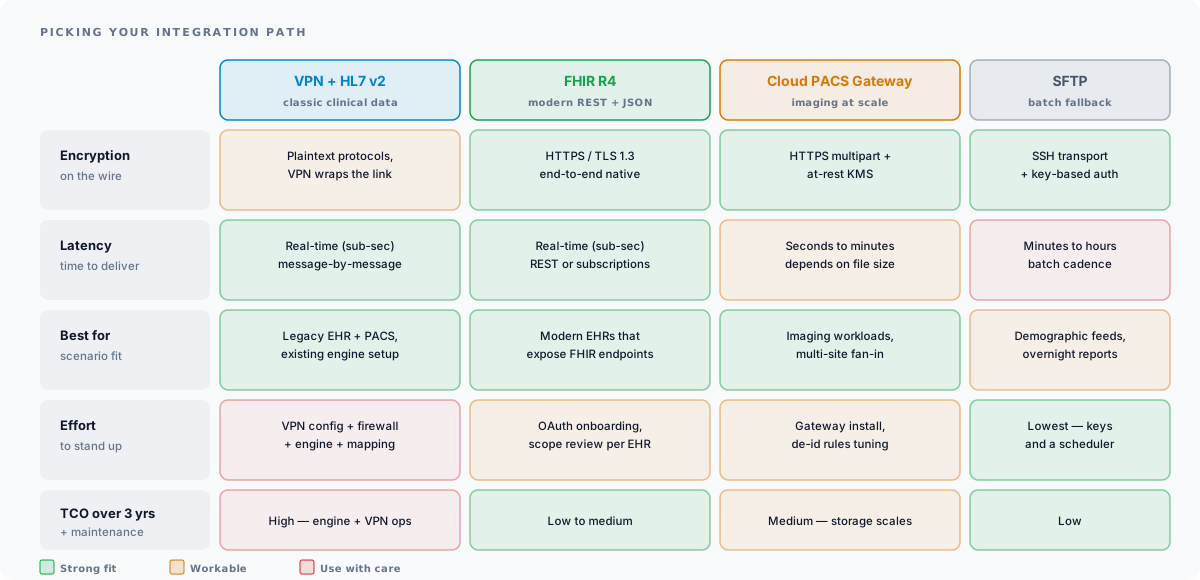
| Dimension | VPN + HL7 v2 | FHIR R4 | Cloud PACS GW | SFTP |
|---|---|---|---|---|
| Encryption | VPN-wrapped plaintext | HTTPS native | HTTPS + at-rest KMS | SSH transport |
| Latency | Real-time (sub-sec) | Real-time (sub-sec) | Seconds to minutes | Minutes to hours |
| Best fit | Legacy EHR + PACS, existing engine | Modern EHRs with FHIR endpoints | Imaging workloads, multi-site fan-in | Demographic feeds, overnight reports |
| Effort to stand up | VPN + firewall + engine + mapping | OAuth onboarding, scope review | Gateway install, de-id tuning | Lowest: keys + scheduler |
| 3-yr TCO | High | Low to medium | Medium | Low |
Rule of thumb: lead with FHIR R4 if the EHR supports it, fall back to VPN + HL7 v2 + DICOM for legacy stacks, use a cloud PACS gateway when imaging volume is significant, and reserve SFTP for batch use-cases where minutes-of-latency is acceptable.
Conclusion
Navigating EHR and PACS integration is a domain problem first, an engineering problem second. The hard parts (picking the right connectivity pattern for each hospital partner, structuring the engine layer so it scales, mapping the same data across half a dozen flavors of HL7 v2) are well-understood, but they have to be deliberately solved up front. Vendors that treat integration as an afterthought spend years catching up; vendors that pick the right interface engine and the right two or three connectivity patterns ship faster, support more sites, and have a cleaner ops story.
If you’re planning a vendor-to-hospital integration:
Explore EHR Integration Services PACS Integration Services
On the imaging side specifically: PACS and VNA architecture explained covers how the archive layer is structured, and the DICOM protocol reference covers the wire format. To work with studies directly there are free browser tools: the Saga DICOM Viewer, a DICOM tag editor, and sample DICOM files to test against. For scoping an engagement, see PACS integration services.
For deeper reading on individual topics, see HL7 integration services, FHIR API integration, our Epic FHIR and HL7 v2 reference, or the Open Integration Engine project.