Skip to content
Contact Us

Overview

All-in-one Admin Console extension with embedded Git, MirthSync CLI, and graphical interface. Install once, version control immediately—no separate tools required.

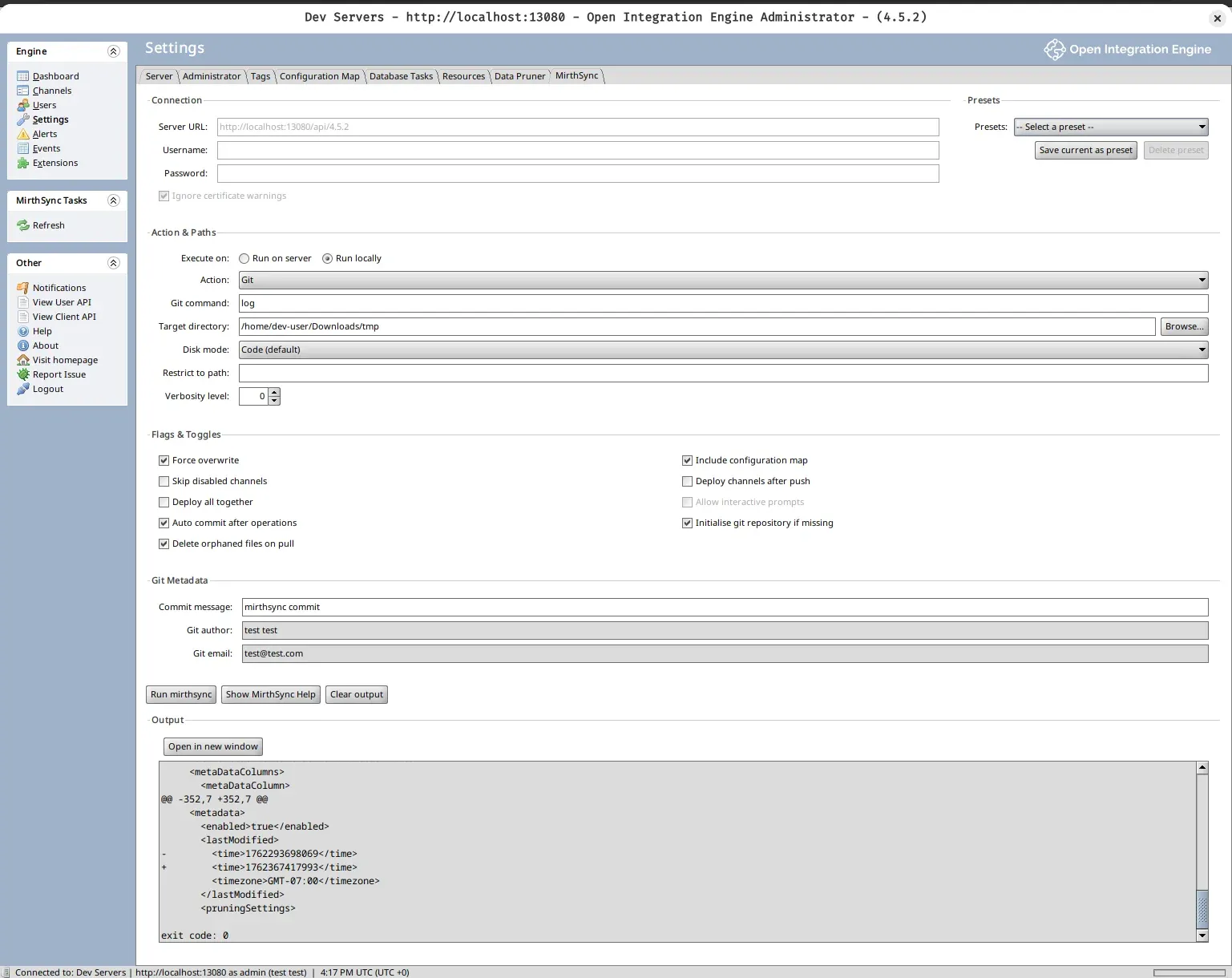
The MirthSync Plugin brings enterprise-grade version control directly into the Mirth Connect Admin Console. Unlike the CLI which requires terminal access, the plugin provides a complete graphical interface for Git operations, configuration management, and team collaboration—all within the familiar Admin Console environment you already use daily.

What makes it all-in-one: A single JAR file contains embedded Git (no separate installation), the complete MirthSync CLI (built-in), and a full graphical interface (point-and-click operations). After installation, you have immediate access to version control, branching, pull requests, and deployment workflows without installing anything else.

MirthSync Plugin Main Interface
RequirementDetails
Open-source Mirth Connect4.x+
OIEAll versions
Java8+ (provided by Mirth)
Installation AccessFile system access to extensions directory

All the power of MirthSync CLI with a graphical interface—no terminal required.

Git Version Control

Full Git functionality from the Admin Console. Track changes, view history, create branches, and rollback—all without leaving the GUI.

  • Visual commit workflow with diff preview
  • Branch management with dropdown selection
  • Complete version history and blame tracking
  • One-click rollback to any previous state

Learn more →

GUI-Based Workflow

Work entirely in the Admin Console—no terminal needed. Visual interface for all operations with real-time feedback and clear status indicators.

  • Point-and-click Git operations
  • Visual confirmation of all settings
  • Real-time output panel
  • No command-line knowledge required

Plugin Guide →

Presets & Automation

Save common operations as presets for one-click execution. Store environment-specific configurations and share with your team.

  • Save action + flags + metadata as named presets
  • Environment-specific configs (Dev, Test, Prod)
  • Export/import team configurations
  • Reduce errors with consistent settings

Best practices →

Dual Execution Modes

Choose where commands execute: local workstation or Mirth server. Flexible deployment options for different team workflows.

  • Local: Fast, personal repositories on workstation
  • Server: Shared, centralized team repositories
  • Switch between modes based on task
  • Mix strategies for dev and production

Multi-environment guide →

Team Collaboration

Enable team workflows with pull request reviews and conflict resolution. Multiple team members can work safely with the same Mirth instance.

  • Visual conflict resolution
  • Pull request integration
  • Shared presets across team
  • Audit trail with commit attribution

Collaboration guide →

Embedded Tools

Everything included in one JAR file. Embedded Git and MirthSync CLI mean zero external dependencies or separate installations.

  • Full Git functionality (no separate install)
  • Complete MirthSync CLI
  • Works out of the box
  • No Node.js, no separate tools

Installation →

Use Plugin WhenUse CLI When
  • Working in Admin Console
  • Prefer visual interface
  • Want preset management
  • Need output window
  • Team uses Admin Console exclusively
  • Automating with scripts
  • Working in terminal
  • CI/CD pipelines
  • Scripting deployments
  • Prefer command-line workflow

Ready to bring version control to your Mirth Connect or Open Integration Engine Admin Console?

Quick overview:

  1. Download the plugin JAR file
  2. Copy to Mirth Connect extensions directory
  3. Restart Mirth Connect
  4. Start using version control from the Admin Console

→ Get Started with Installation Guide