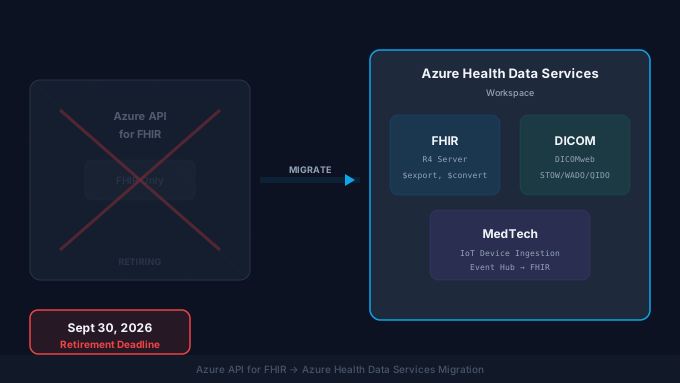
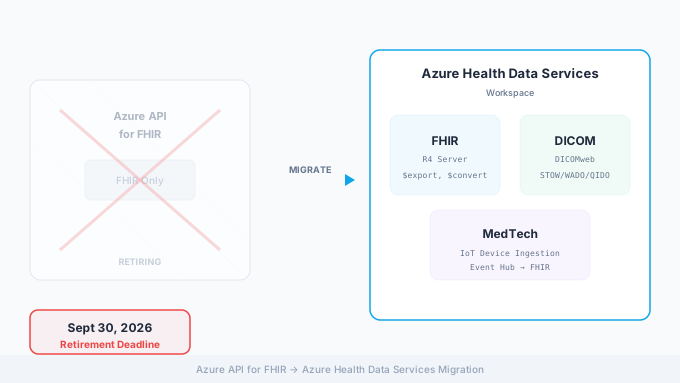
Azure API for FHIR retires on September 30, 2026. If your organization relies on this service for clinical data exchange, patient-facing applications, or backend analytics pipelines, you need a migration plan. The replacement, Azure Health Data Services (AHDS), is not a simple rename. It is a fundamentally different deployment model with expanded capabilities, different configuration patterns, and a few breaking changes that will affect your applications.
This guide walks through the complete migration process, from understanding what changed architecturally to executing a production cutover with minimal downtime. Whether you are running a single FHIR server for a pilot project or operating a multi-tenant platform serving dozens of healthcare organizations, the core migration steps are the same. For the broader cloud-vendor comparison, see our healthcare cloud migration guide.
What Is Changing and Why
Azure API for FHIR launched as a standalone, fully managed FHIR server. You provisioned it as a single resource, configured access control, pointed your applications at its endpoint, and it handled FHIR R4 operations. It was simple and effective for organizations that only needed FHIR.
Azure Health Data Services replaces this with a workspace model. A single AHDS workspace can host multiple services: FHIR, DICOM (medical imaging), and MedTech (device data ingestion). These services share a workspace but operate independently, each with its own endpoint and configuration.
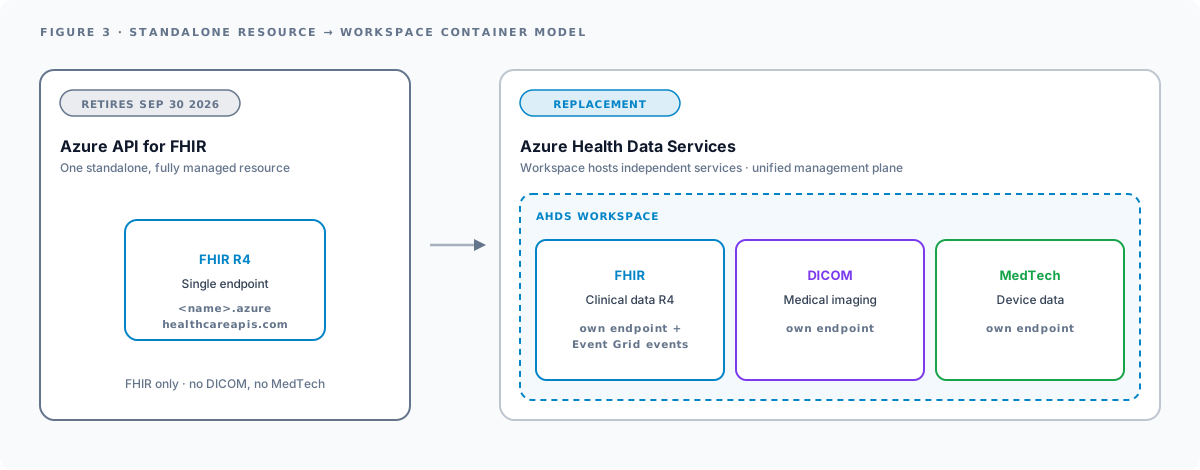
The key architectural changes are:
- Workspace container model: Instead of a standalone FHIR resource, you create an AHDS workspace first, then provision a FHIR service inside it. This enables multi-service deployments where FHIR, DICOM, and MedTech coexist.
- Unified management plane: All healthcare data services are managed through a single Azure resource provider, simplifying governance and cost tracking.
- Enhanced event system: AHDS integrates with Azure Event Grid natively, enabling event-driven workflows when FHIR resources are created, updated, or deleted.
- Improved bulk operations: The
$importoperation supports bothInitialLoadandIncrementalLoadmodes (the latter handles upserts). The$exportoperation supports more granular filtering.
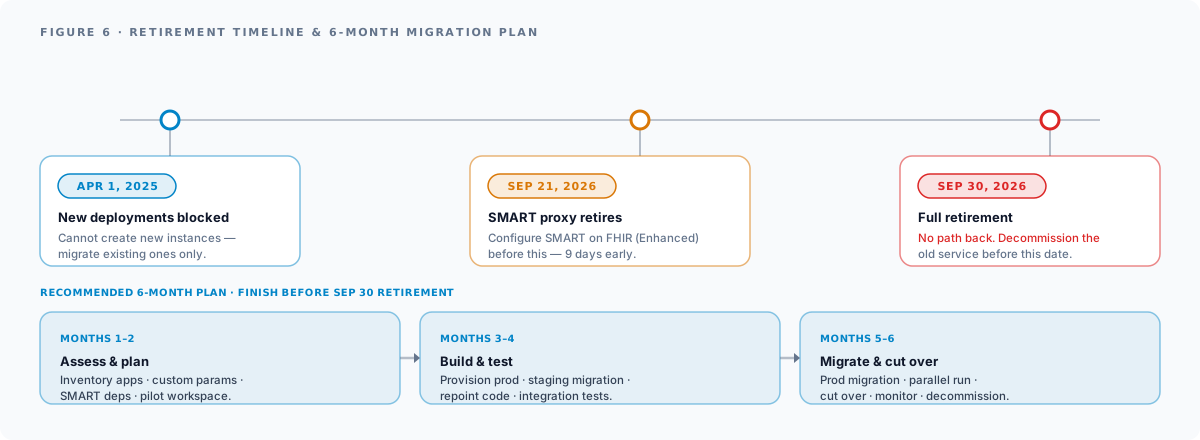
Microsoft blocked new Azure API for FHIR deployments on April 1, 2025. If you are reading this in 2026, you cannot create a new instance of the old service. You can only migrate existing ones.
What You Gain by Migrating
Migration is mandatory, but it is also an opportunity. AHDS adds capabilities that were either missing or limited in Azure API for FHIR.
Improved Bulk Data Operations
The $import operation in AHDS supports two modes. InitialLoad works like the original: it loads data into an empty FHIR service, optimized for first-time bulk loads. IncrementalLoad is new and handles upserts, merging incoming resources with existing data based on resource ID. This is critical for ongoing data pipeline operations where you receive daily feeds from EHR systems or health information exchanges.
The $export operation gains better filtering capabilities. You can export by resource type, date range, and compartment (for example, all resources associated with a specific patient). This makes it practical to run targeted exports for analytics or compliance reporting without pulling the entire database.
Event-Driven Workflows
AHDS FHIR service publishes events to Azure Event Grid when resources are created, updated, or deleted. This enables patterns that were previously complex to implement:
- Trigger an Azure Function when a new Patient resource is created, automatically sending a welcome message through your patient engagement platform.
- Route Observation resources (lab results) to a clinical decision support system in real time.
- Push ADT-equivalent notifications (Encounter create/update events) to downstream systems without polling.
With Azure API for FHIR, you had to build polling-based integrations or use Change Feed (which had significant limitations). Events are a cleaner, more scalable pattern. This is also why FHIR Subscriptions and the FHIR Proxy are deprecated in AHDS: built-in eventing is the replacement.
Analytics Integration
AHDS connects to Azure Synapse Analytics via the FHIR Analytics Pipelines (the successor to the older Sync Agent). This gives you a path from FHIR resources to a SQL-queryable analytics lakehouse without building custom ETL pipelines. From Synapse, you can connect Power BI for dashboards or Azure Machine Learning for predictive models. See our AI-ready healthcare data pipelines guide for the broader architecture.
This analytics pathway is significantly more mature in AHDS than it was with Azure API for FHIR.
SMART on FHIR (Enhanced)
The legacy SMART on FHIR proxy that shipped with Azure API for FHIR is being retired alongside the FHIR service. Its replacement, SMART on FHIR (Enhanced), is built into AHDS and must be configured by September 21, 2026 (nine days before the full retirement date). The enhanced version supports SMART App Launch v2, including asymmetric client authentication and granular scopes. For the deeper SMART App Launch reference, see our SMART on FHIR developer guide.
Compliance and BAA Coverage
Azure Health Data Services is included by default in Microsoft’s HIPAA BAA (under the Microsoft Products + Services Data Protection Addendum). No separate signature required for covered-entity / business-associate customers. AHDS holds HITRUST CSF, SOC 1/2, and ISO 27001 certifications, with FedRAMP High in Azure Government and FedRAMP Moderate in commercial regions. For application-layer compliance, see our HIPAA-compliant software development guide and healthcare cloud security practice.
Migration Timeline
Here are the critical dates and a recommended phased approach.
Key Dates
| Date | Event |
|---|---|
| April 1, 2025 | New Azure API for FHIR deployments blocked |
| September 21, 2026 | SMART on FHIR proxy retirement |
| September 30, 2026 | Azure API for FHIR full retirement: no path back |
Recommended 6-Month Migration Plan
If you are starting in March or April 2026, you have approximately six months. Here is how to allocate that time.
Months 1-2: Assessment and Planning
- Inventory all applications and services connected to Azure API for FHIR.
- Document custom search parameters, extensions, and non-standard configurations.
- Identify SMART on FHIR proxy dependencies.
- Provision an AHDS workspace in a non-production environment and run exploratory tests.
- Estimate data volume for export and import operations.
Months 3-4: Build and Test
- Provision the production AHDS workspace and FHIR service.
- Configure authentication, RBAC, and network settings.
- Run a full data migration in a staging environment.
- Update application code to use the new endpoint and any changed API behaviors.
- Test all SMART on FHIR applications against Enhanced configuration.
- Run integration tests with all consuming and producing systems.
Months 5-6: Migration and Cutover
- Execute production data migration.
- Run parallel operations (both old and new services active) to validate correctness.
- Cut over applications to the new endpoint.
- Monitor for errors, performance regressions, and data gaps.
- Decommission Azure API for FHIR before September 30.
Pre-Migration Checklist: Microsoft-Documented Gotchas
These five Microsoft-documented constraints catch teams off-guard during AHDS planning. Resolve each before you start the actual migration.
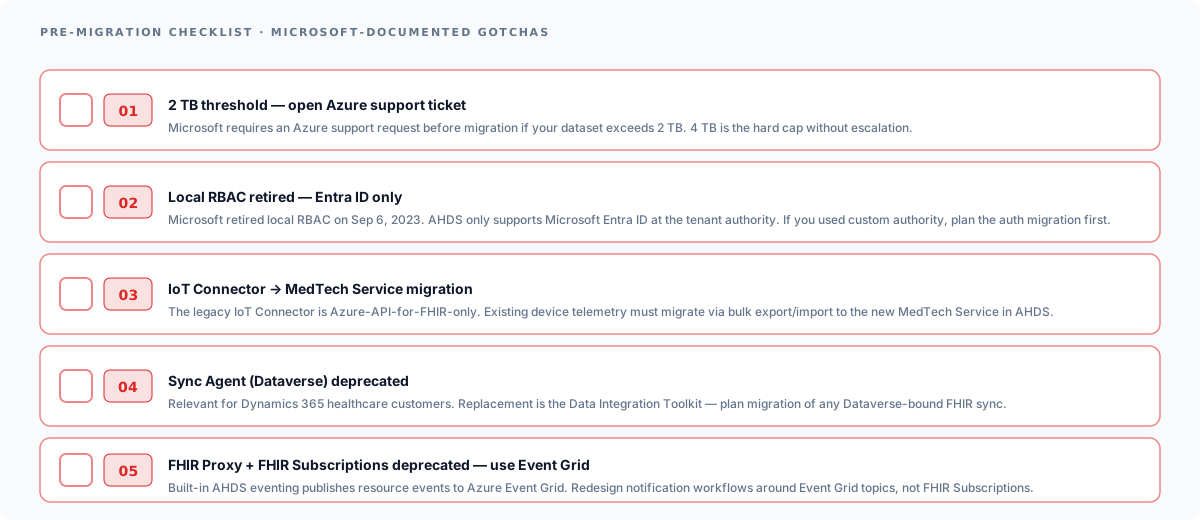
- 2 TB threshold: open Azure support ticket. Microsoft requires an Azure support request before migration if your dataset exceeds 2 TB. 4 TB is the hard cap without escalation.
- Local RBAC retired: Entra ID only. Microsoft retired local RBAC on September 6, 2023. AHDS only supports Microsoft Entra ID at the tenant authority. If your old service used a custom authority, plan that auth migration first.
- IoT Connector → MedTech Service migration. The legacy IoT Connector is Azure-API-for-FHIR-only. Existing device telemetry must migrate via bulk export/import to the new MedTech Service in AHDS.
- Sync Agent (Dataverse) deprecated. Relevant for Dynamics 365 healthcare customers. Replacement is the Data Integration Toolkit. Plan migration of any Dataverse-bound FHIR sync.
- FHIR Proxy + FHIR Subscriptions deprecated. Built-in AHDS eventing publishes resource events to Azure Event Grid. Redesign notification workflows around Event Grid topics, not FHIR Subscriptions.
Migration Strategies
Microsoft documents two primary migration approaches: Lift and Shift (full export/import) and Incremental Copy (date-filtered delta exports). A third Blue-Green Parallel pattern is a Saga-recommended approach for the highest-risk environments. Microsoft also publishes an open-source migration tool at github.com/Azure/apiforfhir-migration-tool that automates the Incremental Copy pattern. Use it.
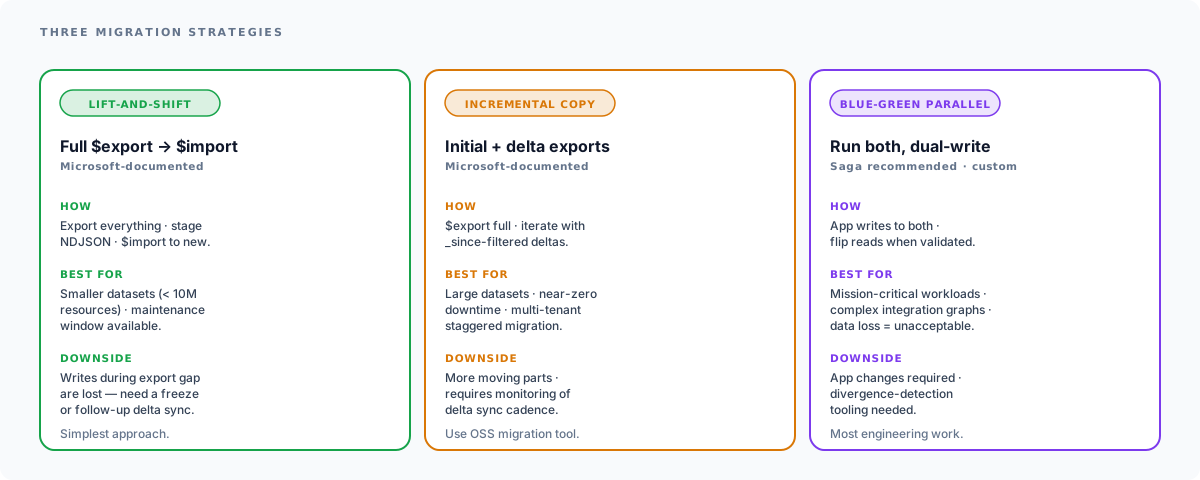
Lift and Shift
This is the simplest approach. You export all data from Azure API for FHIR using the $export operation, which produces NDJSON files in Azure Blob Storage. Then you import those files into AHDS using the $import operation in InitialLoad mode.
Best for: Smaller datasets (under 10 million resources), systems that can tolerate a maintenance window, environments where data changes infrequently.
Downside: During the gap between export and import, any new data written to the old service is not captured. You need a freeze window or a follow-up delta sync.
Incremental Copy
For larger datasets or systems that cannot tolerate extended downtime, use date-based exports to migrate in batches. Run an initial full export and import, then run subsequent exports filtered by _lastUpdated (or _since) to capture changes since the last batch:
GET https://old-fhir-server.azurehealthcareapis.com/$export ?_since=2026-04-01T00:00:00Z &_type=Patient,Observation,Condition,EncounterThis approach lets you migrate incrementally over days or weeks, then perform a final delta sync during a short cutover window. Microsoft’s open-source migration tool automates exactly this pattern.
Best for: Large datasets, systems requiring near-zero downtime, multi-tenant environments where different tenants can be migrated on different schedules.
Blue-Green Parallel (Saga-recommended for mission-critical)
In this approach, you set up the AHDS FHIR service and run both systems simultaneously. Applications write to both endpoints during a transition period. Once you have validated that the new service is receiving data correctly and downstream systems are working, you cut over reads to the new service and decommission the old one.
Best for: Mission-critical systems where data loss is unacceptable, complex integration environments with many upstream and downstream dependencies.
Downside: Requires application changes to dual-write, increases complexity, and you need a strategy for ensuring both systems stay in sync. This is not a Microsoft-documented pattern. It’s a custom architecture for highest-risk environments.
Step-by-Step Migration
The following steps apply regardless of which strategy you choose. Adjust the order and timing based on your migration approach.
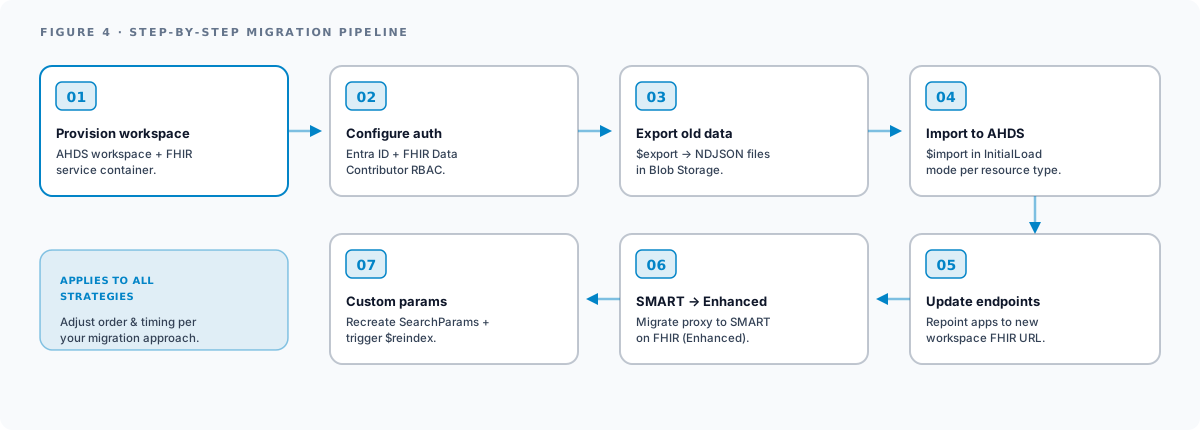
Step 1: Provision the AHDS Workspace and FHIR Service
Create an Azure Health Data Services workspace. This is the container for your FHIR service.
# Create the AHDS workspaceaz healthcareapis workspace create \  --resource-group myResourceGroup \  --workspace-name myHealthWorkspace \  --location eastus
# Create the FHIR service inside the workspaceaz healthcareapis fhir-service create \  --resource-group myResourceGroup \  --workspace-name myHealthWorkspace \  --fhir-service-name myFhirService \  --kind fhir-R4 \  --authority "https://login.microsoftonline.com/<tenant-id>" \  --audience "https://myHealthWorkspace-myFhirService.fhir.azurehealthcareapis.com"
Note the endpoint URL pattern. Azure API for FHIR used https://<name>.azurehealthcareapis.com. AHDS uses https://<workspace>-<fhirservice>.fhir.azurehealthcareapis.com. Every application that references the FHIR endpoint needs to be updated.
Step 2: Configure Authentication
AHDS uses Microsoft Entra ID (formerly Azure Active Directory) for authentication, same as Azure API for FHIR. However, you need to ensure your app registrations and RBAC role assignments are configured for the new FHIR service resource.
Assign the FHIR Data Contributor role on the new FHIR service to any service principals or managed identities that need read/write access:
az role assignment create \ --assignee <app-client-id> \ --role "FHIR Data Contributor" \ --scope /subscriptions/<sub>/resourceGroups/<rg>/providers/Microsoft.HealthcareApis/workspaces/<ws>/fhirservices/<fhir>If you have applications that only need read access, use FHIR Data Reader instead. For import/export operations, the identity also needs FHIR Data Importer or FHIR Data Exporter roles.
Step 3: Export Data from Azure API for FHIR
Trigger a system-level export from the old service. This exports all resource types to NDJSON files in a configured Azure Blob Storage container.
GET https://old-server.azurehealthcareapis.com/$exportAccept: application/fhir+jsonPrefer: respond-asyncAuthorization: Bearer <access-token>The server returns a Content-Location header with a polling URL. Monitor this URL until the export completes:
GET https://old-server.azurehealthcareapis.com/_operations/export/<operation-id>When complete, the response body contains URLs to the exported NDJSON files in Blob Storage. For large datasets, expect the export to take hours. A database with 50 million resources might take 8-12 hours depending on resource complexity and server throughput.
Step 4: Import Data to AHDS FHIR Service
Use the $import operation to load the exported NDJSON files into the new FHIR service. Configure the storage account as an import source first, then trigger the import:
POST https://new-workspace-fhirservice.fhir.azurehealthcareapis.com/$importContent-Type: application/fhir+jsonPrefer: respond-async
{  "resourceType": "Parameters",  "parameter": [    {      "name": "inputFormat",      "valueString": "application/fhir+ndjson"    },    {      "name": "mode",      "valueString": "InitialLoad"    },    {      "name": "input",      "part": [        {          "name": "type",          "valueString": "Patient"        },        {          "name": "url",          "valueUri": "https://storagename.blob.core.windows.net/export/Patient.ndjson"        }      ]    }  ]}
Repeat the input parameter block for each resource type. For incremental loads after the initial migration, change the mode to IncrementalLoad.
Step 5: Update Application Endpoints
Every application, service, and integration that points to the old FHIR endpoint needs to be updated. This typically includes:
- Backend API services that query FHIR resources
- Patient-facing mobile and web applications using SMART on FHIR
- Integration engines (Mirth Connect, Rhapsody, etc.) with FHIR sender/receiver channels
- ETL pipelines that extract data for analytics
- Monitoring and alerting systems that health-check the FHIR endpoint
The URL change from https://<name>.azurehealthcareapis.com to https://<workspace>-<service>.fhir.azurehealthcareapis.com is the primary change. If your applications use configuration files or environment variables for the FHIR base URL, the update is straightforward. If URLs are hardcoded, you have more work to do.
Step 6: Migrate SMART on FHIR Proxy to Enhanced
If you use the SMART on FHIR proxy that shipped with Azure API for FHIR, you must migrate to SMART on FHIR (Enhanced) by September 21, 2026. The Enhanced version is configured differently:
- Register your SMART application in Microsoft Entra ID.
- Configure the FHIR service with the SMART configuration settings, including the authority URL and allowed SMART app client IDs.
- Update your SMART app’s launch and redirect URLs to use the new FHIR service endpoint.
- Test the full SMART launch sequence (authorization, token exchange, FHIR API calls) against the new service.
The Enhanced version supports SMART App Launch v2, including:
- Asymmetric client authentication (private key JWT)
- Granular v2 scopes (e.g.,
patient/Observation.rsfor read and search) - PKCE for public clients (required in v2)
If your SMART apps were built for v1 scopes, verify they work with the Enhanced configuration. Most v1 scopes are backward-compatible, but test thoroughly.
Step 7: Migrate Custom Operations and Extensions
If you defined custom search parameters on Azure API for FHIR, you need to recreate them on the AHDS FHIR service. Export your SearchParameter resources from the old service and POST them to the new one. After posting, trigger a reindex operation to build the search indexes:
POST https://new-endpoint.fhir.azurehealthcareapis.com/$reindexContent-Type: application/fhir+json
{  "resourceType": "Parameters",  "parameter": [    {      "name": "targetResourceTypes",      "valueString": "Patient,Observation"    }  ]}
Reindexing can take significant time on large datasets. Plan for this in your migration timeline.
Azure Health Data Services Pricing
Cost modeling changes when you move from Azure API for FHIR to AHDS. The key dimensions are:
- Structured storage: billed per GB-month of FHIR data, with a separate rate for index storage.
- Provisioned throughput (RU/s): Request Units per second across the workspace, similar to Cosmos DB. AHDS auto-scales up to 1.5× the provisioned RU/s for short bursts.
- Service runtime hours: billed for the active workspace + each in-workspace service.
- MedTech FHIR Transformation: separate per-transformation charge for device-data ingestion.
- API request charges: per-million-call charges on FHIR API operations and Bulk Data operations.
The practical implication: AHDS is typically more cost-effective at higher throughput because of the RU/s scaling model, but small workloads may end up paying slightly more for the minimum workspace footprint. Run a pricing model against your existing Azure API for FHIR consumption before the migration so the cost change doesn’t surprise the finance owner. For the wider cloud-cost picture, see our healthcare cloud migration guide.
Testing and Validation
After migrating data and updating applications, validate the migration before decommissioning the old service.
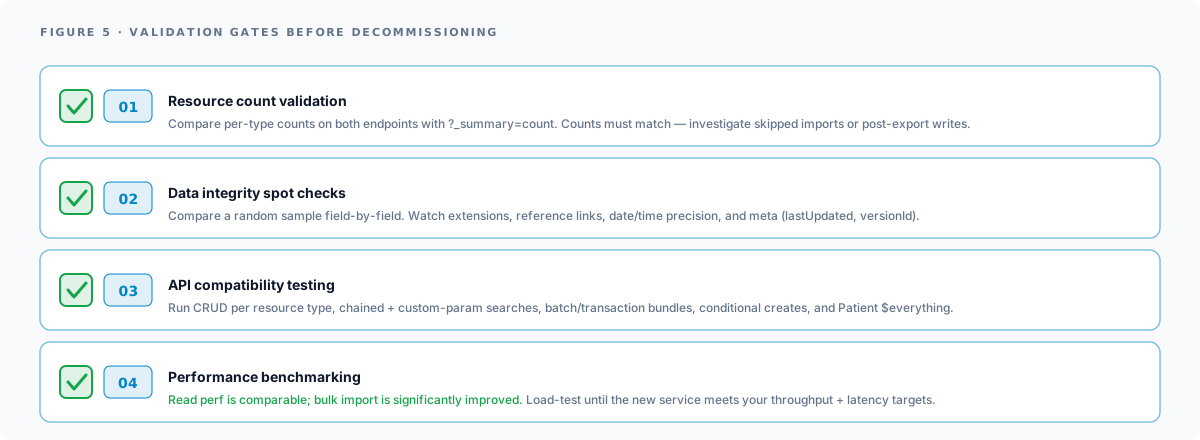
Resource Count Validation
Compare resource counts between the old and new services for every resource type:
GET https://old-server.azurehealthcareapis.com/Patient?_summary=countGET https://new-endpoint.fhir.azurehealthcareapis.com/Patient?_summary=countCounts should match. If they do not, investigate whether resources were skipped during import (check import operation logs) or if new resources were created on the old service after the export.
Data Integrity Spot Checks
Select a random sample of resources and compare them field-by-field between the old and new services. Pay attention to:
- Extension values (custom extensions are sometimes lost if not properly serialized)
- Reference links between resources (Patient references in Observation resources, etc.)
- Date/time precision (some import processes truncate fractional seconds)
- Resource metadata (
meta.lastUpdated,meta.versionId)
API Compatibility Testing
Run your application’s integration test suite against the new FHIR service. If you do not have automated tests, manually verify:
- CRUD operations (create, read, update, delete) for each resource type your applications use
- Search queries, especially chained searches and custom search parameters
- Batch and transaction bundles
- Conditional creates and updates
$everythingoperations on Patient resources
Performance Benchmarking
Run load tests against the new service to ensure it meets your throughput and latency requirements. AHDS FHIR service has different performance characteristics than Azure API for FHIR. In our experience, read performance is comparable, but bulk import performance is significantly improved in AHDS.
Common Pitfalls
Custom Search Parameters Not Reindexed
If you recreate custom search parameters on the new service but forget to trigger a reindex, searches using those parameters will return empty results. The FHIR service will accept the search request without error, making this easy to miss.
Large Dataset Migration Timeouts
Export and import operations on very large datasets (hundreds of millions of resources) can time out or fail silently. For these environments, break the migration into chunks by resource type and date range. Monitor each operation to completion before starting the next.
SMART Proxy Deprecation Timing
The SMART on FHIR proxy retires nine days before the FHIR service itself. If your patient-facing applications depend on the proxy and you are planning a last-minute migration, account for this earlier deadline.
Subscription and Event Handler Differences
Azure API for FHIR had limited support for FHIR Subscriptions. AHDS uses Azure Event Grid instead. If you built notification workflows using FHIR Subscriptions on the old service, you need to redesign them using Event Grid subscriptions on the new service. The event payload format is different, and the filtering model is based on Event Grid topics rather than FHIR search criteria.
Network Configuration Differences
If you used private endpoints or VNET integration with Azure API for FHIR, you need to reconfigure these for the AHDS workspace. The private endpoint resource types are different, and the DNS zone configuration may need to be updated.
Post-Migration Optimization
Once migration is complete, take advantage of AHDS features that were not available in Azure API for FHIR.
Enable Event Grid Integration
Configure Event Grid subscriptions to enable real-time workflows. Create an Event Grid system topic for your FHIR service and subscribe to events like Microsoft.HealthcareApis.FhirResourceCreated and Microsoft.HealthcareApis.FhirResourceUpdated.
Set Up Analytics Pipelines
Deploy the FHIR Analytics Pipelines to sync FHIR data to Azure Data Lake Storage and Synapse Analytics. This gives your data science and business intelligence teams SQL access to clinical data without querying the FHIR API directly.
Implement MedTech Service for Device Data
If your organization collects data from medical devices or remote patient monitoring systems, consider adding the MedTech service to your AHDS workspace. MedTech ingests device telemetry (heart rate, blood pressure, glucose readings) through Azure IoT Hub or Event Hubs and transforms it into FHIR Observation resources automatically.
Configure Diagnostic Logging
Enable diagnostic settings on the AHDS workspace to send logs to Azure Monitor, Log Analytics, or a storage account. Monitor API latency, error rates, throttling events, and import/export operation status. Set up alerts for anomalous patterns.
Next Steps
The September 2026 deadline is firm. Organizations that have not started planning should begin immediately. The migration is technically straightforward for simple deployments, but complex environments with custom search parameters, SMART applications, and large datasets require careful planning and testing.
If your team needs help planning or executing the migration, Saga IT has deep experience with FHIR implementations on Azure, AWS, and GCP. We can assess your current deployment, build a migration plan, execute the technical migration, and validate the results.
- FHIR API Integration Services: Our FHIR integration team can handle the full migration lifecycle, from assessment through post-migration optimization.
- Healthcare Cloud Services: For organizations looking to modernize their entire cloud healthcare infrastructure alongside the FHIR migration.
- Healthcare Cloud Security: VPC architecture, KMS, audit logging deployment for AHDS workloads
- Healthcare Cloud Migration Guide: Broader AWS vs Azure vs GCP comparison
- FHIR R4 vs R5 vs R6: If you are migrating anyway, consider whether to adopt a newer FHIR version during the transition.
- FHIR R4 Implementation Guide: SMART on FHIR launch flows, Bulk Data, common pitfalls
- CMS-0057-F Compliance Checklist: Payer FHIR API requirements driving FHIR adoption
- HIPAA-Compliant Software Development: Application-layer compliance for cloud-hosted FHIR workloads
Frequently Asked Questions
When does Azure API for FHIR retire?
Is there a migration tool from Microsoft?
_since-filtered delta exports to keep the AHDS service in sync with the old service until cutover.