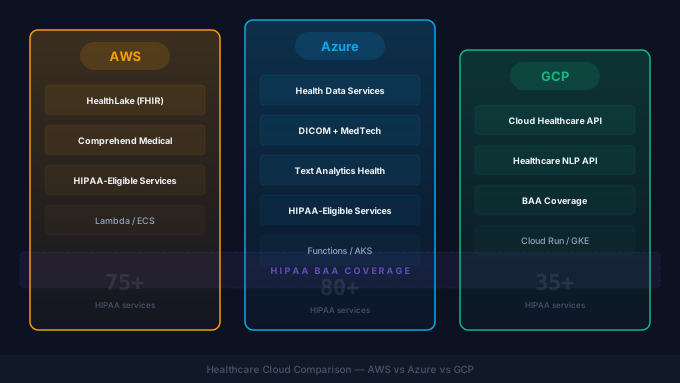
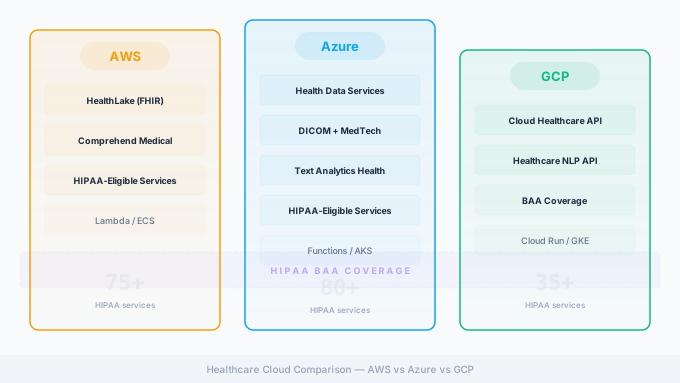
Healthcare integration workloads are moving to the cloud. The motivations are straightforward: managed infrastructure, elastic scaling, and access to healthcare-specific services like hosted FHIR servers and clinical NLP. But choosing between AWS, Azure, and GCP for healthcare integration is not a simple feature comparison. Each platform has different strengths, different HIPAA compliance coverage, different healthcare-specific services, and different cost structures.
This guide compares the three major cloud providers specifically through the lens of healthcare integration. We focus on the services and capabilities that matter for teams running integration engines, building FHIR APIs, processing HL7 messages, managing clinical data, and meeting healthcare compliance requirements. See also our healthcare cloud security practice for the deployment-side detail.
If you have to pick one: AWS for breadth and imaging maturity. Azure for organizations on M365/Teams with a unified Health Data Services stack. GCP for HL7v2-heavy ingestion and Vertex AI workloads. Below is the detail behind that one-liner.
Why Healthcare Is Moving to Cloud
Before comparing providers, it is worth stating why cloud migration matters for healthcare integration specifically.
Scalability. Healthcare message volumes are unpredictable. A hospital might process 50,000 HL7 messages per day normally but spike to 200,000 during a go-live or system migration. Cloud infrastructure scales to absorb these spikes without over-provisioning hardware that sits idle 95% of the time.
Managed services. Running a FHIR server, a message queue, an API gateway, and a monitoring stack on-premises requires significant operational overhead. Cloud providers offer managed versions of all these components, shifting operational burden from your team to the provider.
Disaster recovery. Healthcare systems must be available. Cloud providers offer multi-region deployment, automated backups, and recovery capabilities that are expensive and complex to replicate on-premises.
Compliance infrastructure. All three major providers have invested heavily in healthcare compliance certifications, BAA coverage, and audit capabilities. For many organizations, the cloud provider’s compliance infrastructure is more mature than what they could build internally. See our companion HIPAA-compliant software development guide for the application-layer detail.
HIPAA Compliance Comparison
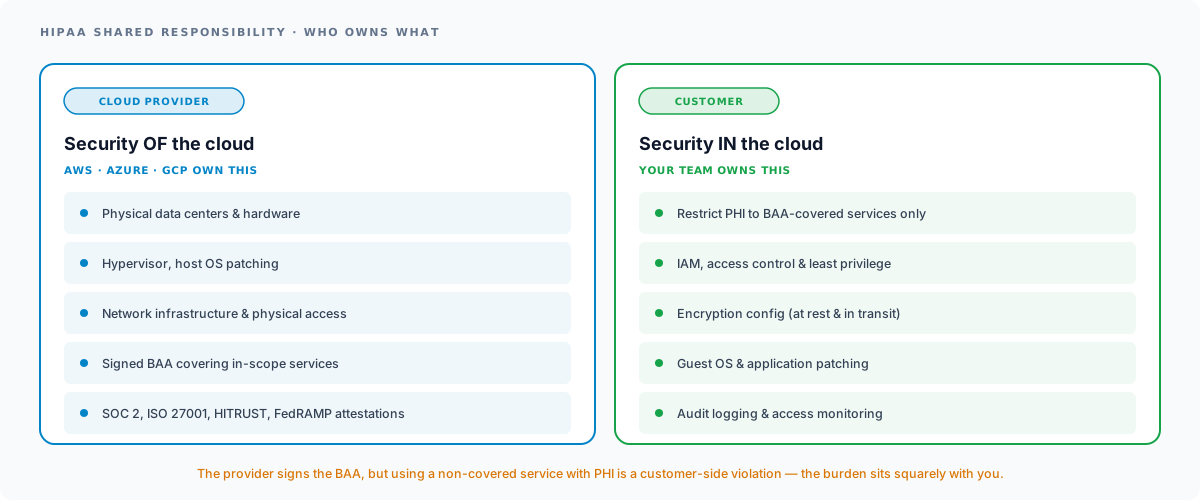
Every healthcare cloud deployment starts with HIPAA. All three providers will sign a Business Associate Agreement (BAA), but the scope of BAA coverage varies. A BAA is only half the picture: every cloud HIPAA deployment runs on a shared responsibility model where the provider secures the infrastructure and you secure everything you configure on top of it.
AWS HIPAA-Eligible Services
AWS offers a BAA that covers a defined list of HIPAA-eligible services. As of May 2026, this list includes 200+ services (per the AWS HIPAA Eligible Services Reference, last updated May 22, 2026). Key services covered under the BAA include EC2, ECS, EKS, Lambda, RDS, Aurora, DynamoDB, S3, SQS, SNS, API Gateway, CloudWatch, HealthLake, Comprehend Medical, and HealthImaging.
AWS publishes its HIPAA-eligible services reference page as the canonical source: bookmark it and check it before architecting any new component into a PHI workload. The critical discipline with AWS is ensuring you only use BAA-covered services for PHI workloads. Using a non-covered service with PHI is a compliance violation, and AWS’s shared responsibility model places that burden squarely on the customer.
AWS also maintains SOC 1/2/3, ISO 27001, ISO 27017, ISO 27018, FedRAMP (High in GovCloud, Moderate commercial), and HITRUST certifications.
Azure HIPAA-Eligible Services
Microsoft Azure includes a BAA by default in the Microsoft Products + Services Data Protection Addendum (DPA): no separate signature is required for covered-entity or business-associate customers with a qualifying agreement. The DPA covers Azure, Azure Government, Microsoft 365, Dynamics 365, Intune, Power Platform, and M365 Copilot. Most Azure platform services are in audit scope, but verify against Microsoft’s published HIPAA / HITECH compliance offering page rather than assuming a service count.
Azure has a notable advantage in healthcare organizations that already use Microsoft 365 and Teams, because the BAA extends across the Microsoft cloud ecosystem. This simplifies compliance for organizations that want to use Teams for clinical communication or SharePoint for document management alongside Azure for integration workloads.
Azure holds SOC 1/2/3, ISO 27001, ISO 27017, ISO 27018, FedRAMP (High in Azure Government, Moderate commercial), and HITRUST certifications.
GCP HIPAA-Eligible Services
Google Cloud signs a BAA through a request flow in the Cloud Console; the agreement amends the Google Cloud Terms of Service. The BAA covers specific GCP services that Google has assessed for HIPAA compliance, including Compute Engine, GKE, Cloud SQL, Cloud Spanner, BigQuery, Cloud Storage, Pub/Sub, Cloud Healthcare API, Vertex AI, and Cloud Run. Google publishes the Cloud HIPAA included-services list: treat that page as the authoritative scope reference.
GCP’s covered-service list is narrower than AWS or Azure but includes the services most relevant to healthcare integration workloads. Google holds HITRUST certification, SOC 1/2/3, ISO 27001, and FedRAMP High (Assured Workloads regions).
Compliance Comparison Summary
| Compliance Area | AWS | Azure | GCP |
|---|---|---|---|
| BAA availability | Self-service via AWS Artifact | Default-included in Products+Services DPA | Request via Cloud Console |
| HIPAA-eligible service scope | 200+ services (May 2026) | Most platform services in audit scope | Cloud Healthcare API + 100+ GCP products |
| HITRUST certified | Yes | Yes | Yes |
| FedRAMP | High (GovCloud) / Moderate (commercial) | High (Azure Gov) / Moderate (commercial) | High (Assured Workloads) |
| SOC 2 Type II | Yes | Yes | Yes |
| ISO 27001 | Yes | Yes | Yes |
All three providers meet the baseline compliance requirements for healthcare workloads. The differences are in the breadth of BAA-covered services and the ease of extending compliance to related services (Microsoft’s advantage with M365 integration, for example).
Healthcare-Specific Services
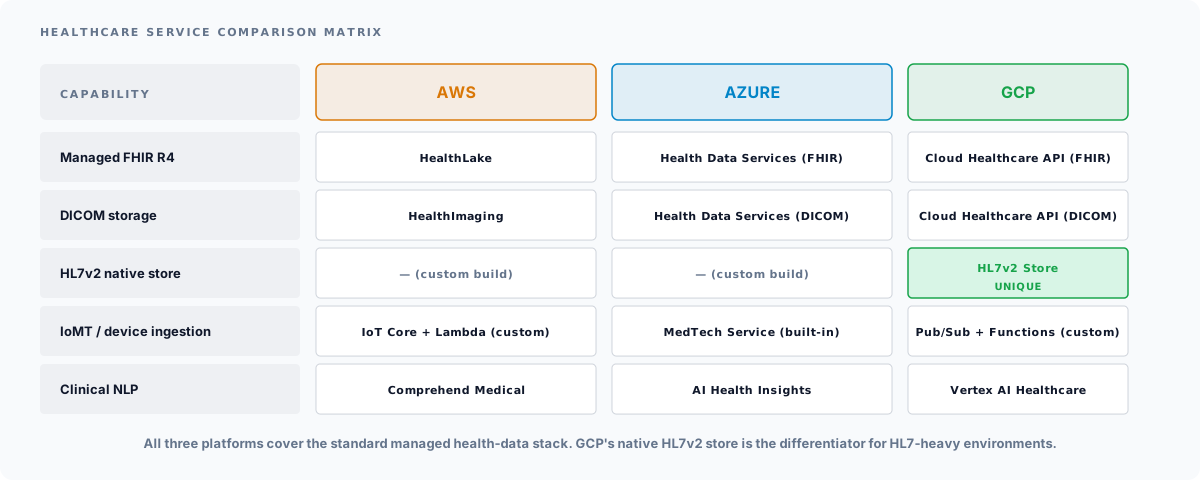
This is where the three providers diverge most significantly. Each has invested in healthcare-specific managed services, but the capabilities and maturity levels differ.
AWS Healthcare Services
AWS HealthLake is a HIPAA-eligible FHIR data store that enables healthcare organizations to store, transform, query, and analyze health data at scale. HealthLake natively supports FHIR R4, provides built-in FHIR APIs, and integrates with AWS analytics services. It supports SMART on FHIR authorization and can ingest data from HL7 v2, C-CDA, and other formats through built-in transformation capabilities.
Amazon Comprehend Medical is a HIPAA-eligible NLP service that extracts medical information from unstructured clinical text. It identifies medical conditions, medications, dosages, procedures, and anatomical references from clinical notes, discharge summaries, and other documents. It is useful for downstream analytics, clinical decision support, and structured data extraction from free-text integration feeds. Routing those extractions back into live clinical workflows is a healthcare AI integration problem, not just a model problem. See our AI-ready healthcare data pipelines guide for the broader pipeline context.
AWS HealthImaging is a purpose-built service for storing, accessing, and analyzing medical imaging data (DICOM). It provides sub-second image retrieval at scale and integrates with PACS systems and imaging viewers.
Azure Healthcare Services
Azure Health Data Services is Microsoft’s unified healthcare data platform. It includes three services under one umbrella:
- FHIR Service: A managed FHIR R4 server with built-in SMART on FHIR authorization, bulk import/export, and FHIR search. It supports US Core profiles and custom FHIR profiles.
- DICOM Service: A managed DICOMweb service for storing and retrieving medical imaging data.
- MedTech Service (IoT Connector): Ingests data from medical devices and IoMT platforms, transforms it into FHIR Observations, and persists it in the FHIR service.
Azure Health Data Services is arguably the most cohesive healthcare platform of the three, with tight integration between FHIR, DICOM, and device data under a single service umbrella.
Migration note: Microsoft is retiring the legacy standalone “Azure API for FHIR” service on September 30, 2026, with new deployments blocked since April 1, 2025, and the SMART on FHIR proxy feature retiring nine days earlier on September 21, 2026. Organizations on the legacy service must migrate to Azure Health Data Services before those dates. See our Azure FHIR migration guide for the migration path.
Azure AI Health Insights (formerly Text Analytics for Health) provides clinical NLP capabilities similar to Comprehend Medical, extracting medical entities, relations, and assertions from clinical text.
GCP Healthcare Services
Cloud Healthcare API is Google’s managed healthcare data service. It provides:
- FHIR Store: Managed FHIR R4 with REST API, search, and bulk operations.
- DICOM Store: DICOMweb-compatible medical image storage and retrieval.
- HL7v2 Store: Native HL7 v2 message storage and retrieval, a unique capability among the three providers.
The HL7v2 Store is particularly relevant for integration workloads. It can receive HL7 v2 messages, store them persistently, and make them available for processing. This is useful for organizations migrating HL7 v2 pipelines to the cloud that want to maintain the HL7 v2 format for downstream systems while building new FHIR-based capabilities.
Vertex AI with healthcare-specific models provides clinical NLP, medical image analysis, and custom model training for healthcare use cases. Google’s strength in AI/ML infrastructure is a meaningful differentiator for organizations with advanced analytics requirements.
Where the Big Three EHRs Are Hosted
A frequently-overlooked input to the cloud decision: where does your EHR vendor actually live? Co-locating your integration platform with your EHR vendor’s hosting reduces latency, network complexity, and BAA scope. The big three US EHR vendors have very different stories:
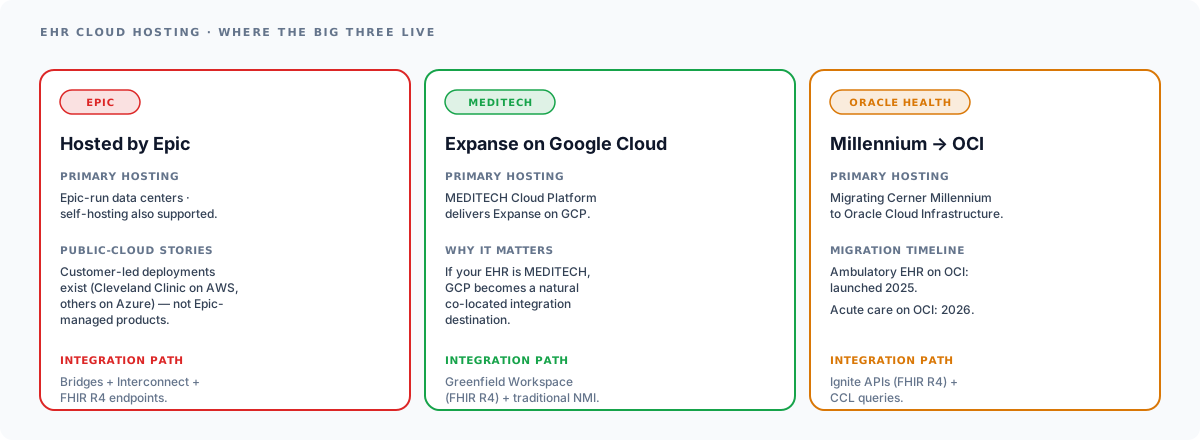
- Epic primarily uses Hosted by Epic (Epic-run data centers) or customer self-hosting. Customer-led deployments on AWS (e.g., Cleveland Clinic) and Azure exist but are not Epic-managed products. For Epic-bound integration, the cloud-provider decision is decoupled from the EHR location.
- MEDITECH delivers Expanse through the MEDITECH Cloud Platform, hosted on Google Cloud. If your EHR is MEDITECH, GCP becomes a natural co-location target for integration workloads: same region, lower data-transfer costs, simpler network architecture. See our EHR integration guide for the deeper EHR-cloud story.
- Oracle Health (Cerner) is migrating Cerner Millennium to Oracle Cloud Infrastructure (OCI). The new ambulatory EHR on OCI launched August 2025 and the acute-care platform follows in 2026. Customers running Cerner today should treat OCI as a serious option alongside the big three.
Integration Tools Comparison
Beyond healthcare-specific services, integration workloads rely on general-purpose cloud services for messaging, queuing, API management, and event-driven processing.
Messaging and Queuing
| Service Type | AWS | Azure | GCP |
|---|---|---|---|
| Message queue | SQS | Service Bus Queues | Pub/Sub |
| Pub/sub messaging | SNS | Service Bus Topics | Pub/Sub |
| Event streaming | Kinesis | Event Hubs | Pub/Sub (streaming) |
| Event routing | EventBridge | Event Grid | Eventarc |
For healthcare integration, the critical considerations are message durability (healthcare messages cannot be lost), ordering guarantees (HL7 messages are often order-dependent), and dead letter queue support (failed messages must be preserved for investigation).
All three providers support these requirements, but the implementations differ. AWS SQS FIFO queues provide strict ordering with exactly-once processing. Azure Service Bus provides sessions for ordered message processing. GCP Pub/Sub provides ordered delivery within a single ordering key.
API Management
| Capability | AWS | Azure | GCP |
|---|---|---|---|
| API Gateway | API Gateway | API Management | Apigee / API Gateway |
| Rate limiting | Yes | Yes | Yes |
| OAuth 2.0 | Cognito + API Gateway | Azure AD B2C + APIM | Identity Platform + Apigee |
| FHIR proxy | Custom | Built-in FHIR support | Custom |
Azure has an edge for FHIR API management because Azure API Management includes built-in support for FHIR-specific policies and can be configured as a proxy in front of Health Data Services with minimal custom code.
Container Orchestration
Running an integration engine like Mirth Connect or OIE in the cloud typically means containerized deployment. All three providers offer managed Kubernetes (EKS, AKS, GKE) and simpler container services (ECS/Fargate, Container Apps, Cloud Run).
For integration engine workloads, the key requirement is persistent storage for the engine’s database. All three providers offer managed relational databases (RDS/Aurora, Azure SQL/PostgreSQL, Cloud SQL) that can serve as the Mirth Connect or OIE backing database.
Running Mirth Connect or OIE in the Cloud
A containerized Mirth Connect or OIE deployment on any of the three providers follows a similar pattern:
- Container image. Build a Docker image with Mirth Connect or OIE, your custom plugins, and any required configuration.
- Database. Use a managed PostgreSQL instance (RDS, Azure Database for PostgreSQL, Cloud SQL) as the backing database. PostgreSQL is recommended for Mirth Connect/OIE in production.
- Secrets management. Store database credentials, API keys, and certificates in the provider’s secrets manager (AWS Secrets Manager, Azure Key Vault, GCP Secret Manager).
- Load balancer. Place a load balancer in front of the integration engine for TLS termination and high availability.
- Persistent storage. If your channels write to the filesystem (file reader/writer channels), use managed file storage (EFS, Azure Files, Filestore).
- Monitoring. Forward Mirth Connect/OIE logs to the provider’s logging service (CloudWatch, Azure Monitor, Cloud Logging) and set up alerts for channel errors and performance metrics.
The provider-specific differences are in the operational details: how you configure networking, how you manage container orchestration, and how you integrate with the provider’s monitoring and alerting ecosystem. The core architecture is the same across all three.
Cost Comparison Framework
Direct cost comparisons between cloud providers are difficult because pricing structures, discount models, and unit costs change frequently. Instead, here is a framework for evaluating costs for a healthcare integration workload.
Cost Components
| Component | What to Measure | Cost Drivers |
|---|---|---|
| Compute | Integration engine instances | Instance type, reserved vs. on-demand, hours per month |
| Database | Managed PostgreSQL | Instance size, storage, IOPS, backup retention |
| Managed FHIR | FHIR server operations | API calls, storage, data indexed |
| Messaging | Queue/topic usage | Messages per month, message size, retention |
| Storage | Message archives, logs, images | Storage volume, access frequency, retrieval costs |
| Data transfer | Cross-region, internet egress | GB transferred, direction |
| API Gateway | API management | API calls, data transfer, features used |
Cost Optimization Strategies
- Reserved instances or committed use discounts for always-on integration engines (1-year or 3-year commitments for 30-60% savings).
- Right-sizing compute instances based on actual CPU and memory utilization, not peak capacity.
- Message pruning to control database and storage growth. Mirth Connect’s message pruning settings directly affect cloud storage costs.
- Tiered storage for message archives: hot storage for recent messages, cold storage (S3 Glacier, Azure Archive, Coldline) for compliance archives.
- Data transfer planning to minimize egress charges, which are often the most surprising cost component in cloud deployments.
Migration Strategy: The 6Rs
Moving integration workloads to the cloud is not a single-step process. The AWS / Gartner 6Rs framework (also referenced in Microsoft’s Cloud Adoption Framework) gives you a vocabulary for the choices.
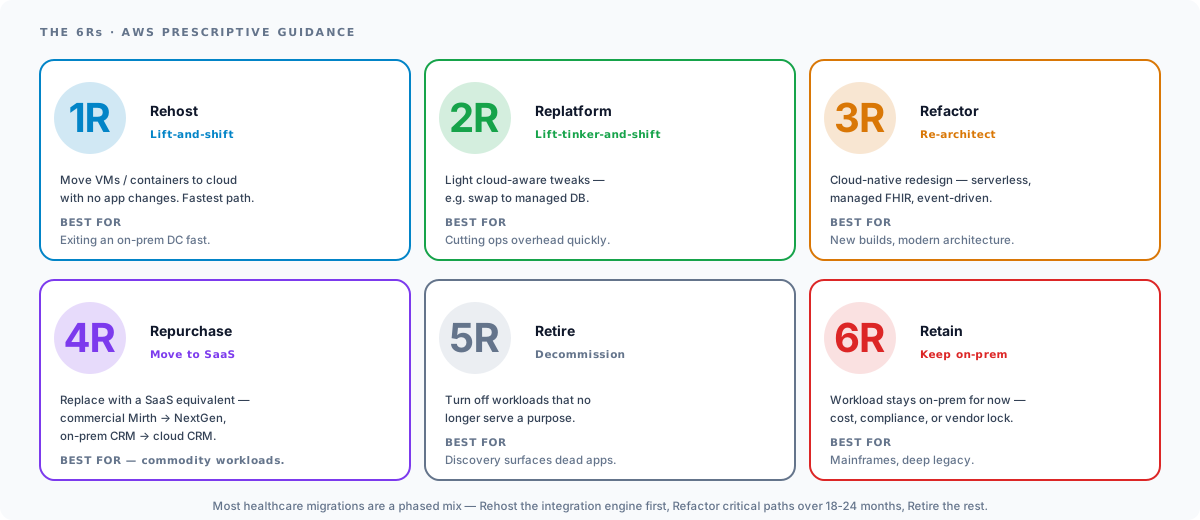
| Strategy | What it means | Best for |
|---|---|---|
| Rehost | Lift-and-shift to cloud VMs/containers, no app changes | Exiting an on-prem data center quickly |
| Replatform | Lift-tinker-and-shift: minor cloud-aware tweaks (e.g., swap to managed DB) | Reducing ops overhead without redesigning |
| Refactor | Re-architect for cloud-native (serverless, managed FHIR, event-driven) | New builds or modernization projects |
| Repurchase | Move to a SaaS replacement (commercial Mirth on NextGen, etc.) | Commodity workloads with viable SaaS option |
| Retire | Decommission what’s not needed | Cloud migration is a great time to audit |
| Retain | Keep on-prem (for now): cost, compliance, or vendor lock | Mainframes, deep legacy systems |
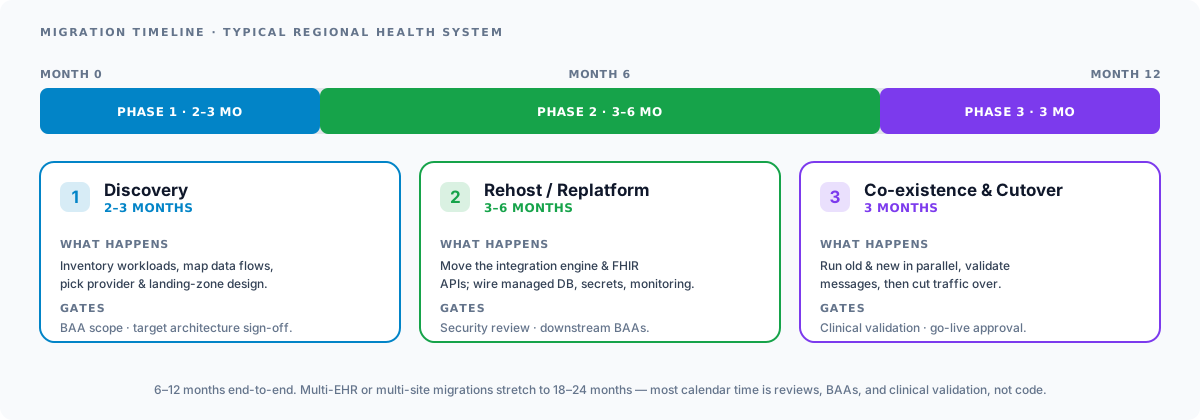
Most healthcare cloud migrations are a phased mix: Rehost the integration engine first to build cloud operations experience, then incrementally Refactor critical paths over 18-24 months, Repurchase commodity components when SaaS makes sense, Retire dead workloads discovery surfaces, and Retain only what truly can’t move yet. In practice that mix unfolds across three phases on a 6-12 month calendar for a typical regional health system.
Multi-Cloud Considerations
Some healthcare organizations operate in multiple cloud environments, either by choice (best-of-breed strategy) or by circumstance (acquisitions, partner requirements, EHR vendor preferences). Multi-cloud adds complexity but is sometimes unavoidable.
Key considerations for multi-cloud healthcare integration:
- Cross-cloud data transfer costs. Data moving between clouds incurs egress charges from both providers. For high-volume integration workloads, these costs add up.
- Consistent security controls. Each cloud has different IAM models, encryption implementations, and network security constructs. Maintaining consistent security posture across clouds requires additional tooling and expertise.
- Unified monitoring. Integrating monitoring and alerting across clouds requires a cloud-agnostic observability platform or significant custom integration work.
- Compliance documentation. Auditors will want to see consistent compliance controls across all cloud environments. This means maintaining separate BAAs, separate compliance documentation, and separate audit evidence for each provider.
For most healthcare organizations, we recommend choosing a primary cloud provider and standardizing on it. Use a second cloud only when there is a compelling technical or business reason (for example, a partner organization that requires Azure connectivity when your primary environment is AWS).
Choosing the right cloud provider for healthcare integration is a decision that affects your team’s productivity, your compliance posture, and your operating costs for years to come. The right choice depends on your existing technology investments, your integration requirements, and your team’s expertise.
For help planning and executing a healthcare cloud migration, explore our related services:
- Healthcare Cloud Services: Cloud architecture, migration, and optimization for healthcare
- Healthcare Cloud Security: HIPAA compliance, security hardening, and monitoring in the cloud
- FHIR API Integration: FHIR R4 API development on cloud-native FHIR servers
- Mirth Connect Services: Mirth Connect deployment, optimization, and cloud migration
- Epic Integration Services: Re-pointing Epic interfaces and validating connectivity during cloud moves
- Azure FHIR Migration Guide: Companion deep-dive on the Azure API for FHIR → Health Data Services migration
- AI-Ready Healthcare Data Pipelines: Building FHIR + OMOP + Vertex AI pipelines in the cloud
- HIPAA-Compliant Software Development: Application-layer compliance for cloud-hosted health software