Saga DICOM Viewer
Free DICOM Viewer & DCM File Viewer: Open .dcm Files Online
Saga DICOM Viewer is a free, browser-based viewer for .dcm files. Drop one in
and see it immediately. No install, no upload, no account: files never leave your computer.
Launch the viewer → Browse sample DICOM files
- Platform
- Any modern browser, on Mac, Windows, Chromebook, or Linux
- Price
- Free, no account required
- Privacy
- Files never leave your device
- Engine
- OHIF v3, open source
Looking for the full toolkit? See the DICOM Tools & References hub: viewer plus tag editor, validator, anonymizer, and samples.
Updated
No DICOM file? Browse public studies
Don't have a .dcm file handy? The viewer ships with two public DICOMweb sources you can
switch to from the data-source dropdown: the OHIF demo dataset (CT, MR, US, mammography) and
NCI Imaging Data Commons
(TCIA + research collections). Or browse our
curated sample catalog with one-click deep-links into the viewer.
How to use the viewer
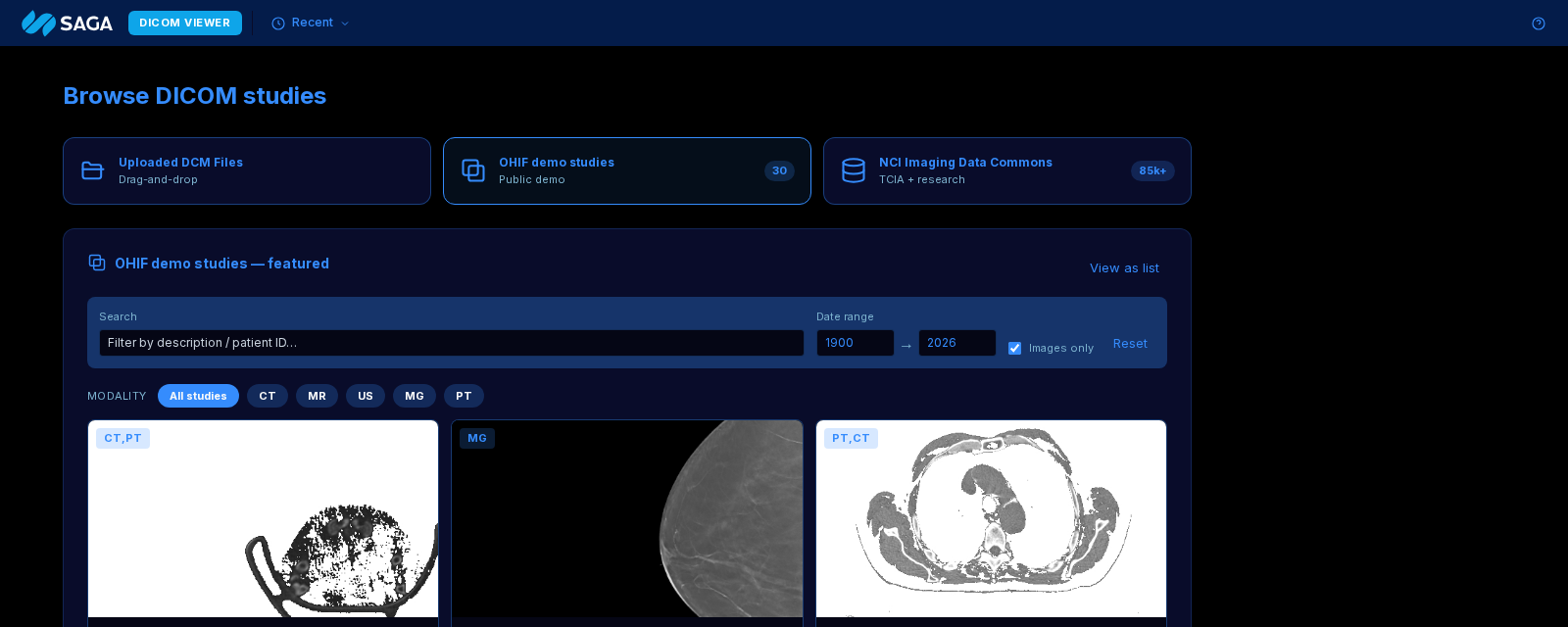
The launcher dashboard opens with three data sources: Uploaded DCM Files (drag-and-drop your own), OHIF demo studies (30 public studies), and NCI Imaging Data Commons (85k+ TCIA + research studies). Click a tile to load that study directly in the viewer.
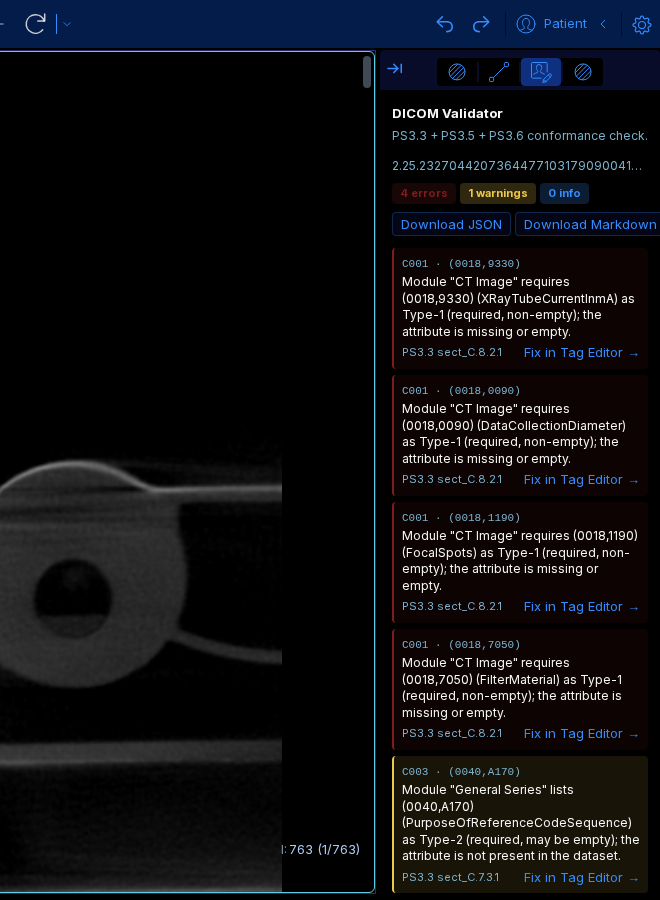
With a study open, click the DICOM Validator icon in the right-side panel chooser. The panel auto-runs PS3.3 + PS3.5 + PS3.6 conformance checks against the loaded study and lists each issue with a spec citation. Each row has a Fix in Tag Editor → shortcut. Download the full report as JSON or Markdown.
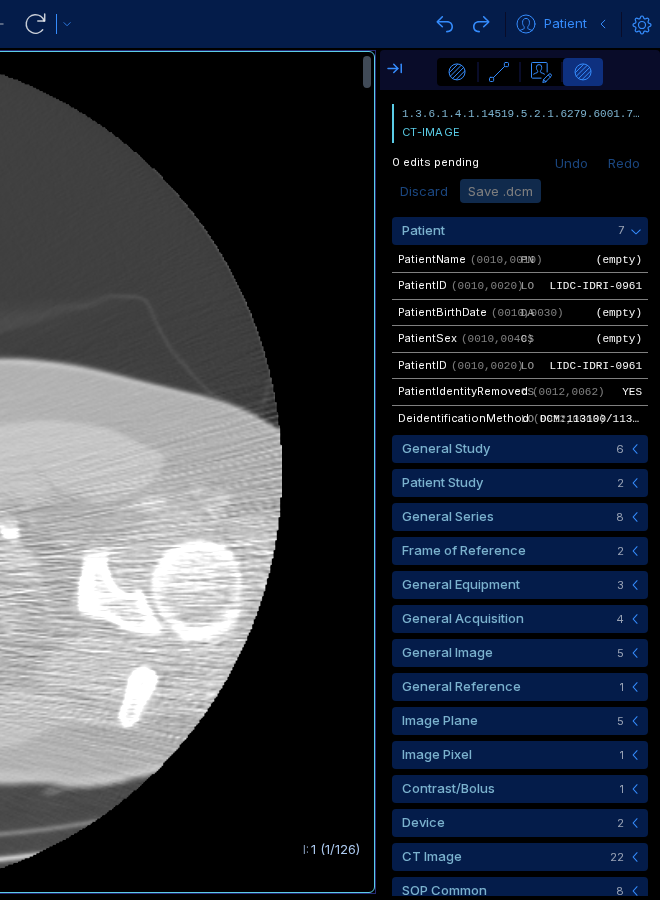
Switch to the DICOM Tag Editor panel. When the active study lives on a
real DICOMweb server (most production PACS), the panel auto-pulls the current instance's
bytes via WADO-RS and opens with the parsed tag tree, VR-aware inputs, and a Save button
that downloads the edited .dcm. Demo studies on static-WADO servers (OHIF
demo, IDC) don't expose whole DICOM files; on those the panel surfaces a one-click link
to the standalone editor where you can drop the file directly.
A free online DICOM viewer that opens .dcm files in the browser
Saga DICOM Viewer is a free, browser-based tool for opening .dcm files without
installing software. Drag the file in, the viewer parses it locally, and renders the image with tag
browser, window/level, pan/zoom, and multi-frame navigation. Built on open-source OHIF v3. Files
never leave your computer.
DICOM (.dcm) is the file format every hospital, imaging clinic, and PACS uses for
medical images. It isn't a plain image: each file packs the pixel data alongside patient, study,
series, and modality metadata per the NEMA PS3 standard. Your default
image viewer won't open it.
People call this tool different things. An online DICOM viewer, a
DCM viewer, a DCM file viewer, a
DICOM file viewer, a DICOM reader, a
DCM file reader, or a DCM reader all mean the same thing: something that opens the
.dcm files a scanner produces. This one does it in the browser tab you already
have open.
Saga DICOM Viewer answers every one of those with a single zero-install browser tool. Launch the viewer, drag the file in, and it parses locally. If you need to go deeper (edit tags, anonymize, or check conformance), there are dedicated tools built on the same OHIF v3 core.
View DICOM on Mac, Windows, Chromebook, or Linux
OHIF runs entirely in the browser, so the OS doesn't matter: any Chrome, Edge, Firefox, or Safari above the version floor works. We have OS-specific landing pages if you prefer those as bookmarks: DICOM viewer for Mac and DICOM viewer for Windows. Both link back to this page.
For Chromebook and Linux users: any recent Chrome or Firefox works the same way. No "this app isn't supported on your device" surprise.
Anonymize DICOM files locally
Research and cross-institution sharing almost always requires de-identification per DICOM PS3.15 Basic Confidentiality Profile. The Saga DICOM anonymizer redacts PHI in the browser, preserves study-level structure for researchers, and lets you download the cleaned file. No PHI is ever sent to our servers.
Edit DICOM tags
Integration engineers need to patch StudyInstanceUID, AccessionNumber, and patient demographics all the time. The tag editor gives you an inline editable table with VR-aware validation (date pickers for DA, enum dropdowns for CS). "Save As" downloads the edited file.
Validate DICOM conformance
The in-browser validator runs every loaded file against the parsed NEMA PS3 standard: Type 1/1C/2/2C presence, VR, value multiplicity, UID format, and PS3.3 enum terms. Issues link to the offending tag with a spec citation, and the cross-tool Fix in Tag Editor → action jumps you straight to the editor with the failing value pre-populated. No upload, no server-side processing.
Convert DICOM to JPG, PNG, or PDF
OHIF's built-in toolbar captures the current viewport as PNG or JPG, useful for research slides, patient reports, and reviewer feedback. Files stay local; capture and download happen entirely in the browser.
Frequently asked questions
Is there a free DICOM viewer?
Yes. Saga DICOM Viewer is a free online DICOM viewer that runs in any modern browser on Mac, Windows, Chromebook or Linux. No account, no install, no upload: drag a .dcm file into the window and the file is parsed locally in your browser. Built on the open-source OHIF v3 platform with a Saga shell for easier file handling.
How can I view DICOM images on my computer?
The easiest path is a browser-based viewer: open the Saga viewer page, drag your .dcm file or folder in, and the images render locally. No installation, no login, and the file never leaves your computer. Works on Windows, Mac, Chromebook, and Linux.
What is the most popular DICOM viewer?
Desktop viewers like MicroDicom, Horos, OsiriX, and RadiAnt dominate installs. For browser-based use, OHIF v3 is the de-facto clinical-grade option, the same codebase that powers the Saga viewer. Browser viewers are growing fast because they avoid IT install approvals.
Which program opens DCM files?
Any standards-compliant DICOM viewer. In the browser, the Saga viewer opens .dcm files directly: drop the file on the page and it renders. On the desktop, MicroDicom (Windows), Horos (Mac), and Weasis (cross-platform) are all free.
How do I view DICOM images on my PC?
On any modern PC with Chrome, Edge, or Firefox, open the Saga viewer in your browser and drag the .dcm file in. No driver, no install. If you prefer a desktop tool, MicroDicom is a free Windows-only option.
What is the best free DICOM viewer?
It depends on your workflow. For zero-install browser use with tag inspection and image rendering, the Saga viewer (built on OHIF v3) is the professional-grade option. For installed desktop use, MicroDicom (Windows), Horos (Mac), and Weasis (Linux/cross-platform) are all free and well-supported.
Is DICOM software free?
Many are. OHIF, dcm4chee, MicroDicom, Horos, Weasis, and Orthanc are all free and open-source. Saga's browser viewer is free to use (built on the open-source OHIF v3 platform with a proprietary Saga shell). Commercial viewers exist too, but the free options cover clinical image review, tag inspection, and basic measurements for most non-diagnostic use cases.
Related tools & references
Why Saga built this
Saga IT integrates DICOM across PACS, VNA, cloud imaging (AWS HealthImaging, Azure HDS, Google Cloud Healthcare), and AI/ML pipelines. Most of our customers can't install desktop software on-site: hospital IT gates it, cross-vendor reviews stall it. A zero-install browser viewer solves the 90% use case: "I have a DICOM file and I need to see it or inspect its tags right now."
The viewer is built on open-source OHIF v3, with a proprietary Saga shell and privacy stance ("files never leave your browser"). If you need help shipping a production DICOM integration, talk to us.