Building software that handles Protected Health Information (PHI) means building software that satisfies the HIPAA Security Rule. Not in the abstract, checkbox-on-a-form sense, but in the concrete, show-me-the-encryption-key-management-architecture sense. Auditors, breach investigators, and covered entities evaluating your product will want to see specific technical decisions, not generic compliance statements.
This guide covers the technical safeguards, architecture decisions, and implementation patterns that make software HIPAA-compliant. It is written for developers and engineers who need to build systems that handle PHI and want to understand exactly what HIPAA requires at the technical level. For the consulting and assessment side of compliance work, see our healthcare security and HIPAA compliance practices.
HIPAA Technical Safeguards Overview
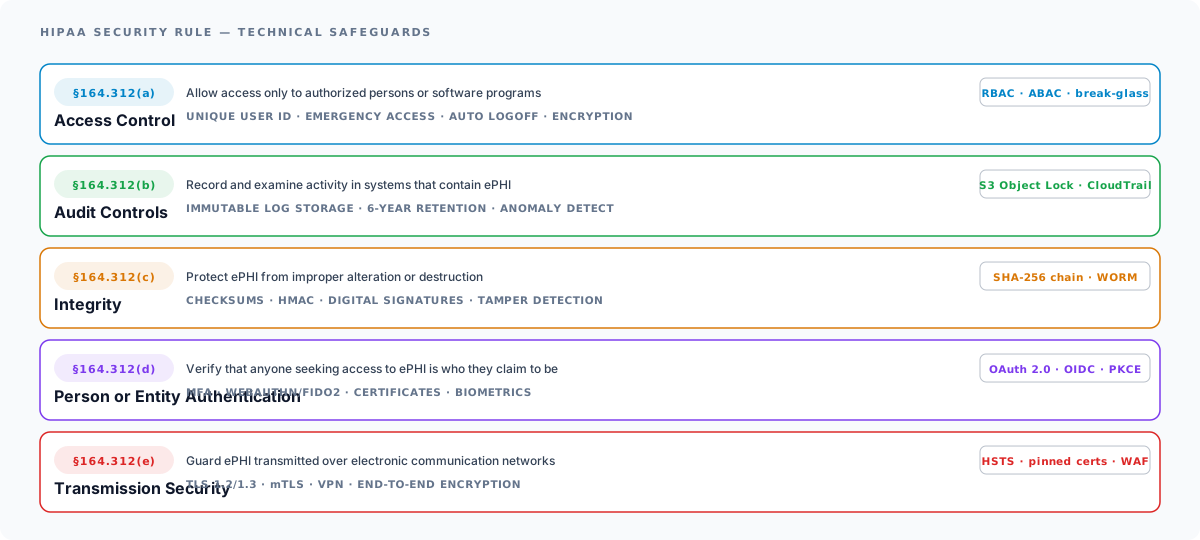
The HIPAA Security Rule (45 CFR Part 160 and Subparts A and C of Part 164) organizes safeguards into three categories: administrative, physical, and technical. Technical safeguards are the ones that live in your code, your infrastructure configuration, and your deployment architecture.
The Security Rule defines five technical safeguard standards:
| Standard | Requirement | Implementation |
|---|---|---|
| Access Control (§164.312(a)) | Implement technical policies and procedures for electronic information systems that maintain ePHI to allow access only to authorized persons or software programs | Unique user IDs, emergency access procedures, automatic logoff, encryption |
| Audit Controls (§164.312(b)) | Implement hardware, software, and procedural mechanisms that record and examine activity in systems that contain or use ePHI | Audit logging, log review, anomaly detection |
| Integrity (§164.312(c)) | Implement policies and procedures to protect ePHI from improper alteration or destruction | Data integrity controls, checksums, tamper detection |
| Person or Entity Authentication (§164.312(d)) | Implement procedures to verify that a person or entity seeking access to ePHI is who they claim to be | MFA, certificate-based auth, biometrics |
| Transmission Security (§164.312(e)) | Implement technical security measures to guard against unauthorized access to ePHI transmitted over an electronic communications network | TLS encryption, VPN tunnels, secure messaging |
Many of these standards have “addressable” implementation specifications, which means you must implement the specification or document why an alternative measure is equally effective. “Addressable” does not mean “optional.”
Regulatory note (as of May 2026): The HHS Office for Civil Rights published a HIPAA Security Rule NPRM on January 6, 2025 that proposes removing the “addressable” vs. “required” distinction altogether: every implementation specification would become required. OCR’s published regulatory agenda lists a final rule for May 2026, but no final rule has been issued as of this writing; OCR is still processing 4,700+ public comments and the proposal faces ongoing industry opposition. The current “addressable” framework remains binding until OCR publishes a final rule. For a deeper dive on the proposed changes, see our HIPAA Security Rule 2026 update.
Architecture Decisions: Encryption
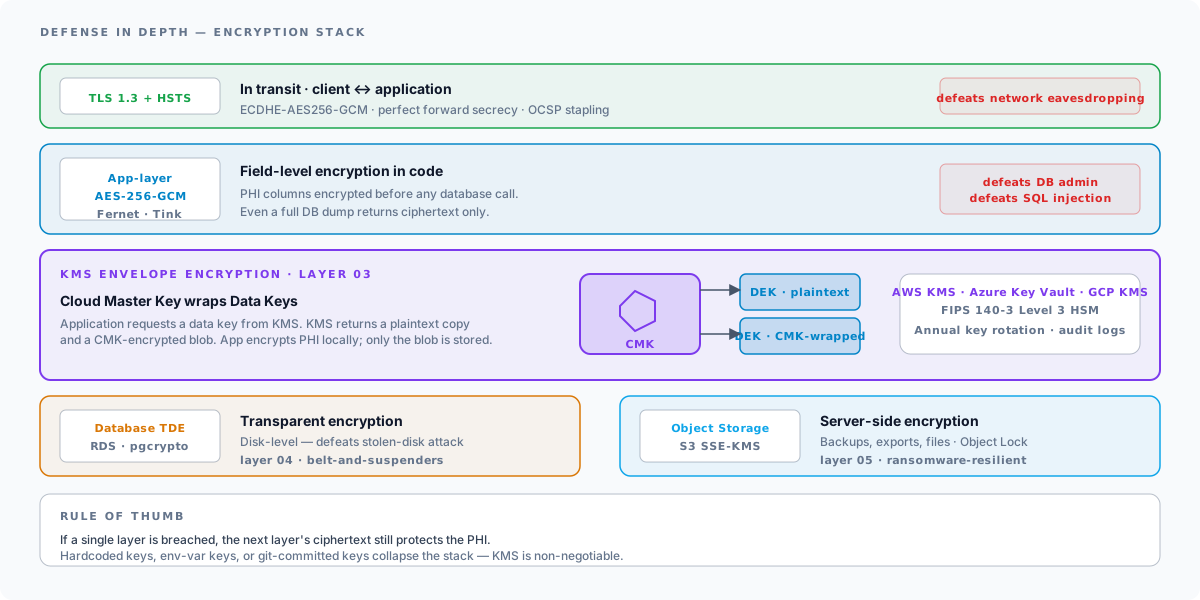
Encryption is the foundation of HIPAA technical compliance. You need encryption at rest and in transit, with key management that can withstand audit scrutiny.
Encryption at Rest
All datastores that contain ePHI must be encrypted. This includes your primary database, object storage, backups, message queues, caches, and log stores (if logs contain PHI).
AES-256 is the standard, defined by NIST in FIPS 197 and recommended for end-user storage encryption by NIST SP 800-111. It is the baseline expectation for HIPAA-covered systems.
Database-level encryption configuration varies by platform:
-- PostgreSQL: Transparent Data Encryption via pgcrypto extension-- Column-level encryption for specific PHI fieldsCREATE EXTENSION IF NOT EXISTS pgcrypto;
-- Encrypt a PHI columnUPDATE patientsSET ssn = pgp_sym_encrypt(ssn_plaintext, current_setting('app.encryption_key'))WHERE ssn_plaintext IS NOT NULL;
-- Decrypt at query time (application layer preferred)SELECT pgp_sym_decrypt(ssn::bytea, current_setting('app.encryption_key'))FROM patientsWHERE id = $1;
For most applications, application-layer encryption (encrypting PHI before it reaches the database) provides stronger protection than transparent database encryption (TDE) alone. TDE protects against physical disk theft but does not protect against SQL injection, database admin access, or backup exfiltration. Application-layer encryption ensures that even a complete database dump yields ciphertext.
# Python: Application-layer field encryption with Fernet (AES-128-CBC)from cryptography.fernet import Fernetimport os
class PHIEncryptor:    """Encrypt/decrypt PHI fields before database storage."""
    def __init__(self, key: bytes | None = None):        # Key must come from KMS, never hardcoded        self.key = key or os.environ["PHI_ENCRYPTION_KEY"].encode()        self.cipher = Fernet(self.key)
    def encrypt(self, plaintext: str) -> str:        """Encrypt a PHI value. Returns base64-encoded ciphertext."""        return self.cipher.encrypt(plaintext.encode()).decode()
    def decrypt(self, ciphertext: str) -> str:        """Decrypt a PHI value."""        return self.cipher.decrypt(ciphertext.encode()).decode()
# Usageencryptor = PHIEncryptor()encrypted_ssn = encryptor.encrypt("123-45-6789")# Store encrypted_ssn in database
Encryption in Transit
All network communication carrying ePHI must be encrypted. TLS 1.3 is the current standard; TLS 1.2 is the minimum acceptable version. TLS 1.0 and 1.1 are deprecated and must not be used.
Configure your application servers, load balancers, and API gateways to enforce minimum TLS versions:
# Nginx: Enforce TLS 1.2+ with strong cipher suitesserver {    listen 443 ssl;    ssl_protocols TLSv1.2 TLSv1.3;    ssl_ciphers 'ECDHE-ECDSA-AES256-GCM-SHA384:ECDHE-RSA-AES256-GCM-SHA384:ECDHE-ECDSA-CHACHA20-POLY1305';    ssl_prefer_server_ciphers on;    ssl_session_timeout 1d;    ssl_session_tickets off;
    # HSTS header    add_header Strict-Transport-Security "max-age=63072000; includeSubDomains; preload" always;}
For internal service-to-service communication, do not assume that traffic inside your VPC is safe. Use mutual TLS (mTLS) between services that handle PHI, particularly in microservice architectures where PHI may traverse multiple services.
Key Management
Encryption is only as strong as your key management. Hardcoding encryption keys, storing them in environment variables on the application server, or checking them into version control are compliance failures that auditors actively look for.
Cloud KMS Solutions
Use a dedicated key management service. The major cloud providers all offer HSM-backed KMS under their HIPAA BAAs:
| Provider | Service | FIPS validation | HIPAA BAA |
|---|---|---|---|
| AWS | KMS | FIPS 140-3 Level 3 (HSMs validated 2024; sunset 2026-11-17, re-validation in progress) | Yes |
| Azure | Key Vault Premium + Managed HSM | FIPS 140-3 Level 3 (Marvell LiquidSecurity HSMs, all public regions) | Yes |
| Azure | Key Vault Standard (software-protected) | FIPS 140-2 Level 1 | Yes |
| GCP | Cloud KMS + Cloud HSM | FIPS 140-2 Level 3 (Cloud HSM Cert #4399; FIPS 140-2 moves to NIST Historical List 2026-09-21) | Yes |
| HashiCorp | Vault Enterprise | FIPS 140-2 Level 2 (with HSM backend) | Available |
Verify current certification status before architecture decisions: the FIPS 140-2 → 140-3 transition is in flight across all major providers in 2025–2026, and certificates expire on cycles. Check the NIST Cryptographic Module Validation Program (CMVP) registry for the current state of each module.
AWS KMS integration for application-layer encryption:
import boto3import base64
class KMSEncryptor:    """PHI encryption using AWS KMS envelope encryption."""
    def __init__(self, key_id: str):        self.kms = boto3.client("kms")        self.key_id = key_id
    def encrypt(self, plaintext: str) -> dict:        """Envelope encrypt: KMS generates a data key, we encrypt locally."""        # Generate a data key        response = self.kms.generate_data_key(            KeyId=self.key_id,            KeySpec="AES_256"        )        # Encrypt plaintext with the plaintext data key        from cryptography.hazmat.primitives.ciphers.aead import AESGCM        aesgcm = AESGCM(response["Plaintext"])        nonce = os.urandom(12)        ciphertext = aesgcm.encrypt(nonce, plaintext.encode(), None)
        return {            "ciphertext": base64.b64encode(ciphertext).decode(),            "nonce": base64.b64encode(nonce).decode(),            "encrypted_key": base64.b64encode(                response["CiphertextBlob"]            ).decode(),        }
    def decrypt(self, encrypted: dict) -> str:        """Decrypt using KMS to unwrap the data key."""        # Decrypt the data key via KMS        response = self.kms.decrypt(            CiphertextBlob=base64.b64decode(encrypted["encrypted_key"])        )        from cryptography.hazmat.primitives.ciphers.aead import AESGCM        aesgcm = AESGCM(response["Plaintext"])        plaintext = aesgcm.decrypt(            base64.b64decode(encrypted["nonce"]),            base64.b64decode(encrypted["ciphertext"]),            None,        )        return plaintext.decode()
Key Rotation
HIPAA does not specify a key rotation frequency, but NIST SP 800-57 recommends rotating AES keys at least annually. Cloud KMS services support automatic key rotation:
- AWS KMS: Automatic annual rotation (configurable)
- Azure Key Vault: Configurable rotation policies with Event Grid notifications
- GCP Cloud KMS: Automatic rotation with configurable period
Ensure your application supports key versioning so that data encrypted with old keys can still be decrypted while new data uses the current key.
Authentication Patterns
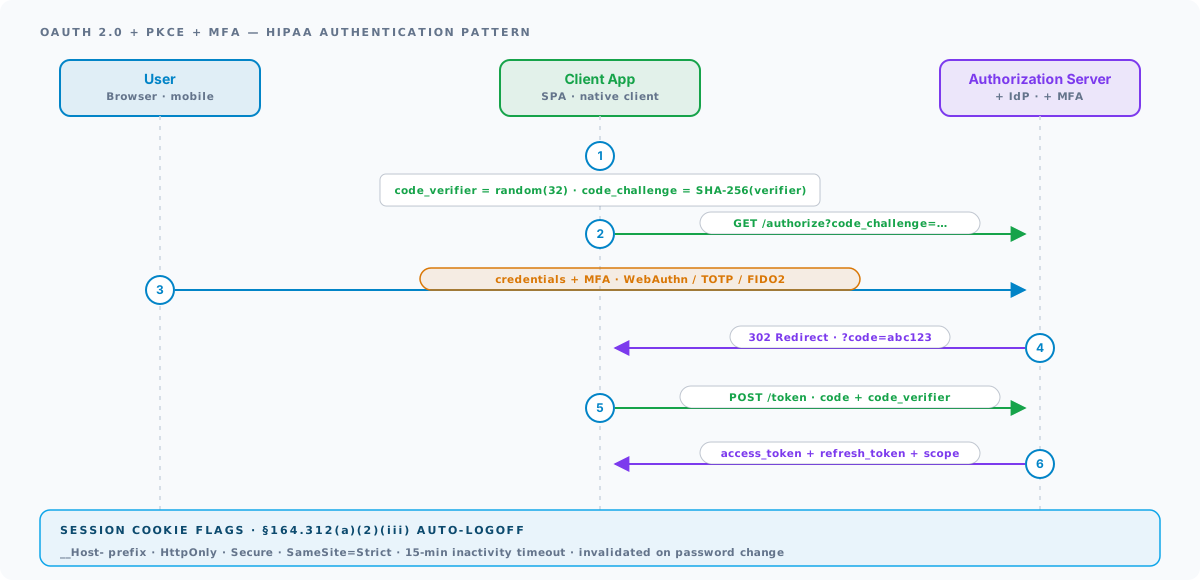
HIPAA’s Person or Entity Authentication standard (§164.312(d)) requires verifying the identity of anyone accessing ePHI. In practice, this means strong authentication with multi-factor requirements.
OAuth 2.0 with PKCE
For modern web and mobile applications handling PHI, OAuth 2.0 with Proof Key for Code Exchange (PKCE) is the recommended authorization framework. PKCE prevents authorization code interception attacks, which is critical for mobile and single-page applications.
// OAuth 2.0 + PKCE flow for HIPAA-compliant applicationsimport crypto from "crypto";
function generatePKCE(): {  codeVerifier: string;  codeChallenge: string;} {  // Generate a cryptographically random code verifier  const codeVerifier = crypto.randomBytes(32)    .toString("base64url");
  // Create S256 code challenge  const codeChallenge = crypto    .createHash("sha256")    .update(codeVerifier)    .digest("base64url");
  return { codeVerifier, codeChallenge };}
// Authorization requestconst { codeVerifier, codeChallenge } = generatePKCE();const authUrl = new URL("https://auth.example.com/authorize");authUrl.searchParams.set("response_type", "code");authUrl.searchParams.set("client_id", CLIENT_ID);authUrl.searchParams.set("redirect_uri", REDIRECT_URI);authUrl.searchParams.set("scope", "openid profile phi:read phi:write");authUrl.searchParams.set("code_challenge", codeChallenge);authUrl.searchParams.set("code_challenge_method", "S256");authUrl.searchParams.set("state", crypto.randomBytes(16).toString("hex"));
Multi-Factor Authentication (MFA)
MFA is an addressable implementation specification under the HIPAA Security Rule. For any system with direct access to ePHI, MFA should be treated as required. Common MFA implementations:
- TOTP (Time-based One-Time Password): RFC 6238 compatible authenticator apps (Google Authenticator, Authy)
- WebAuthn/FIDO2: Hardware security keys or platform authenticators (fingerprint, face recognition)
- SMS OTP: Acceptable but not recommended due to SIM swapping attacks (NIST SP 800-63B guidance)
For healthcare applications, WebAuthn/FIDO2 is the strongest option because it is phishing-resistant and does not rely on a shared secret.
Session Management
Sessions for PHI-accessing applications must implement:
- Automatic logoff (§164.312(a)(2)(iii)) – HIPAA requires termination after “a predetermined period of inactivity” without specifying a number. 15 minutes is a common baseline for clinical applications; high-risk administrative sessions may require shorter timeouts. Document your chosen interval in your risk assessment.
- Secure session tokens – use cryptographically random session identifiers, transmitted only over HTTPS, with
Secure,HttpOnly, andSameSite=Strictcookie flags. - Session invalidation on password change, permission change, or explicit logout.
// Express.js session configuration for HIPAA complianceimport session from "express-session";import RedisStore from "connect-redis";
app.use(session({  store: new RedisStore({ client: redisClient }),  secret: process.env.SESSION_SECRET, // From KMS, not hardcoded  name: "__Host-session",             // __Host- prefix enforces Secure + Path=/  resave: false,  saveUninitialized: false,  cookie: {    secure: true,          // HTTPS only    httpOnly: true,         // No JavaScript access    sameSite: "strict",     // CSRF protection    maxAge: 15 * 60 * 1000, // 15-minute absolute timeout  },}));
Role-Based Access Control (RBAC) for PHI
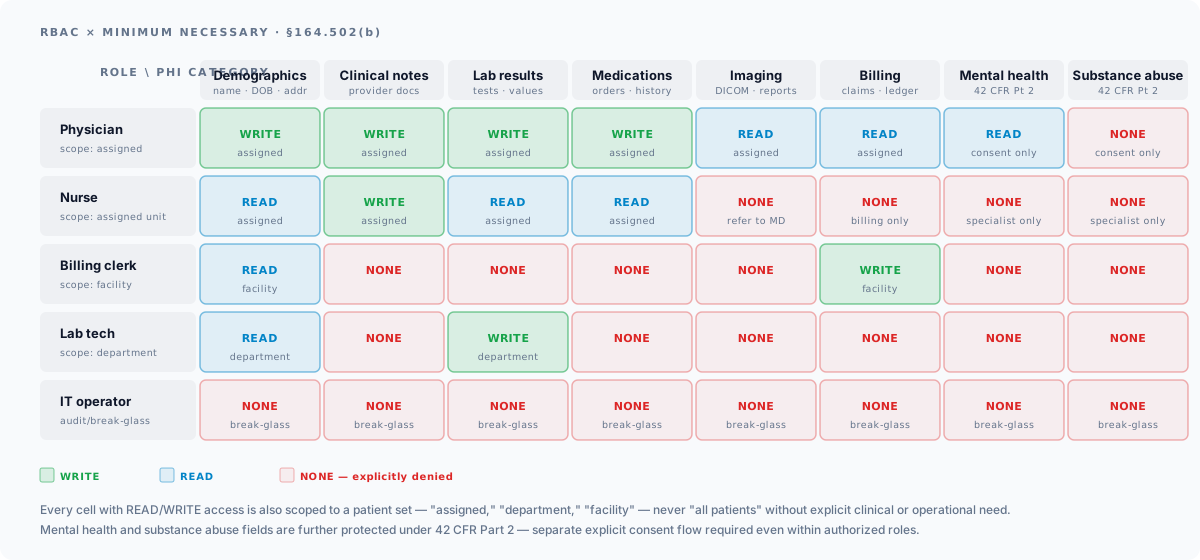
The Access Control standard (§164.312(a)) requires that only authorized users and programs can access ePHI. RBAC is the most common implementation pattern, but HIPAA compliance requires going beyond simple role assignment.
Minimum Necessary Standard
HIPAA’s minimum necessary standard (§164.502(b)) requires that access to PHI be limited to the minimum amount necessary to accomplish the intended purpose. This means:
- Granular roles – not just “admin” and “user,” but roles that reflect actual job functions (billing clerk, nurse, physician, lab technician)
- Data-level access control – a billing clerk can see diagnosis codes and procedure codes but not clinical notes; a nurse can see vitals and medications for their assigned patients but not for other units
- Temporal access – break-the-glass emergency access with mandatory post-access review
# RBAC schema supporting minimum necessary accessfrom enum import Enumfrom dataclasses import dataclass
class PHICategory(Enum):    DEMOGRAPHICS = "demographics"       # Name, DOB, address    CLINICAL_NOTES = "clinical_notes"   # Provider documentation    LAB_RESULTS = "lab_results"         # Laboratory data    MEDICATIONS = "medications"         # Medication records    IMAGING = "imaging"                 # Radiology reports, images    BILLING = "billing"                 # Claims, financial data    MENTAL_HEALTH = "mental_health"     # 42 CFR Part 2 protected    SUBSTANCE_ABUSE = "substance_abuse" # 42 CFR Part 2 protected
class AccessLevel(Enum):    NONE = 0    READ = 1    WRITE = 2    ADMIN = 3
@dataclassclass RolePermission:    role: str    phi_category: PHICategory    access_level: AccessLevel    patient_scope: str  # "assigned", "department", "facility", "all"
# Example role definitionsROLE_PERMISSIONS = [    # Nurses: read/write clinical data for assigned patients    RolePermission("nurse", PHICategory.DEMOGRAPHICS, AccessLevel.READ, "assigned"),    RolePermission("nurse", PHICategory.CLINICAL_NOTES, AccessLevel.WRITE, "assigned"),    RolePermission("nurse", PHICategory.MEDICATIONS, AccessLevel.READ, "assigned"),    RolePermission("nurse", PHICategory.LAB_RESULTS, AccessLevel.READ, "assigned"),    # Billing: demographics and billing data only, facility-wide    RolePermission("billing_clerk", PHICategory.DEMOGRAPHICS, AccessLevel.READ, "facility"),    RolePermission("billing_clerk", PHICategory.BILLING, AccessLevel.WRITE, "facility"),    # No access to clinical notes, mental health, or substance abuse]
Break-the-Glass Access
Clinical emergencies may require access to PHI beyond a user’s normal role. Implement break-the-glass (BTG) access with:
- A clear BTG action that the user must explicitly invoke (not a silent fallback)
- A mandatory reason code (emergency, patient request, continuity of care)
- Immediate audit log entry with elevated priority
- Automatic notification to the privacy officer for post-access review
- Time-limited elevated access (auto-reverts after a defined period)
Audit Logging
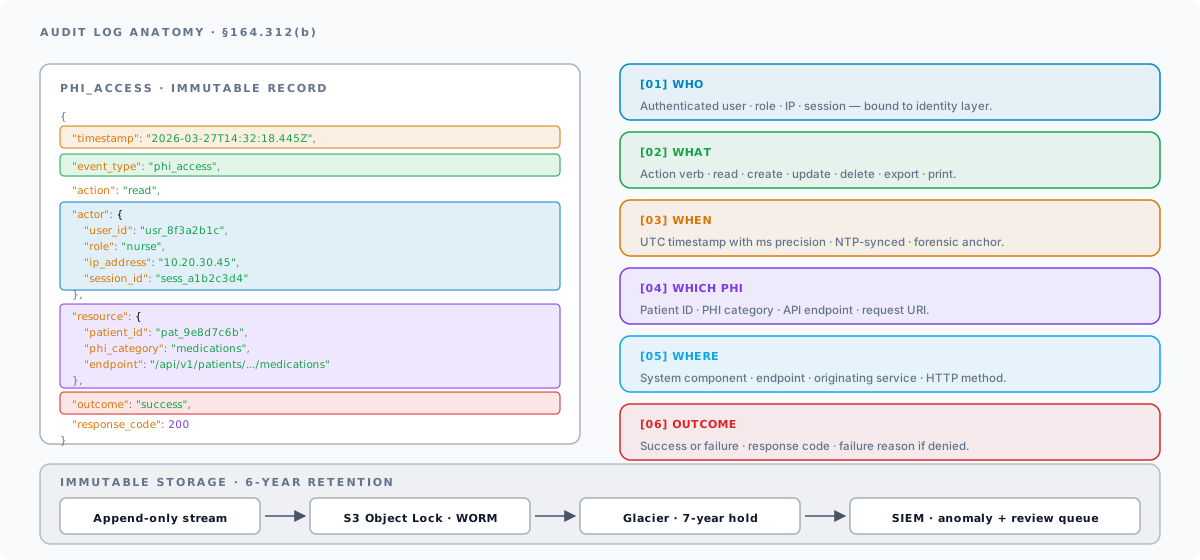
The Audit Controls standard (§164.312(b)) requires recording and examining activity in systems that contain ePHI. Effective audit logging is both a compliance requirement and your primary forensic tool in the event of a breach.
What to Log
Every access to ePHI must generate an audit record. At minimum, log:
- Who – authenticated user ID, role, originating IP address
- What – the action performed (read, create, update, delete, export, print)
- Which PHI – patient identifier and the category of PHI accessed
- When – timestamp in UTC with millisecond precision
- Where – the system component, API endpoint, or module
- Outcome – success or failure, and if failure, the reason
{ "timestamp": "2026-03-27T14:32:18.445Z", "event_type": "phi_access", "action": "read", "actor": { "user_id": "usr_8f3a2b1c", "role": "nurse", "ip_address": "10.20.30.45", "session_id": "sess_a1b2c3d4" }, "resource": { "patient_id": "pat_9e8d7c6b", "phi_category": "medications", "endpoint": "/api/v1/patients/pat_9e8d7c6b/medications", "http_method": "GET" }, "outcome": "success", "response_code": 200, "break_the_glass": false}Immutable Log Storage
Audit logs must be tamper-evident. If an attacker or malicious insider can modify audit logs, the logs lose their forensic value. Implement immutability through:
- Write-once storage – AWS S3 with Object Lock (Compliance mode), Azure Blob with immutability policies, or GCP Cloud Storage with retention policies
- Append-only log streams – write logs to an append-only store and separately replicate to immutable storage
- Cryptographic chaining – each log entry includes a hash of the previous entry, creating a tamper-evident chain (similar to blockchain)
Retention Requirements
HIPAA requires retaining documentation of policies and procedures for six years (§164.530(j)(2)) from the date of creation or the date when it was last in effect. While HIPAA does not explicitly mandate a six-year retention for audit logs, this is the widely accepted interpretation and the standard most auditors apply. Many organizations retain logs for longer based on state-specific requirements or organizational policy.
Configure your log storage with automated lifecycle policies:
# AWS S3 lifecycle policy for HIPAA audit logsRules: - ID: hipaa-audit-retention Status: Enabled Filter: Prefix: audit-logs/ Transitions: - Days: 90 StorageClass: STANDARD_IA - Days: 365 StorageClass: GLACIER # No expiration — retain indefinitely or set to 2,555 days (7 years) NoncurrentVersionExpiration: NoncurrentDays: 2555Secure API Design
Modern healthcare applications expose APIs for interoperability, mobile clients, and third-party integrations. APIs that serve PHI require specific security patterns.
FHIR Server Authorization
For FHIR-based APIs, the SMART on FHIR authorization framework defines OAuth 2.0 scopes that map to FHIR resource types and access levels:
# SMART on FHIR scope examplespatient/Patient.read # Read patient demographicspatient/Observation.read # Read lab results, vitalspatient/MedicationRequest.read # Read medication ordersuser/Patient.write # Clinician write accesssystem/Bundle.read # Backend service bulk accessScope enforcement must happen at the API gateway or middleware layer, not just at the UI level. Every API request must be validated against the granted scopes:
// Middleware: SMART on FHIR scope enforcementfunction enforceFHIRScopes(  requiredScope: string) {  return (req: Request, res: Response, next: NextFunction) => {    const grantedScopes = req.auth?.scopes || [];
    if (!grantedScopes.includes(requiredScope)) {      // Log the unauthorized access attempt      auditLogger.warn({        event_type: "authorization_failure",        actor: req.auth?.userId,        required_scope: requiredScope,        granted_scopes: grantedScopes,        endpoint: req.originalUrl,      });      return res.status(403).json({        error: "insufficient_scope",        message: `Required scope: ${requiredScope}`,      });    }    next();  };}
// Route registrationrouter.get(  "/fhir/r4/Patient/:id",  enforceFHIRScopes("patient/Patient.read"),  getPatientHandler);
Rate Limiting
Rate limiting protects against brute force attacks, credential stuffing, and data exfiltration. Implement rate limits at multiple levels:
- Per-user rate limits – prevent a single compromised account from exfiltrating large volumes of PHI
- Per-IP rate limits – prevent distributed attacks from a single source
- Per-endpoint rate limits – tighter limits on sensitive endpoints (authentication, PHI export, bulk data access)
// Rate limiting configuration for PHI-serving APIsimport rateLimit from "express-rate-limit";
// Standard API rate limitconst apiLimiter = rateLimit({  windowMs: 15 * 60 * 1000,  // 15 minutes  max: 1000,                   // 1000 requests per window  standardHeaders: true,  legacyHeaders: false,});
// Stricter limit for authentication endpointsconst authLimiter = rateLimit({  windowMs: 15 * 60 * 1000,  max: 10,                     // 10 attempts per 15 minutes  skipSuccessfulRequests: true, // Only count failures});
// PHI export endpoint — very restrictiveconst exportLimiter = rateLimit({  windowMs: 60 * 60 * 1000,   // 1 hour  max: 5,                      // 5 exports per hour});
PHI Data Handling
Beyond encryption and access control, HIPAA-compliant systems need specific data handling patterns for PHI.
De-identification: Safe Harbor Method
The Safe Harbor method (§164.514(b)(2)(i)) defines 18 categories of identifiers that must be removed to de-identify PHI. De-identified data is not subject to HIPAA, which is valuable for analytics, research, and development/testing environments.
The 18 Safe Harbor identifiers:
- Names
- Geographic data smaller than a state (3-digit ZIP codes may be retained only when the area covers >20,000 people; otherwise must be set to 000)
- Dates (except year) related to an individual. Ages 90 and older must be aggregated to “90+”
- Phone numbers
- Fax numbers
- Email addresses
- Social Security numbers
- Medical record numbers
- Health plan beneficiary numbers
- Account numbers
- Certificate/license numbers
- Vehicle identifiers and serial numbers
- Device identifiers and serial numbers
- Web URLs
- IP addresses
- Biometric identifiers
- Full-face photographs
- Any other unique identifying number or code
Safe Harbor also has an “actual knowledge” requirement: even after the 18 identifiers are removed, the dataset is not de-identified if the covered entity has actual knowledge that the remaining information could be used to identify an individual.
For development and testing environments, never use production PHI. Generate synthetic data using tools like Synthea that creates realistic but entirely fictional patient records, or build a de-identification pipeline that strips the 18 Safe Harbor identifiers before data enters non-production environments.
Tokenization
Tokenization replaces PHI with non-sensitive placeholder tokens while maintaining a secure mapping in a tokenization vault. Unlike encryption, tokenized data has no mathematical relationship to the original value, so even if the token is compromised, the PHI is not exposed.
Use cases for tokenization in HIPAA-compliant systems:
- Patient identifiers in analytics databases – replace MRNs with tokens in the analytics layer
- Cross-system patient matching – use tokens to correlate records without exposing identifiers to intermediary systems
- Third-party integrations – share tokens instead of PHI with vendors who do not need to see the actual data
HIPAA Security Risk Assessment
The Security Management Process standard (§164.308(a)(1)) requires a risk assessment to identify threats and vulnerabilities to ePHI. This is not a one-time exercise; HIPAA expects risk assessments to be conducted regularly and whenever significant changes occur. The consulting side of this work (gap analysis, control mapping, remediation planning) is the bulk of our healthcare compliance consulting practice.
Risk Assessment Process
- Identify ePHI scope – inventory all systems, applications, and data flows that create, receive, maintain, or transmit ePHI
- Identify threats – natural (floods, earthquakes), human (hackers, insider threats, social engineering), environmental (power failure, hardware failure)
- Identify vulnerabilities – unpatched software, weak authentication, missing encryption, insufficient logging
- Assess current controls – document existing safeguards and their effectiveness
- Determine likelihood – probability that a threat will exploit a vulnerability
- Determine impact – severity of harm if the threat is realized (financial, reputational, patient harm)
- Calculate risk – likelihood x impact, producing a risk score for each threat-vulnerability pair
- Document remediation plans – for risks that exceed your organization’s risk tolerance
The HHS Office for Civil Rights (OCR) provides a Security Risk Assessment Tool (SRA Tool) that walks through this process. For software development teams, the risk assessment should be integrated into your SDLC, with risk reviews occurring at architecture decisions, major feature additions, and deployment changes.
Compliance Testing
HIPAA compliance must be verified through testing, not assumed through good intentions. Integrate security testing into your CI/CD pipeline and conduct periodic manual assessments.
Static Application Security Testing (SAST)
SAST tools analyze source code for security vulnerabilities without executing the application:
- SonarQube – broad language support, OWASP Top 10 rules, configurable quality gates
- Semgrep – lightweight, pattern-based rules, good for custom healthcare-specific checks
- CodeQL – GitHub-native, deep data flow analysis
Run SAST on every pull request. Block merges that introduce high-severity findings.
Dynamic Application Security Testing (DAST)
DAST tools test running applications for vulnerabilities by sending crafted requests:
- OWASP ZAP – open-source, CI/CD integration, comprehensive scanning
- Burp Suite – industry standard for manual and automated testing
Run DAST scans against staging environments on a regular cadence (weekly or per-release).
Penetration Testing
Annual penetration testing by a qualified third party is a HIPAA best practice and a requirement for many covered entity vendor assessments. Scope should include:
- External network penetration testing
- Internal network penetration testing
- Web application penetration testing (with focus on PHI-accessing endpoints)
- Social engineering (phishing, pretexting)
- Physical security testing (if applicable to the deployment environment)
Penetration test reports should feed into your risk assessment process and result in tracked remediation items.
Deployment and Infrastructure
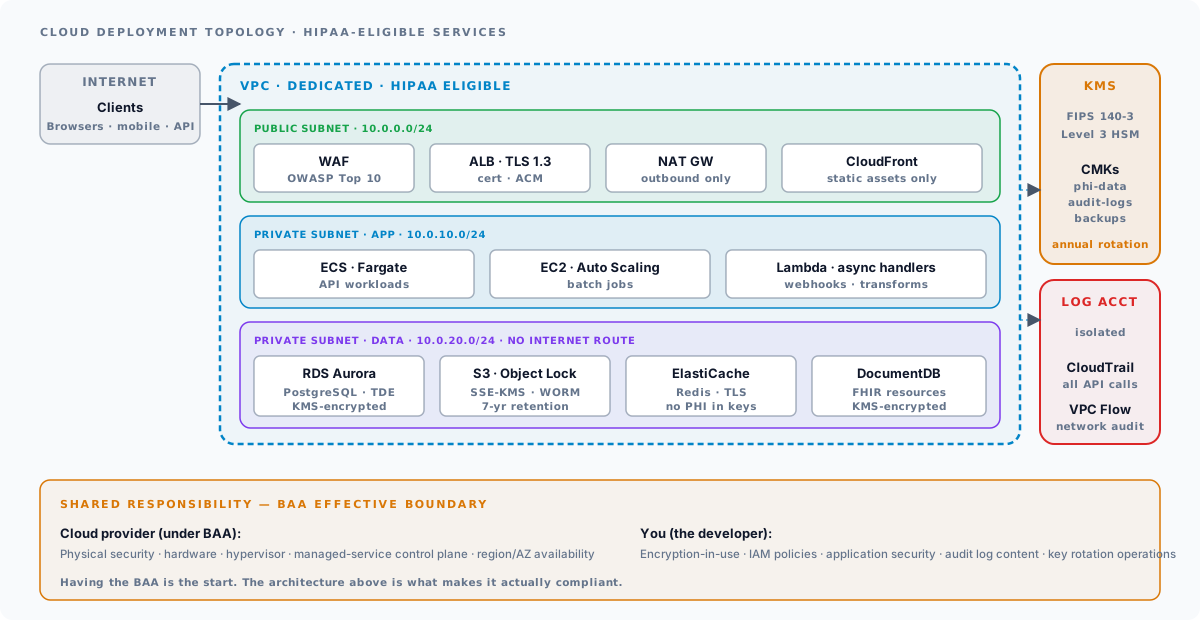
The infrastructure that hosts HIPAA-compliant software must itself satisfy HIPAA requirements. This starts with the Business Associate Agreement and extends through the full infrastructure stack. See our healthcare cloud security practice for the deployment-side perspective.
HIPAA Business Associate Agreements (BAAs)
Any entity that creates, receives, maintains, or transmits ePHI on behalf of a covered entity is a business associate and must sign a BAA. For cloud-hosted applications, this means:
- Cloud provider BAA – AWS, Azure, and GCP all offer HIPAA BAAs, but you must explicitly request and execute them. Having an AWS account does not automatically make you HIPAA-compliant.
- SaaS vendor BAAs – every third-party service that touches ePHI (logging platforms, error tracking, email providers, analytics) must have a BAA in place
- Subcontractor BAAs – if your business associates use subcontractors who access ePHI, the chain of BAAs must continue
Model and inference providers count as business associates too. HIPAA compliance for AI vendors turns on the same BAA chain, plus one question the standard checklist misses: whether the vendor trains on your data.
For a complete BAA review checklist (required clauses, common gotchas, vendor-specific BAA links), see our HIPAA BAA checklist.
Cloud Provider HIPAA Services
Not all services within a cloud provider’s platform are covered by the BAA. Use only HIPAA-eligible services:
AWS HIPAA-eligible services (partial list: AWS now lists 165+ eligible services; check the current registry at aws.amazon.com/compliance/hipaa-eligible-services-reference/):
- Compute: EC2, ECS, EKS, Lambda, Fargate
- Storage: S3, EBS, EFS, Glacier
- Database: RDS, DynamoDB, Aurora, DocumentDB
- Networking: VPC, ALB, NLB, CloudFront, Route 53
- Security: KMS, CloudHSM, WAF, GuardDuty
- Monitoring: CloudWatch, CloudTrail
Azure HIPAA-eligible services (partial list):
- Compute: Virtual Machines, App Service, AKS, Functions
- Storage: Blob Storage, Managed Disks, Files
- Database: SQL Database, Cosmos DB, Database for PostgreSQL
- Security: Key Vault, Defender for Cloud, Sentinel
Infrastructure Configuration
Beyond selecting HIPAA-eligible services, configure them securely:
# Terraform: HIPAA-compliant S3 bucket for PHI storageresource "aws_s3_bucket" "phi_storage" {  bucket = "myapp-phi-storage"}
resource "aws_s3_bucket_server_side_encryption_configuration" "phi_storage" {  bucket = aws_s3_bucket.phi_storage.id  rule {    apply_server_side_encryption_by_default {      sse_algorithm     = "aws:kms"      kms_master_key_id = aws_kms_key.phi_key.arn    }    bucket_key_enabled = true  }}
resource "aws_s3_bucket_versioning" "phi_storage" {  bucket = aws_s3_bucket.phi_storage.id  versioning_configuration {    status = "Enabled"  }}
resource "aws_s3_bucket_public_access_block" "phi_storage" {  bucket = aws_s3_bucket.phi_storage.id  block_public_acls       = true  block_public_policy     = true  ignore_public_acls      = true  restrict_public_buckets = true}
resource "aws_s3_bucket_logging" "phi_storage" {  bucket        = aws_s3_bucket.phi_storage.id  target_bucket = aws_s3_bucket.access_logs.id  target_prefix = "phi-storage-logs/"}
Network Architecture
HIPAA-compliant deployments should use defense-in-depth network architecture:
- VPC isolation – PHI-handling services in a dedicated VPC or subnet
- Private subnets – databases and internal services in private subnets with no direct internet access
- NAT gateways – outbound internet access for updates and external API calls, without inbound exposure
- Security groups – least-privilege firewall rules, deny-by-default, allow only required ports and protocols
- VPC Flow Logs – capture network traffic metadata for audit and anomaly detection
- WAF – web application firewall in front of PHI-serving endpoints, with rules for OWASP Top 10
Common HIPAA Development Mistakes
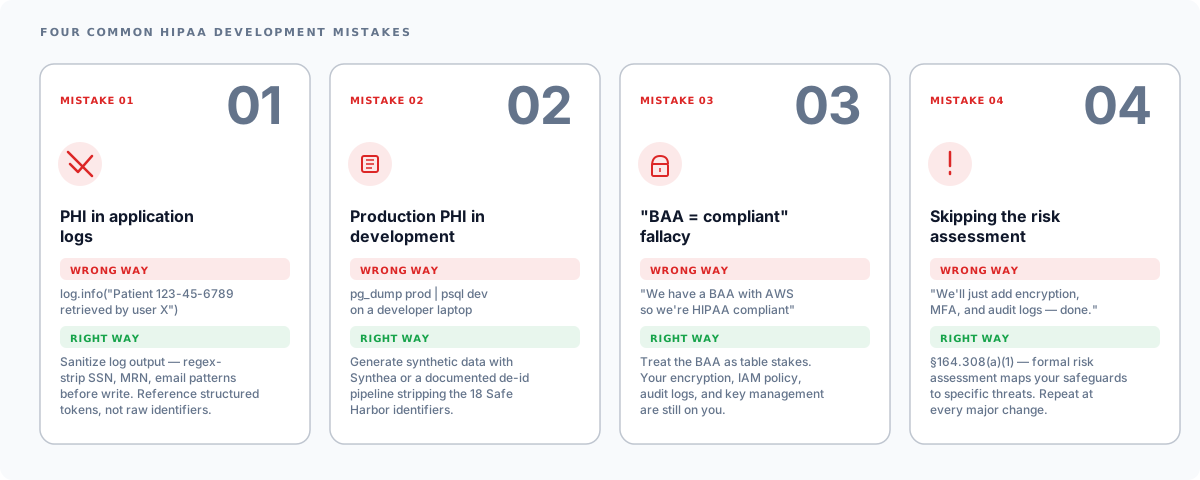
Logging PHI in Application Logs
The most common accidental exposure: writing PHI to application logs that end up in Splunk, CloudWatch, or a developer’s terminal. Sanitize all log output:
import re
def sanitize_log_message(message: str) -> str:    """Strip potential PHI from log messages."""    # SSN pattern    message = re.sub(r"\b\d{3}-\d{2}-\d{4}\b", "[REDACTED-SSN]", message)    # MRN pattern (adjust for your format)    message = re.sub(r"\bMRN:\s*\d+\b", "MRN:[REDACTED]", message)    # Email pattern    message = re.sub(        r"\b[A-Za-z0-9._%+-]+@[A-Za-z0-9.-]+\.[A-Z|a-z]{2,}\b",        "[REDACTED-EMAIL]",        message,    )    return message
Using Production PHI in Development
Development databases populated with production data expose PHI to every developer on the team, most of whom do not need it. Use synthetic data generators or a formal de-identification pipeline.
Assuming Cloud = Compliant
Having a BAA with AWS does not make your application HIPAA-compliant. The BAA covers the cloud provider’s infrastructure responsibilities. Your application’s encryption, access controls, logging, and security configurations are your responsibility. This is the shared responsibility model.
Skipping the Risk Assessment
Building technical safeguards without a risk assessment is building without a blueprint. The risk assessment identifies which threats your safeguards must address and provides the documentation trail that auditors require.
Treating the BAA as a One-Time Checkbox
A BAA is a living document. Subprocessor changes, new services within the cloud platform, and acquisitions all change the chain of responsibility. Review BAAs annually and whenever you add a new third-party service that touches PHI, and chase the subprocessor BAAs that flow downstream.
HIPAA Compliance Checklist for Software Teams
Everything above, condensed into one review pass. A checklist is not a certification and it is not the risk assessment; it is the list to walk before a release, grouped by the Security Rule standard each item satisfies. Every line links back to the section that explains it.
Risk analysis and administration (§164.308)
- A security risk assessment exists for this system, names every store and flow of PHI, and was reviewed in the last twelve months.
- Every vendor that touches PHI has a signed Business Associate Agreement, and the BAA list was re-checked when the last third-party service was added.
- Only HIPAA-eligible cloud services sit in the PHI path, and the shared-responsibility split is written down.
Access control (§164.312(a))
- Every user and service has a unique identity; no shared accounts reach PHI.
- Role-based access enforces the minimum-necessary standard, with a break-the-glass path that is logged and reviewed.
- Sessions time out, and session management invalidates tokens on logout and on password change.
- PHI at rest is encrypted with AES-256, keys live in a KMS, and key rotation is scheduled rather than aspirational.
Audit controls (§164.312(b))
- Every read, write and export of PHI writes an audit event with who, what, when and from where.
- Logs are immutable and kept for the retention period the organization has set (six years is the HIPAA documentation floor).
- No PHI appears in application logs, error messages, crash reports or analytics events.
Integrity (§164.312(c))
- PHI records carry version history or checksums, and unauthorized alteration is detectable.
- De-identification or tokenization is applied wherever the use case does not need identifiable data, including analytics and development.
- Production PHI never reaches development or test environments.
Person or entity authentication (§164.312(d))
- Users authenticate through OAuth 2.0 with PKCE or an equivalent standard flow; no home-grown password handling.
- Multi-factor authentication is required for every account that can reach PHI, including administrators and service consoles.
- API clients, including FHIR clients, are authorized per scope, and rate limiting is in front of PHI-serving endpoints.
Transmission security (§164.312(e))
- Every connection carrying PHI uses TLS 1.2 or later, with certificate validation on and legacy ciphers off.
- PHI-handling services run in private subnets behind a WAF, with deny-by-default security groups and flow logs on.
Verification
- SAST and DAST run in the pipeline, and a penetration test covered this system in the last year or since its last major change.
- The common mistakes above have each been checked against this codebase, not assumed absent.
HIPAA-compliant software development is not about checking boxes on a compliance form. It is about making deliberate architecture decisions – encryption, access control, audit logging, key management – that protect patient data throughout its lifecycle. The technical safeguards described in this guide form the foundation; your specific implementation will vary based on your application’s architecture, deployment model, and the populations you serve.
For help building HIPAA-compliant software or assessing your current compliance posture:
- HIPAA Compliance Services – Risk assessments, gap analysis, and remediation
- Healthcare Software Development – HIPAA-compliant architecture and implementation
- Healthcare Cybersecurity – Penetration testing, vulnerability management, and incident response
- Healthcare Cloud Security – VPC architecture, KMS, audit logging deployment
- HIPAA BAA Checklist – Business Associate Agreement requirements and best practices
- HIPAA Security Rule 2026 Update – The proposed NPRM and what it means for developers