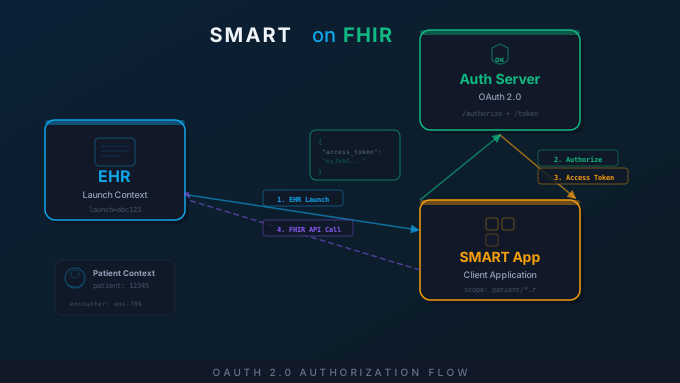
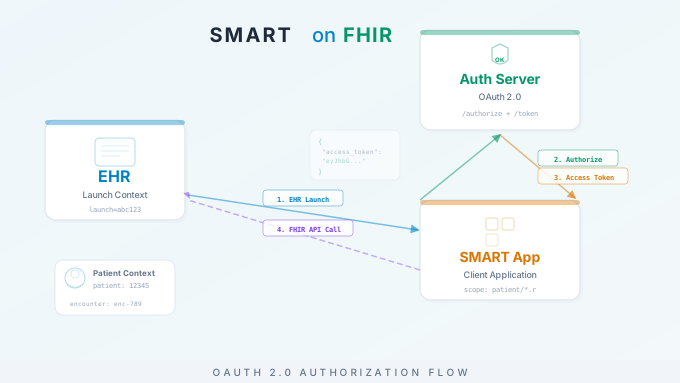
SMART on FHIR is the open standard that lets a healthcare app launch inside an EHR, sign the user in with OAuth 2.0, receive the patient the clinician has open, and read or write that patient’s data through the EHR’s FHIR API. One app, built once, runs in Epic, Oracle Health, athenahealth, MEDITECH and every other EHR that implements the spec.
This guide explains how it works at the level a developer or a product owner needs: the two launch contexts, the six-step authorization flow, scopes in the current v2 syntax, token lifetimes, SMART Backend Services, sandboxes, and how apps reach Epic and Oracle Health customers.
What Is SMART on FHIR
SMART stands for Substitutable Medical Applications, Reusable Technologies. It came out of the SMART Health IT project at Boston Children’s Hospital and Harvard Medical School, and the idea is in the name: healthcare apps should be substitutable. A clinician should be able to swap one clinical decision support app for another without anyone rebuilding the EHR integration. That same argument now carries AI apps launched via SMART on FHIR into the chart.
The standard is the SMART App Launch implementation guide, published by HL7. The current release is 2.2.0 (2024); US certification rules for EHRs reference 2.0.0, and SMART v1 stopped counting for certification on January 1, 2026. It specifies:
- How an app discovers a FHIR server’s authorization endpoints.
- How an app requests and receives authorization from the user or system.
- What scopes (permissions) an app can request.
- How an app receives context about the current patient, encounter, or user.
- How an app manages access tokens and refresh tokens.
The framework is EHR-agnostic. Vendors differ in the resources and search parameters they support, but the launch and authorization protocol is the same everywhere.
How to build a SMART on FHIR app, in eight steps
- Pick the launch context. EHR launch or standalone: the EHR opens your app with patient context, or the user opens it and picks a patient.
- Register the app with each EHR’s authorization server and record the client IDs and redirect URI.
- Discover the endpoints from
.well-known/smart-configurationon the FHIR base URL the launch hands you. - Implement the OAuth 2.0 authorization code flow with PKCE, exchanging the code for an access token that carries the launch context.
- Request the narrowest scopes that do the job, and read back what was granted.
- Manage the token lifecycle: expiry, refresh, and what to do when a refresh fails.
- Test against a public sandbox before touching a customer’s EHR.
- Publish where your customers look: Epic, Oracle Health, and the SMART App Gallery.
SMART App Launch: Two Contexts
SMART defines two ways an app starts, and they differ in who supplies the context.
EHR Launch
In an EHR launch, the clinician starts the app from inside the EHR: a button, a menu item or a tab in the chart. The app opens in an embedded panel, an iframe or a new tab, and the EHR hands it the context: the current patient, the current encounter and the signed-in user.
- The EHR calls the app’s registered launch URL with a
launchparameter (an opaque token) and anissparameter (the FHIR server’s base URL). - The app uses
issto fetch.well-known/smart-configurationand find the authorization endpoints. - The app redirects to the authorize endpoint, passing the
launchtoken back. - The authorization server recognizes the existing EHR session and, if required, shows a consent screen.
- It redirects back to the app with an authorization code.
- The app exchanges the code for an access token, and the token response carries the context: patient ID, encounter ID and more.
The advantage is context. The app opens already knowing the patient and the user, with no search screen in the way. When the app is embedded under the EHR’s own patient banner, the token response can say so with need_patient_banner: false, so the app does not spend screen space repeating it.
Standalone Launch
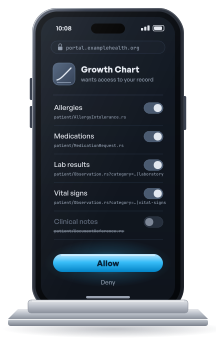
In a standalone launch, the app starts outside the EHR. The user opens it directly, as a web app or a phone app, and the app has to find the FHIR server, sign the user in and obtain the patient on its own.
- The app knows its FHIR server, or asks the user to pick their health system.
- It fetches
.well-known/smart-configuration. - It redirects to the authorize endpoint and requests the
launch/patientscope, which asks the server to supply a patient. - The authorization server signs the user in. A patient signing in to their own record is the patient; for a clinician, whether a picker appears depends on the server.
- The server redirects back with a code, and the token response names the patient.
This is how patient-facing apps work, signed in with portal credentials. The consent screen is where the patient decides: in MyChart, for example, a patient can remove categories of data and may choose how long the app keeps access. The token can come back narrower than the request, and the scope field in the token response is the record of what was granted.
OAuth 2.0 Authorization Flow
Both launch types use the OAuth 2.0 authorization code grant. Here is the flow, step by step, with the HTTP it sends.
Step 1: Discovery
The app retrieves the FHIR server’s SMART configuration:
GET https://fhir.example.com/.well-known/smart-configurationResponse (abridged):
{ "authorization_endpoint": "https://auth.example.com/authorize", "token_endpoint": "https://auth.example.com/token", "grant_types_supported": ["authorization_code", "client_credentials"], "code_challenge_methods_supported": ["S256"], "token_endpoint_auth_methods_supported": ["client_secret_basic", "private_key_jwt"], "scopes_supported": ["launch", "launch/patient", "openid", "fhirUser", "offline_access", "patient/*.rs"], "capabilities": ["launch-ehr", "launch-standalone", "client-public", "client-confidential-symmetric", "context-banner", "permission-v2"]}In SMART v2 this document is the discovery mechanism; the older route through the FHIR CapabilityStatement is deprecated. permission-v2 tells you the server understands v2 scopes.
Step 2: Authorization Request
The app redirects the browser to the authorization endpoint:
GET https://auth.example.com/authorize? response_type=code& client_id=my-smart-app& redirect_uri=https://myapp.example.com/callback& scope=launch patient/Patient.rs patient/Observation.rs openid fhirUser& state=abc123& aud=https://fhir.example.com& launch=xyz789& code_challenge=E9Melhoa2OwvFrEMTJguCHaoeK1t8URWbuGJSstw-cM& code_challenge_method=S256response_type=code: requests an authorization code.client_idandredirect_uri: the app’s registration.scope: what the app is asking for (next section).state: a random value that ties the response to this request.aud: the FHIR server the token is for.launch: the launch token from the EHR (EHR launch only).code_challengeandcode_challenge_method: the PKCE challenge.
PKCE is required. SMART App Launch 2 requires apps to use Proof Key for Code Exchange with S256, and Epic’s documentation recommends it for every app, public or confidential. The app generates a random code_verifier, sends its SHA-256 hash as the code_challenge, and later proves possession by presenting the verifier. An authorization code intercepted on the redirect is useless without it. Generate a fresh verifier per launch.
Step 3: Authorization Code
After the user approves, the authorization server redirects back:
HTTP/1.1 302 FoundLocation: https://myapp.example.com/callback?code=AUTH_CODE_HERE&state=abc123The app checks that state matches what it sent, then exchanges the code.
Step 4: Token Exchange
POST https://auth.example.com/tokenContent-Type: application/x-www-form-urlencoded
grant_type=authorization_code&code=AUTH_CODE_HERE&redirect_uri=https://myapp.example.com/callback&client_id=my-smart-app&code_verifier=dBjftJeZ4CVP-mB92K27uhbUJU1p1r_wW1gFWFOEjXk
The server hashes the code_verifier, compares it with the challenge bound to that code, and rejects the exchange if they differ. A confidential client also authenticates here, with its secret over HTTP Basic or with a signed JWT assertion. It still sends the verifier: client authentication and PKCE answer different questions.
Step 5: Token Response
{ "access_token": "eyJ0eXAiOiJKV1QiLCJhbGciOi...", "token_type": "Bearer", "expires_in": 3600, "scope": "launch patient/Patient.rs patient/Observation.rs openid fhirUser", "patient": "12345", "encounter": "67890", "need_patient_banner": false, "id_token": "eyJ0eXAiOiJKV1QiLCJhbGciOi...", "refresh_token": "dGhpcyBpcyBhIHJlZnJlc2ggdG9rZW4..."}patient and encounter are the launch context. scope is what was granted, which can be less than was asked. Some servers send booleans such as need_patient_banner as strings, so parse them defensively.
Step 6: FHIR API Calls
GET https://fhir.example.com/Patient/12345Authorization: Bearer eyJ0eXAiOiJKV1QiLCJhbGciOi...Accept: application/fhir+jsonThe FHIR server validates the token, checks the request against the granted scopes, and returns the data.
Need help building a SMART on FHIR app? Saga IT’s healthcare app development practice builds production SMART on FHIR apps: OAuth and PKCE, US Core conformance, EHR sandbox testing, and the path to Epic and Oracle Health customers. Talk to our team.
Launching Inside Epic
Epic is where most SMART apps meet their first real EHR, and a few things differ from the generic flow.
Two client IDs from the start. Creating an app on fhir.epic.com or through Epic Vendor Services assigns both a non-production and a production client ID. Treat the client ID as configuration from day one, because the sandbox and a customer’s production system expect different values.
iss changes per customer. An EHR launch from Hyperspace sends iss as that organization’s FHIR base URL. Resolve the endpoint from iss at launch time, fetch its SMART configuration, and keep an allowlist of the iss values you expect; some organizations share an endpoint, so do not treat the URL as a customer identifier.
Scopes follow the app record. The access Epic grants reflects both the authorize request and the APIs selected on the app. Once an app is marked ready for production its record is locked, so adding APIs later means creating a new app record.
Activation is per health system. Each organization decides whether to turn the app on in its environment, on its own review and change calendar. Patient-facing, read-only apps that use the USCDI data classes are the exception: they are made available to customers automatically.
For patient-facing apps, the path is a standalone launch from MyChart. A provider standalone launch, by contrast, does not return a patient. The wider Epic surface, from Bridges interfaces to write-back, is in our Epic FHIR and HL7 v2 reference.
SMART Scopes Explained
A scope says whose data, which resource, and which actions. SMART v2 writes the actions as letters: c create, r read, u update, d delete, s search.
| Scope (v2) | Tier | What it grants |
|---|---|---|
patient/Patient.rs | patient | Demographics for the patient in context |
patient/Observation.rs | patient | That patient’s observations |
patient/MedicationRequest.rs | patient | That patient’s medication orders |
patient/Condition.rs | patient | That patient’s conditions |
user/Patient.rs | user | Any patient the signed-in user may see |
user/Encounter.cruds | user | Full access to encounters the user may reach |
system/Patient.rs | system | Any patient, for a backend service with no user |
launch | context | Permission to receive the EHR launch context |
launch/patient | context | Ask for a patient on standalone launch |
openid fhirUser | identity | An ID token and the FHIR resource of the signed-in user |
offline_access | tokens | A refresh token that outlives the session |
online_access | tokens | A refresh token only while the user is signed in |
Reading v1 scopes in older code: .read is .rs, .write is .cud, and .* is .cruds.
Three tiers, narrowest first. patient/ limits the token to the patient in context, user/ to what the signed-in user may see, and system/ is for backend services with no user at all. Request patient/ scopes unless the app genuinely crosses patients, and name resource types instead of *. Oracle Health, for one, does not accept wildcard scopes.
SMART v2 Granular Scopes
v2 lets a scope carry a search filter, so an app can ask for one category of a resource instead of all of it:
patient/Observation.rs?category=http://terminology.hl7.org/CodeSystem/observation-category|laboratoryThat grants read and search on the patient’s laboratory Observations and nothing else: no vital signs, no social history. Under the ONC HTI-1 rule, certified EHRs must support category scopes for Condition and Observation, and Epic’s and Oracle Health’s sandboxes both advertise permission-v2.
Token Management
Access Token Expiration
The spec says access tokens should live no longer than an hour, and many servers issue them for less: Oracle Health’s default is under ten minutes. Read expires_in and refresh before it runs out.
Refresh Tokens
With offline_access (or online_access) granted, the token response includes a refresh token. Use it to get a new access token without the user:
POST https://auth.example.com/tokenContent-Type: application/x-www-form-urlencoded
grant_type=refresh_token&refresh_token=dGhpcyBpcyBhIHJlZnJlc2ggdG9rZW4...&client_id=my-smart-app
Refresh tokens expire and get revoked too. When a refresh fails, send the user through the authorization flow again rather than failing silently.
Token Storage
Keep tokens server-side, in a session or an encrypted cookie. Never put them in URLs or browser local storage, where any injected script can read them. Native apps use the platform’s secure storage: Keychain on iOS, Keystore on Android.
Backend Services Authorization
Not every SMART client has a user. Bulk exports, integration engines and warehouse syncs need FHIR data with nobody signed in. SMART Backend Services uses the OAuth 2.0 client credentials grant, authenticated with a signed JWT instead of a password.
Bulk data export is the most common use. Clinical Extract, our research data product, documents backend services used for bulk export.
- Register the service and give the authorization server its public key, as a JWKS URL or an uploaded key.
- Sign a JWT assertion with the private key (RS384 or ES384), carrying the client ID, the token endpoint, a short expiry and a unique ID.
- Request a token:
POST https://auth.example.com/tokenContent-Type: application/x-www-form-urlencoded
grant_type=client_credentials&scope=system/Patient.rs system/Observation.rs&client_assertion_type=urn:ietf:params:oauth:client-assertion-type:jwt-bearer&client_assertion=eyJ0eXAiOiJKV1QiLCJhbGciOi...- Use the token, which carries system scopes and no user or patient context. These tokens are short, five minutes or less, and come without a refresh token: the service simply asks again.
Typical uses are bulk data export ($export for population health or payer exchange), integration engine FHIR connections from Mirth Connect, OIE or BridgeLink channels, warehouse syncs and quality-measure batches.
Publishing a SMART App
Building the app is half of it; reaching customers is the other half.
Epic. Apps are created on fhir.epic.com, free, or through Epic Vendor Services, Epic’s paid developer program (formerly App Orchard). Marking an app ready for production is self-service, and Epic states it does not endorse or certify apps; each health system still activates it. A public listing on Epic Showroom is optional and comes after a first live customer. The whole path, from Vendor Services to a Showroom listing, is in our guide to Epic Showroom and Vendor Services, and our Epic integration services cover the build.
Oracle Health. The Oracle Health Developer Program replaced the old Cerner code program. Apps are registered in its developer console against the Millennium Platform FHIR R4 APIs, can be listed on the Oracle Healthcare Marketplace for customers to consider, and can go through an optional validation track in Oracle PartnerNetwork. Oracle’s FHIR differs from Epic’s in supported resources and search parameters, so test both if you sell to both. See our Oracle Health integration services.
SMART App Gallery. The community directory run by SMART Health IT, at apps.smarthealthit.org. It is not an EHR marketplace, but it is where the SMART ecosystem looks for apps.
Testing with Public Sandboxes
| Sandbox | What it tests |
|---|---|
| SMART Launcher, launch.smarthealthit.org | EHR and standalone launch against R4, with a choice of patients, practitioners and encounters. The fastest loop for launch code |
| Epic, fhir.epic.com | Synthetic patients and production-like Epic behavior; open.epic.com is Epic’s information site |
| Oracle Health, via the Developer Program | Oracle’s FHIR R4 behavior with synthetic data; setup is documented on docs.oracle.com |
| Inferno, inferno.healthit.gov | ONC’s conformance testing; its SMART App Launch test kit checks both servers and clients |
Common Pitfalls
The same problems come up in almost every SMART build.
Assuming the scopes you asked for. The token can grant less. Read its scope field and degrade gracefully when a category is missing.
Scope creep. Asking for more than the app needs slows every customer’s security review and raises privacy questions. Request the minimum, and use v2 granular scopes where the server supports them.
Token refresh failures. Apps that do not handle a revoked or expired refresh token break mid-session. Always have a path back through the authorization flow.
CORS. Browser apps calling FHIR from JavaScript hit CORS restrictions, and some FHIR servers do not allow cross-origin calls at all. Test in each target sandbox before assuming the browser can talk to FHIR directly.
Redirect URI mismatches. The redirect URI must match the registration exactly: trailing slashes, http against https and ports all count.
Assuming every FHIR server is the same. Resources, search parameters, extensions and operations vary by vendor. Read the server’s CapabilityStatement at startup, test against each platform, and code defensively for missing data.
SMART on FHIR is the standard way to build an app that works across EHRs: FHIR for the data, OAuth 2.0 for the authorization, and a launch protocol that hands the app its context. For help building one:
- Healthcare App Development: production SMART on FHIR apps, patient portals and mobile health builds
- FHIR API Integration: FHIR R4 API development, US Core conformance and SMART app integration
- Epic Integration Services: Epic FHIR integration and the path to Showroom
- Clinical Decision Support: CDS Hooks and SMART apps in the clinical workflow
- Epic FHIR and HL7 v2 Reference: Epic’s integration architecture in depth
- FHIR R4 Implementation Guide: the FHIR R4 resource model and US Core profiles
Frequently Asked Questions
What is the SMART on FHIR standard?
What is a SMART application?
How does SMART on FHIR work?
.well-known/smart-configuration to find its authorize and token endpoints, redirects the browser to the authorize endpoint with its client ID, requested scopes, a PKCE challenge, and the launch token the EHR handed it, the user approves, the server redirects back with an authorization code, the app exchanges that code plus its PKCE verifier for an access token, and then calls the FHIR API with the token as a bearer credential. The token response also carries the resolved context, such as which patient the clinician had open.What is the difference between FHIR and SMART on FHIR?
Can a patient grant an app less access than it asks for?
scope field says what was actually granted, so an app must read it rather than assume its own request came back whole.