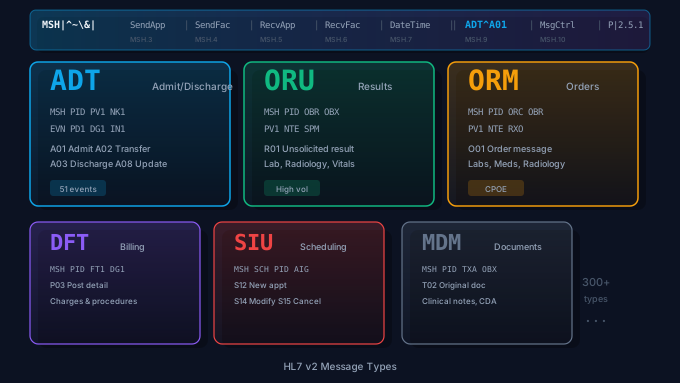
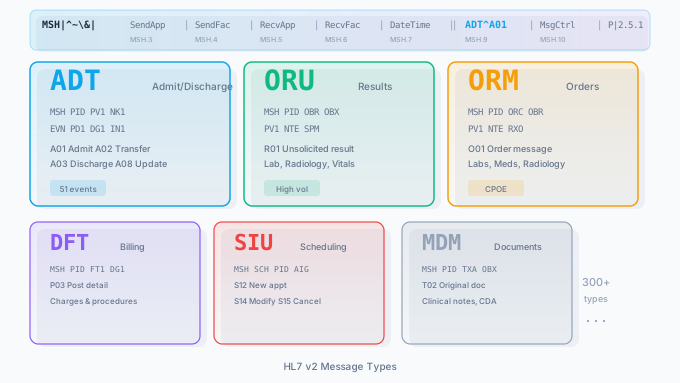
HL7 v2 messages remain the backbone of healthcare data exchange. Despite the rise of FHIR and RESTful APIs, the vast majority of real-time clinical data still flows between hospital systems as pipe-delimited HL7 v2 messages. If you work in healthcare IT, you will encounter ADT, ORU, ORM, and other HL7 message types every single day.
This guide provides a comprehensive reference for the most common HL7 message types, complete with annotated examples you can use to understand segment structure, trigger events, and real-world integration patterns. Whether you are building a new interface in Mirth Connect, debugging a failed message, or onboarding to a healthcare integration team, this article will give you the foundation you need. For the higher-level v2-vs-FHIR question, see our HL7 vs FHIR comparison.
HL7 Message Structure Overview
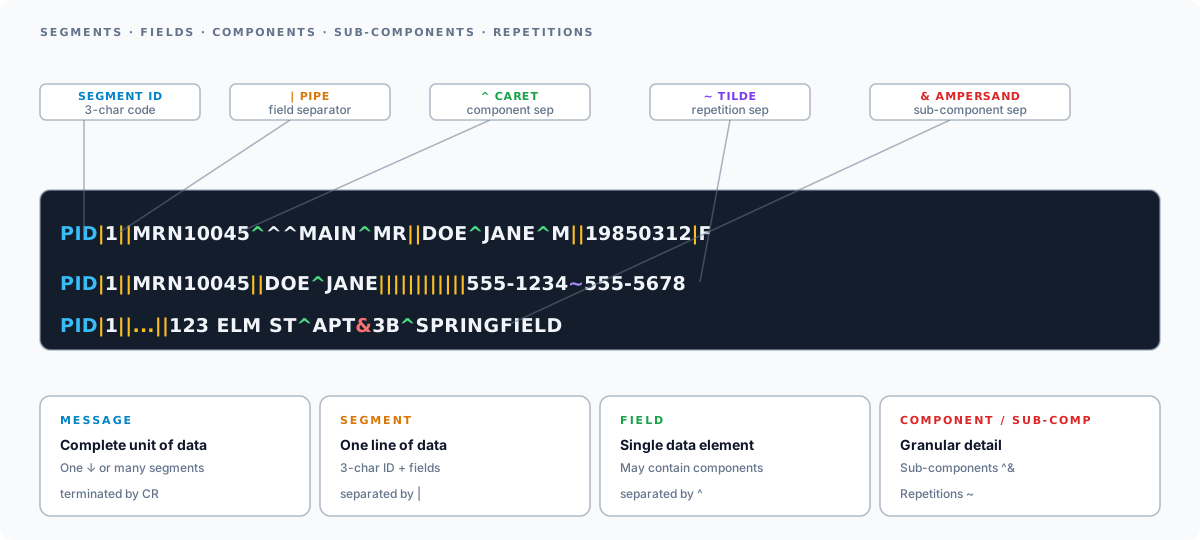
Before diving into specific message types, it helps to understand how HL7 v2 messages are structured. Every HL7 v2 message follows the same basic pattern: a collection of segments, where each segment is a single line containing fields separated by pipe characters (|).
Segments, Fields, and Delimiters
An HL7 message is built from these components:
- Message: The complete unit of data sent between systems. A message consists of one or more segments.
- Segment: A single line identified by a three-character code (e.g.,
MSH,PID,OBX). Each segment groups related data fields. - Field: A single data element within a segment, separated by the pipe character
|. - Component: A sub-element within a field, separated by the caret
^. - Sub-component: A further subdivision, separated by the ampersand
&. - Repetition separator: The tilde
~separates repeating values within a field.
The standard encoding characters are defined in the second field of the MSH segment: |^~\&
| Character | Name | Purpose |
|---|---|---|
| | Field separator | Separates fields within a segment |
^ | Component separator | Separates components within a field |
~ | Repetition separator | Separates repeated values |
\ | Escape character | Escapes special characters |
& | Sub-component separator | Separates sub-components |
Key Segments You Will See in Every Message
Certain segments appear across nearly all HL7 message types:
- MSH (Message Header): Present in every HL7 message. Contains the sending and receiving application, message type, trigger event, timestamp, and version.
- PID (Patient Identification): Contains patient demographics including name, date of birth, medical record number, sex, address, and phone number.
- PV1 (Patient Visit): Contains visit-level data such as patient class (inpatient, outpatient, emergency), attending physician, admission date, and location.
- EVN (Event Type): Contains the trigger event code and the timestamp of the event.
Annotated Example: Basic MSH-PID-PV1
Here is a minimal HL7 message showing the three most fundamental segments:
MSH|^~\&|EPIC|MAIN_CAMPUS|LAB_SYS|LAB_FAC|20260215143022||ADT^A01|MSG00001|P|2.5.1PID|1||MRN10045^^^MAIN_CAMPUS^MR||DOE^JANE^M||19850312|F|||123 ELM ST^^SPRINGFIELD^IL^62701||2175550142PV1|1|I|4EAST^401^A^^^MAIN_CAMPUS||||1234567890^SMITH^ROBERT^J^^^MD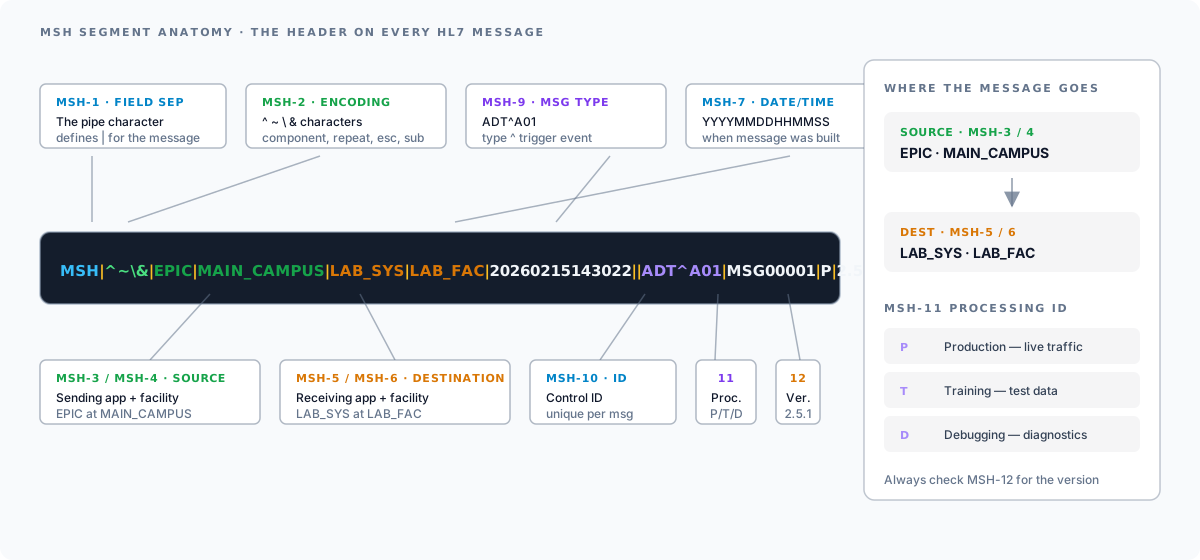
Breaking down the MSH segment field by field:
| Position | Field | Value | Meaning |
|---|---|---|---|
| MSH-1 | Field Separator | | | Pipe character |
| MSH-2 | Encoding Characters | ^~\& | Component, repetition, escape, sub-component |
| MSH-3 | Sending Application | EPIC | Source system |
| MSH-4 | Sending Facility | MAIN_CAMPUS | Source facility |
| MSH-5 | Receiving Application | LAB_SYS | Destination system |
| MSH-6 | Receiving Facility | LAB_FAC | Destination facility |
| MSH-7 | Date/Time of Message | 20260215143022 | When the message was created |
| MSH-9 | Message Type | ADT^A01 | ADT message, trigger event A01 |
| MSH-10 | Message Control ID | MSG00001 | Unique message identifier |
| MSH-11 | Processing ID | P | Production (T = training, D = debugging) |
| MSH-12 | Version ID | 2.5.1 | HL7 version |
The PID segment contains patient demographics. PID-3 is the patient identifier list (medical record number), PID-5 is the patient name in the format LAST^FIRST^MIDDLE, PID-7 is the date of birth, and PID-8 is the sex.
The PV1 segment contains visit information. PV1-2 is the patient class (I for inpatient, O for outpatient, E for emergency), PV1-3 is the assigned patient location, and PV1-7 is the attending doctor.
ADT Messages (Admit, Discharge, Transfer)
ADT messages are the most common HL7 message category. They communicate patient movement and demographic updates throughout a facility. When a patient registers, gets admitted, transfers to a new unit, or is discharged, an ADT message is generated and broadcast to downstream systems including labs, pharmacy, radiology, and billing.
ADT messages have over 60 trigger events defined in the HL7 standard, but in practice, a handful account for the vast majority of interface traffic. The six events below are the ones you will meet first; the complete HL7 ADT event type reference covers every event a production feed is likely to carry, with the segment tables that go with them.
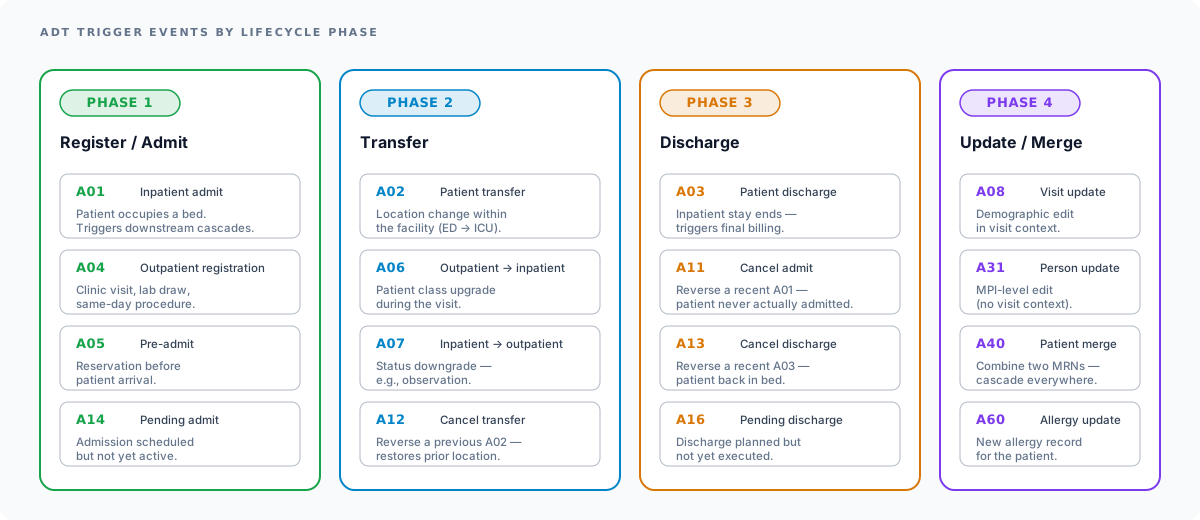
A01: Patient Admit
When it is sent: A patient is admitted to an inpatient bed. This is one of the most critical ADT events because it triggers bed assignments, dietary orders, nursing workflows, and billing initialization.
Key segments: MSH, EVN, PID, PV1, NK1 (next of kin), IN1 (insurance), GT1 (guarantor)
Example ADT^A01 message:
MSH|^~\&|EPIC|MAIN_CAMPUS|PHARMACY|MAIN_CAMPUS|20260215080000||ADT^A01|ADT20260215001|P|2.5.1EVN|A01|20260215075500PID|1||MRN20198^^^MAIN_CAMPUS^MR||JOHNSON^MICHAEL^A||19670423|M|||456 OAK AVE^^CHICAGO^IL^60601||3125550199|||S|||999-88-7777NK1|1|JOHNSON^SARAH||3125550188|||||ECPV1|1|I|ICU^301^A^^^MAIN_CAMPUS||||9876543210^WILLIAMS^CAROL^L^^^MD|||MED||||ADM|||9876543210^WILLIAMS^CAROL^L^^^MD|||||||||||||||||||||||||20260215080000IN1|1|BCBS001|BLUE CROSS BLUE SHIELD|PO BOX 1234^^CHICAGO^IL^60601|||||GROUP12345||JOHNSON ENTERPRISES|20250101|20261231|||JOHNSON^MICHAEL^A|SELF|19670423|456 OAK AVE^^CHICAGO^IL^60601GT1|1||JOHNSON^MICHAEL^A||456 OAK AVE^^CHICAGO^IL^60601|3125550199||19670423|M||SELFIn this example, patient Michael A. Johnson is being admitted to the ICU (bed 301-A) under Dr. Carol Williams. The message includes his next of kin (Sarah Johnson), insurance (Blue Cross Blue Shield), and guarantor information. Every downstream system that receives this A01 will create a new encounter for this patient.
A04: Patient Registration
When it is sent: A patient registers for an outpatient visit, such as a clinic appointment, lab draw, or same-day procedure. The A04 is the outpatient equivalent of the A01.
The key difference between A01 and A04 is the patient class in PV1-2: A01 uses I (inpatient) while A04 uses O (outpatient). This distinction drives downstream logic in billing systems, bed management, and length-of-stay calculations.
Example ADT^A04 message:
MSH|^~\&|EPIC|CLINIC_WEST|LAB_SYS|LAB_FAC|20260216100000||ADT^A04|ADT20260216005|P|2.5.1EVN|A04|20260216095500PID|1||MRN30456^^^MAIN_CAMPUS^MR||GARCIA^MARIA^L||19901105|F|||789 PINE RD^^SPRINGFIELD^IL^62704||2175550134PV1|1|O|CLINIC_W^EXAM3^A^^^CLINIC_WEST||||5551234567^CHEN^DAVID^M^^^MD|||PHY||||REF|||5551234567^CHEN^DAVID^M^^^MDNotice PV1-2 is O for outpatient, and the location is a clinic exam room rather than an inpatient bed.
A08: Patient Information Update
When it is sent: A patient’s demographic information changes. Common triggers include address changes, phone number updates, insurance changes, or corrections to existing data. A08 does not represent a new visit. It updates the patient record associated with an existing encounter.
Example use cases:
- Patient moves to a new address and updates their information at check-in
- Insurance information is corrected after a claim denial
- Emergency contact is updated during a follow-up visit
A08 messages carry the same PID segment structure as A01/A04 but contain the updated values. Receiving systems compare the incoming data against their stored records and apply the changes.
A31: Update Person Information
When it is sent: An update is made to the master patient index (MPI) at the person level, independent of any specific visit or encounter. While A08 updates patient information in the context of a visit, A31 updates the person record itself.
The difference between A08 and A31 is subtle but important for enterprise master patient index (EMPI) systems. A31 is a person-level event, meaning it applies across all encounters and facilities. A08 is visit-scoped. In practice, many organizations use both: A31 for MPI updates and A08 for visit-level demographic corrections.
Some EHR systems, including Epic, use A31 as the primary demographic update event, sending it whenever a patient’s record is edited regardless of visit context. Which one your feed carries is a per-site build decision, so confirm it rather than assume: our Epic EHR integration services page covers how Epic Bridges feeds are specified.
A02: Patient Transfer
When it is sent: A patient is moved from one location to another within the facility. For example, a patient moves from the emergency department to an inpatient medical floor, or from a step-down unit to the ICU. The A02 contains the new location in PV1-3 and may include the prior location in PV1-6.
A03: Patient Discharge
When it is sent: A patient is discharged from an inpatient stay. This event triggers final billing calculations, discharge summary generation, and follow-up scheduling. PV1-45 contains the discharge date/time, and PV1-36 contains the discharge disposition code (e.g., home, skilled nursing facility, against medical advice).
Which Trigger Events to Implement
The standard defines more than sixty ADT trigger events and production feeds use about thirty. The complete ADT trigger event reference lists the twenty-four common ones grouped by movement, information and tracking, each marked core, site-dependent or rare, and is the place to decide what your interface needs to handle.
Two things that catch interface builders out, and neither is obvious from a spec: cancellations (A11, A12, A13) are not corrections, so applying an A11 as an update leaves a phantom encounter open; and cancellations arrive out of order, so process on EVN-2 rather than arrival time when sequence matters.
A40: Merge Patient Records
An ADT^A40 says two records were the same person all along. It carries an extra segment, MRG, which no other common ADT event uses:
MSH|^~\&|EPIC|MAIN_CAMPUS|LAB_SYS|MAIN_CAMPUS|20260218140000||ADT^A40|ADT20260218011|P|2.5.1EVN|A40|20260218135500PID|1||MRN20198^^^MAIN_CAMPUS^MR||JOHNSON^MICHAEL^A||19670423|MMRG|MRN44871^^^MAIN_CAMPUS^MRPID-3 holds the surviving identifier and MRG-1 the retired one. Field-level detail for A40 and MRG lives in the HL7 Workbench A40 event reference.
Worth stating plainly because it is not in any spec: this is the highest-risk ADT event to get wrong, and the failure is silent and clinical. If a downstream system ignores A40 a patient’s history stays split across two charts, the results a clinician sees are incomplete, and nothing in the interface logs looks broken. Test merges explicitly, including a merge of a patient who already has open orders.
ORM Messages (Orders)
ORM (Order Message) messages transmit clinical orders from a provider to a fulfilling department. When a physician places a lab order, radiology study, or pharmacy prescription through their EHR, an ORM message is generated and sent to the appropriate system.
The common trigger is O01 (general order): a clinician places, modifies or cancels an order, and the ORC segment carries the control code saying which. The complete HL7 ORM message reference has the segment tables that go with each trigger. What follows is what an ORM looks like on the wire.
Example ORM^O01 message (lab order for a Complete Blood Count):
MSH|^~\&|EPIC|MAIN_CAMPUS|LAB_SYS|LAB_FAC|20260216110000||ORM^O01|ORM20260216001|P|2.5.1PID|1||MRN30456^^^MAIN_CAMPUS^MR||GARCIA^MARIA^L||19901105|FPV1|1|O|CLINIC_W^EXAM3^A^^^CLINIC_WEST||||5551234567^CHEN^DAVID^M^^^MDORC|NW|ORD5001^EPIC||||||||||5551234567^CHEN^DAVID^M^^^MDOBR|1|ORD5001^EPIC||CBC^COMPLETE BLOOD COUNT^L|||20260216110000||||||||5551234567^CHEN^DAVID^M^^^MDDr. Chen is ordering a CBC for Maria Garcia. ORC-1 of NW makes it a new order, OBR-4 carries the test and OBR-16 the ordering provider.
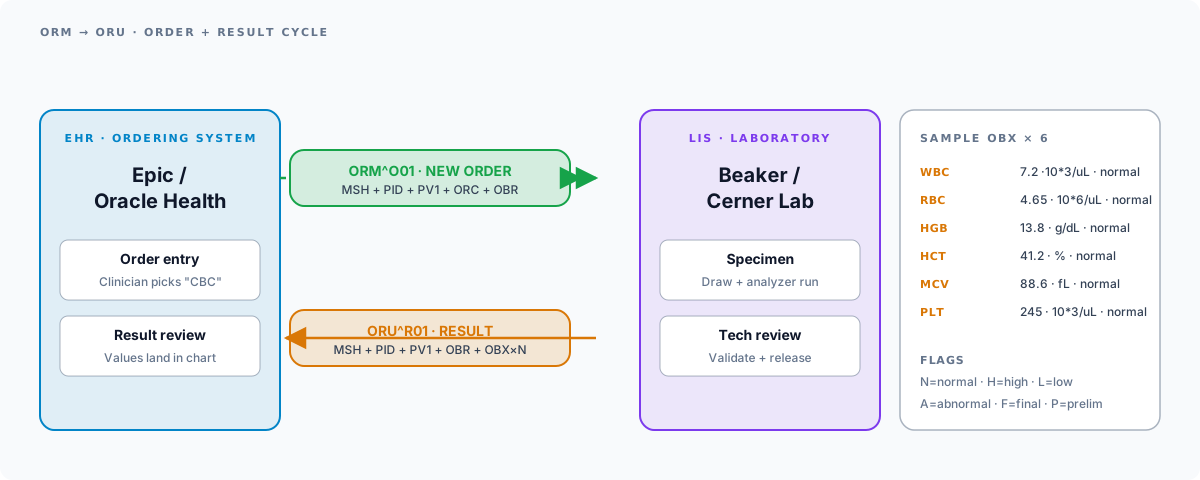
The relationship between ORM and ORU: ORM starts the order-result cycle. The lab system receives the ORM, performs the test, and sends back an ORU message with the results. This ORM-to-ORU workflow is one of the most fundamental patterns in healthcare integration. See our LIS/LIMS integration practice for the full workflow.
ORU Messages (Results)
ORU (Observation Result Unsolicited) messages deliver clinical results from performing departments back to the ordering system and to the patient chart. Lab results, radiology reports, pathology findings, and other diagnostic observations all flow through ORU messages.
R01: Unsolicited Observation Result
When it is sent: Results are available for a completed test or study. The lab analyzer produces values, a technologist reviews and releases them, and the lab information system (LIS) generates an ORU^R01 message.
Key segments: MSH, PID, PV1, OBR (observation request), OBX (observation result, multiple instances)
The OBX segment is where the actual result values live. Each OBX represents a single observation within a result set. For example, a complete blood count produces multiple OBX segments: one for white blood cell count, one for hemoglobin, one for hematocrit, and so on.
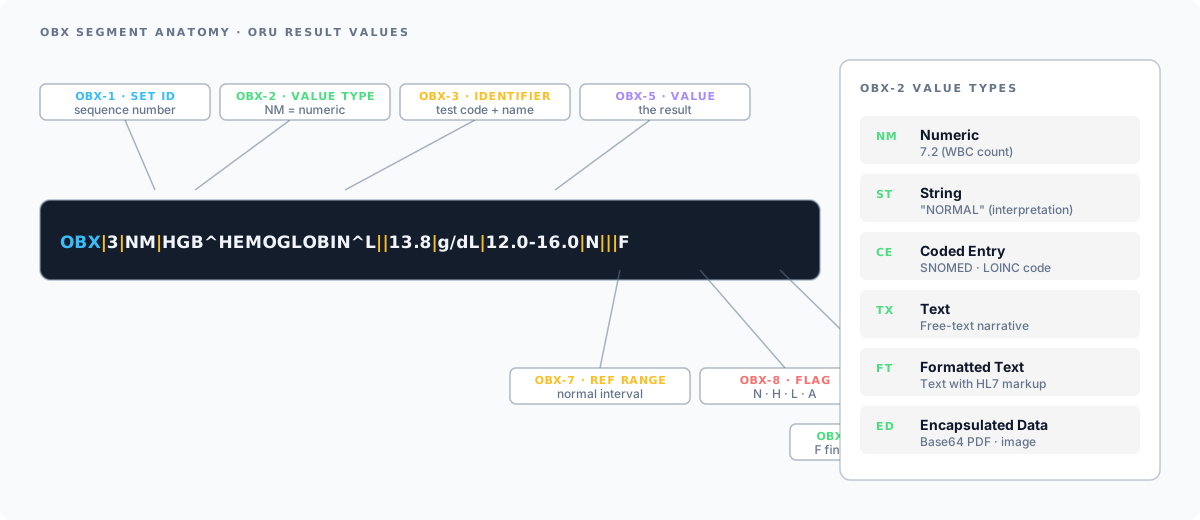
OBX value types determine how to interpret the data: NM numeric, ST string, CE coded entry, TX text, FT formatted text, ED an embedded document such as a Base64 PDF. The OBX segment reference covers each type, the abnormal flags in OBX-8 and the result-status codes in OBX-11.
Example ORU^R01 message (Complete Blood Count results with multiple OBX segments):
MSH|^~\&|LAB_SYS|LAB_FAC|EPIC|MAIN_CAMPUS|20260216153000||ORU^R01|ORU20260216042|P|2.5.1PID|1||MRN30456^^^MAIN_CAMPUS^MR||GARCIA^MARIA^L||19901105|FPV1|1|O|CLINIC_W^EXAM3^A^^^CLINIC_WEST||||5551234567^CHEN^DAVID^M^^^MDOBR|1|ORD5001^EPIC|SPEC7890^LAB_SYS|CBC^COMPLETE BLOOD COUNT^L|||20260216110000|||||||20260216120000||5551234567^CHEN^DAVID^M^^^MD||||||20260216150000|||FOBX|1|NM|WBC^WHITE BLOOD CELL COUNT^L||7.2|10*3/uL|4.5-11.0|N|||FOBX|2|NM|RBC^RED BLOOD CELL COUNT^L||4.65|10*6/uL|4.00-5.50|N|||FOBX|3|NM|HGB^HEMOGLOBIN^L||13.8|g/dL|12.0-16.0|N|||FOBX|4|NM|HCT^HEMATOCRIT^L||41.2|%|36.0-46.0|N|||FOBX|5|NM|MCV^MEAN CORPUSCULAR VOLUME^L||88.6|fL|80.0-100.0|N|||FOBX|6|NM|PLT^PLATELET COUNT^L||245|10*3/uL|150-400|N|||FEach OBX line contains: the set ID (OBX-1), the value type (OBX-2), the observation identifier (OBX-3), the result value (OBX-5), units (OBX-6), reference range (OBX-7), abnormal flag (OBX-8, where N = normal, H = high, L = low, A = abnormal), and result status (OBX-11, where F = final, P = preliminary).
Notice how the OBR-25 value of F indicates all results in this report are final, and each OBX-11 also shows F. During partial result reporting, some OBX segments may show P for preliminary while others show F for final.
ORU vs ORM: Understanding the Difference
One of the most common points of confusion for newcomers to HL7 is the difference between ORM and ORU messages. They are two sides of the same coin:
| Aspect | ORM (Order Message) | ORU (Observation Result) |
|---|---|---|
| Direction | Ordering system to fulfilling system | Fulfilling system to ordering system |
| Purpose | Requests a test or procedure | Delivers results of a test or procedure |
| Trigger | Clinician places an order | Lab/department completes a test |
| Key segment | ORC (order control) | OBX (observation result) |
| Example flow | EHR sends lab order to LIS | LIS sends CBC results to EHR |
| Contains results? | No | Yes |
The order-result workflow:
- A clinician orders a CBC in the EHR
- The EHR generates an ORM^O01 message and sends it to the lab information system (LIS)
- The lab draws blood, runs the specimen on an analyzer, and a technologist reviews the results
- The LIS generates an ORU^R01 message and sends it back to the EHR
- The results appear in the patient’s chart for the clinician to review
In many modern implementations, the ORM^O01 message type has been superseded by the OML (Order Message - Laboratory) message type, specifically OML^O21 for lab orders. However, ORM^O01 remains extremely common in production interfaces, and many LIS vendors still expect it.
DFT Messages (Financial)
DFT (Detailed Financial Transaction) messages transmit charge information from clinical systems to billing and revenue cycle management systems. When a clinical service is performed, a DFT message captures the associated charges so they can be processed for claims submission.
P03: Post Detail Financial Transaction
When it is sent: A chargeable event occurs, such as a completed lab test, administered medication, or performed procedure. The clinical system generates a DFT^P03 message containing the charge details.
Key segments: MSH, PID, PV1, FT1 (financial transaction), DG1 (diagnosis)
Example DFT^P03 message:
MSH|^~\&|LAB_SYS|LAB_FAC|BILLING|MAIN_CAMPUS|20260216160000||DFT^P03|DFT20260216010|P|2.5.1PID|1||MRN30456^^^MAIN_CAMPUS^MR||GARCIA^MARIA^L||19901105|FPV1|1|O|CLINIC_W^EXAM3^A^^^CLINIC_WEST||||5551234567^CHEN^DAVID^M^^^MDFT1|1|CHG90001||20260216120000|20260216120000|CG|85025^CBC WITH DIFFERENTIAL^CPT4||1|||||||||||||||5551234567^CHEN^DAVID^M^^^MDDG1|1||Z00.00^ENCOUNTER FOR GENERAL ADULT MEDICAL EXAMINATION^ICD10|||FThe FT1 segment contains the charge details: FT1-7 is the charge code (CPT 85025 for CBC with differential), FT1-10 is the quantity, and FT1-20 is the performing provider. The DG1 segment carries the diagnosis code associated with the charge, which is essential for claims adjudication.
DFT messages are critical for revenue cycle integrity. Missing or malformed DFT messages result in lost charges, which directly impact a hospital’s revenue. Integration teams often build reconciliation processes to catch charges that fail to transmit.
SIU Messages (Scheduling)
SIU (Schedule Information Unsolicited) messages communicate scheduling events: new appointments, reschedules, modifications, and cancellations. These messages keep downstream systems like registration, billing, and clinical departments synchronized with the master schedule.
S12: Notification of New Appointment Booking
When it is sent: A new appointment is booked in the scheduling system.
Key segments: MSH, SCH (scheduling), PID, PV1, AIG (appointment information, general resource), AIL (appointment information, location resource)
Example SIU^S12 message:
MSH|^~\&|EPIC|MAIN_CAMPUS|RADIOLOGY|MAIN_CAMPUS|20260217090000||SIU^S12|SIU20260217001|P|2.5.1SCH|APPT4001|||||MOD^MODERATE^L|OFFICE VISIT|SCHEDULED|30|MIN|^^^20260301100000^20260301103000|||||5551234567^CHEN^DAVID^M^^^MDPID|1||MRN30456^^^MAIN_CAMPUS^MR||GARCIA^MARIA^L||19901105|FPV1|1|O|CLINIC_W^EXAM3^A^^^CLINIC_WEST||||5551234567^CHEN^DAVID^M^^^MDAIG|1||5551234567^CHEN^DAVID^M^^^MDAIL|1||CLINIC_W^EXAM3^A^^^CLINIC_WESTThe SCH segment contains the appointment details: SCH-1 is the appointment ID, SCH-11 contains the start and end date/times, and SCH-16 is the scheduled provider. The AIG segment identifies the provider resource, and AIL identifies the location resource.
Related SIU trigger events:
| Trigger | Event | Description |
|---|---|---|
| S12 | New booking | A new appointment is scheduled |
| S13 | Rescheduled | An existing appointment is rescheduled to a new date/time |
| S14 | Modification | Appointment details are modified (same date/time) |
| S15 | Cancellation | An appointment is cancelled |
| S17 | Deletion | An appointment is deleted from the schedule |
| S26 | Patient no-show | Patient did not appear for the appointment |
MDM Messages (Documents)
MDM (Medical Document Management) messages handle the exchange of clinical documents such as transcribed notes, discharge summaries, operative reports, and other narrative clinical content. As more organizations adopt electronic document management, MDM messages play an increasingly important role in ensuring that clinical documents reach all systems that need them.
T02: Original Document Notification and Content
When it is sent: A clinical document is created, finalized, or signed and needs to be distributed to other systems. Common sources include transcription services, clinical documentation systems, and dictation platforms.
Key segments: MSH, PID, PV1, TXA (transcription document header), OBX (document content)
Example MDM^T02 message:
MSH|^~\&|TRANSCRIPTION|MAIN_CAMPUS|EPIC|MAIN_CAMPUS|20260216180000||MDM^T02|MDM20260216001|P|2.5.1PID|1||MRN20198^^^MAIN_CAMPUS^MR||JOHNSON^MICHAEL^A||19670423|MPV1|1|I|ICU^301^A^^^MAIN_CAMPUS||||9876543210^WILLIAMS^CAROL^L^^^MDTXA|1|HP^HISTORY AND PHYSICAL^L|TX|20260215|||9876543210^WILLIAMS^CAROL^L^^^MD||||||DOC88001|||AUOBX|1|TX|HP^HISTORY AND PHYSICAL^L||CHIEF COMPLAINT: Chest pain, shortness of breath.||||||FOBX|2|TX|HP^HISTORY AND PHYSICAL^L||HISTORY OF PRESENT ILLNESS: Mr. Johnson is a 58-year-old male presenting with||||||FOBX|3|TX|HP^HISTORY AND PHYSICAL^L||acute onset chest pain radiating to the left arm, accompanied by dyspnea.||||||FOBX|4|TX|HP^HISTORY AND PHYSICAL^L||ASSESSMENT: Acute coronary syndrome. Plan for cardiac catheterization.||||||FThe TXA segment is unique to MDM messages. TXA-2 identifies the document type (HP for history and physical, DS for discharge summary, OP for operative note, CN for consultation note). TXA-17 is the document completion status: DI (dictated), AU (authenticated/signed), IN (incomplete), or LA (legally authenticated).
Common MDM trigger events:
| Trigger | Event | Description |
|---|---|---|
| T01 | Original notification | Notification that a document exists (no content) |
| T02 | Original notification + content | Document notification with full content |
| T03 | Document status change notification | Document status changed (e.g., dictated to signed) |
| T04 | Document status change + content | Status change with full content |
| T09 | Document replacement notification | A document has been replaced |
| T10 | Document replacement + content | Replacement with full content |
MDM messages are especially important for organizations that use third-party transcription services or clinical documentation improvement (CDI) platforms. The documents transmitted via MDM often become part of the legal medical record.
HL7 Message Types List (Quick Reference)
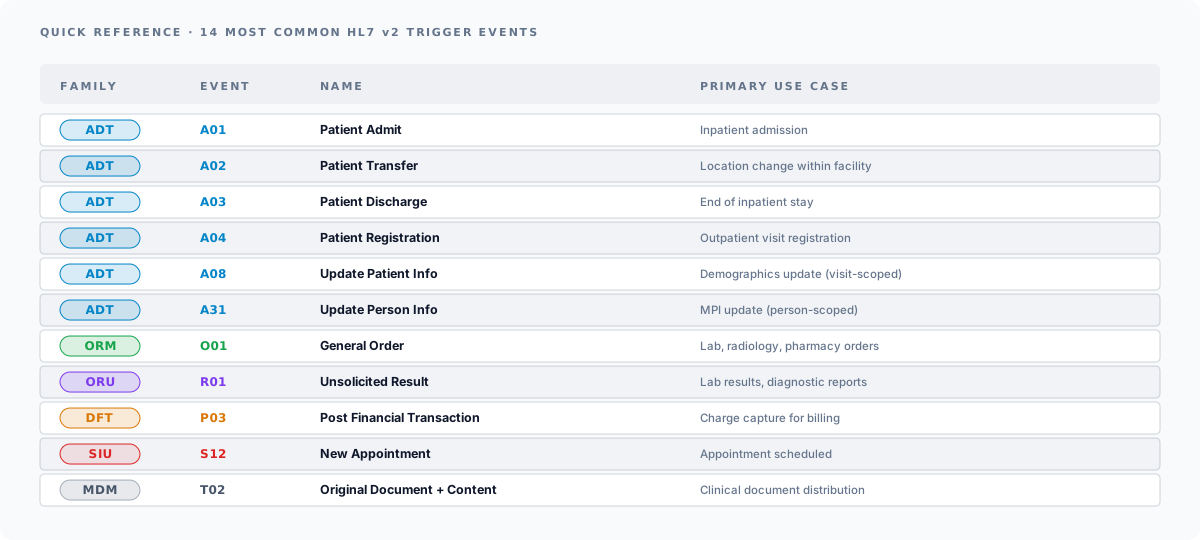
This table summarizes all the HL7 message types and trigger events covered in this guide:
| Message Type | Trigger Event | Description | Primary Use Case |
|---|---|---|---|
| ADT | A01 | Patient Admit | Inpatient admission |
| ADT | A02 | Patient Transfer | Location change within facility |
| ADT | A03 | Patient Discharge | End of inpatient stay |
| ADT | A04 | Patient Registration | Outpatient visit registration |
| ADT | A08 | Update Patient Info | Demographics update (visit-scoped) |
| ADT | A31 | Update Person Info | MPI update (person-scoped) |
| ORM | O01 | General Order | Lab, radiology, pharmacy orders |
| ORU | R01 | Unsolicited Result | Lab results, diagnostic reports |
| DFT | P03 | Post Financial Transaction | Charge capture for billing |
| SIU | S12 | New Appointment | Appointment scheduling |
| SIU | S13 | Rescheduled Appointment | Appointment reschedule |
| SIU | S14 | Modified Appointment | Appointment modification |
| SIU | S15 | Cancelled Appointment | Appointment cancellation |
| MDM | T02 | Original Document + Content | Clinical document distribution |
Testing HL7 Messages
Working with HL7 messages requires reliable tools for parsing, validating, and testing. Here are the most practical options:
HL7 Workbench (Online Parser)
Saga IT’s HL7 Workbench is a free online HL7 parser that lets you paste any HL7 message and instantly see it parsed into a tree view. It is useful for quickly breaking down message structure, identifying segments and fields, and validating message syntax without installing any software.
Mirth Connect by NextGen Healthcare
Mirth Connect is one of the most widely used integration engines in healthcare. NextGen moved Mirth Connect to a commercial-only license in early 2025, and the first commercial-only release (v4.6) shipped mid-2025; the open-source forks OIE and BridgeLink continue the MPL 2.0 lineage from v4.5.2. See our OIE vs BridgeLink vs Commercial Mirth Connect comparison. Mirth can send, receive, transform, and route HL7 messages. For testing, Mirth Connect lets you create test channels, import sample messages, and verify transformations before going live. This is the tool you will use most often in production healthcare integration environments.
HAPI Test Panel
The HAPI (HL7 Application Programming Interface) project provides a Java-based HL7 library and a test panel GUI. The HAPI Test Panel can send and receive HL7 messages over TCP/IP (MLLP protocol), making it useful for end-to-end connectivity testing. It is open source and available at the HL7 API project site.
Tips for Testing
- Always use fictional patient data in test messages. Never send real PHI through non-production channels.
- Use the MSH-11 field to distinguish production (
P), training (T), and debugging (D) messages. - Validate your messages against the specific HL7 version in MSH-12. Segment and field definitions can differ between versions 2.3, 2.4, 2.5, and 2.5.1.
- Test with both valid and malformed messages to ensure your interfaces handle errors gracefully.
Next Steps
HL7 v2 messaging is a foundational skill for anyone working in healthcare integration. Understanding message types, trigger events, and segment structure is what separates productive integration engineers from those who are constantly debugging in the dark.
To put this knowledge into practice:
- Parse and explore real HL7 messages with HL7 Workbench, our free online HL7 parser and message analyzer
- Build and test HL7 interfaces with expert guidance from our HL7 integration services team
- Understand how HL7 v2 compares to FHIR in our guide to HL7 vs FHIR and when each standard applies
- Deploy production-grade integration engines with our Mirth Connect consulting services
If you are planning a new HL7 integration, migrating from legacy interfaces, or need help troubleshooting message processing issues, contact Saga IT to discuss your project.
Frequently Asked Questions
What are the most common HL7 message types?
What are the ADT event type codes?
ADT^A01. The standard defines more than sixty codes; production feeds use about thirty. Movement: A01 admit, A02 transfer, A03 discharge, A04 register, A05 pre-admit, A06 and A07 patient-class changes, A11 A12 A13 the matching cancellations. Person and record: A08 update patient, A28 add person, A31 update person, A40 merge patient, A41 merge account, A44 move account. Tracking: A09 and A10 departing and arriving, A15 and A16 pending transfer and discharge, A21 and A22 leave of absence and return, A25 and A26 the cancellations of those. The full table is below.What is an A08 ADT message?
ADT^A08 is an update to a patient record in the context of a visit: an address correction, a phone change, a new insurance policy, a demographic fix caught at check-in. It carries the same PID and PV1 structure as an A01, with the changed values in place. Receiving systems treat it as an upsert against the stored record rather than as a new encounter. Where the change belongs to the person rather than the visit, the correct event is A31.What are the common HL7 ADT message segments?
What is an example of an ADT message?
MSH|^~\&|EPIC|MAIN_CAMPUS|PHARMACY|MAIN_CAMPUS|20260215080000||ADT^A01|ADT20260215001|P|2.5.1, then EVN|A01|20260215075500, then a PID carrying the MRN and demographics, then a PV1 carrying patient class I and the assigned bed. Annotated full examples for A01 and A04 are in this guide, and more are in the HL7 v2 sample message library.What's the difference between ORM and ORU messages?
What's the difference between an ADT A08 and an A31?
What HL7 v2 version should I implement?
MSH-12 in any incoming message to know what version you are receiving. Build your interfaces around v2.5.1 unless a trading partner specifically requires something else.What does the abnormal flag in OBX-8 mean?
N = normal, H = high (above reference range), L = low (below reference range), A = abnormal (qualitative abnormality), HH = critically high, LL = critically low, > = above upper detection limit, < = below lower detection limit. Critical-flag values (HH and LL) typically trigger clinical alerts and automatic provider notification workflows.