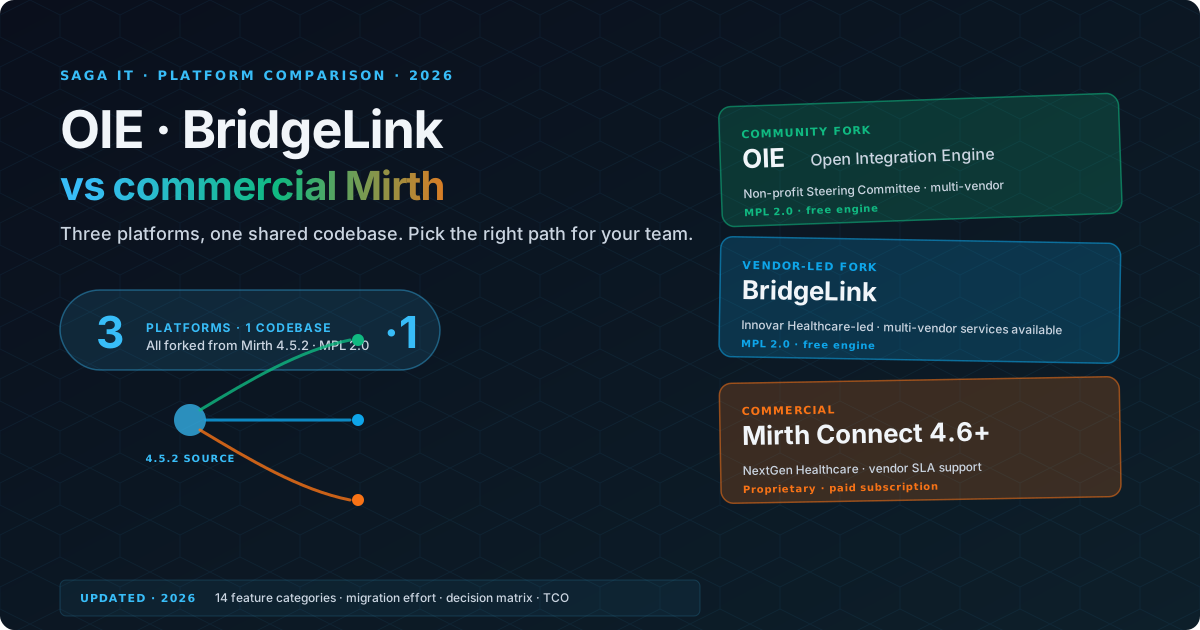
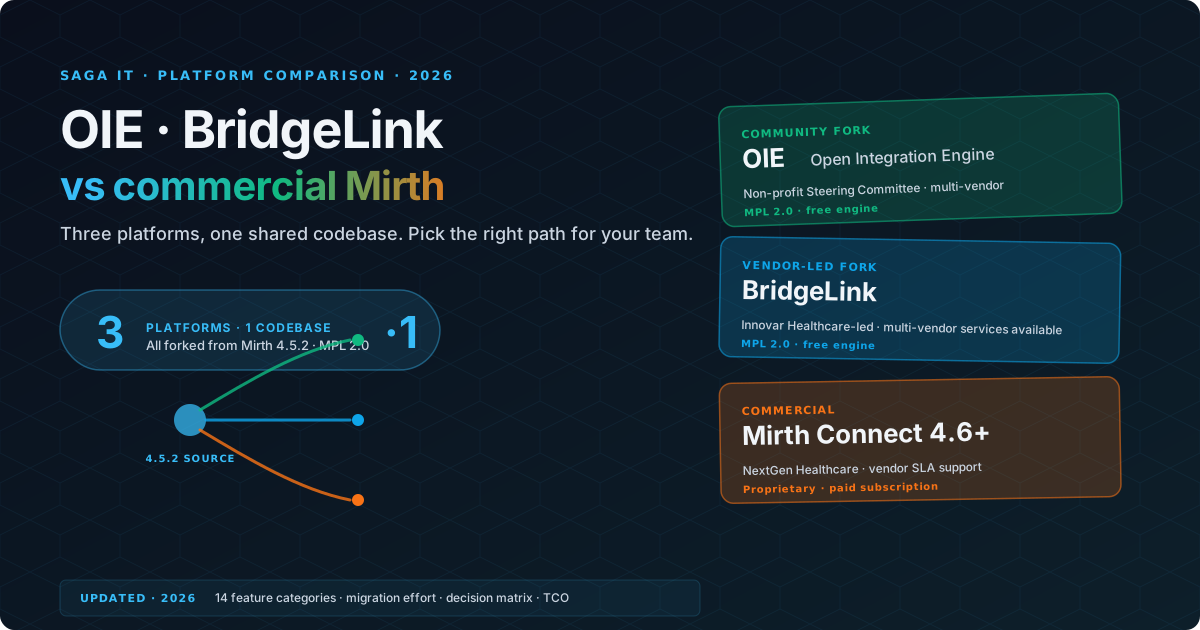
The Mirth Connect ecosystem has fractured into three distinct paths, and every healthcare IT team running Mirth-based integrations needs to choose one. Since NextGen Healthcare moved Mirth Connect to a commercial-only license in March 2025, two open-source forks have continued the MPL 2.0 lineage: the Open Integration Engine (OIE), a community-driven vendor-neutral fork hosted at the Eclipse Foundation, and BridgeLink, an Innovar Healthcare–led fork. Meanwhile, NextGen continues to develop commercial Mirth Connect under its new licensing model.
Each platform has inherited the core Mirth Connect DNA: the channel-based architecture, the JavaScript transformer engine, the multi-protocol connector framework, and the Administrator console. The two open-source forks diverge mostly in community, release cadence, and the services ecosystem around each project, not in core features. This guide provides a detailed, side-by-side comparison to help you make the right choice for your organization.
For background on the licensing change that created this situation, see our companion article: Mirth Connect Alternatives in 2026.
The Three Platforms at a Glance
Before diving into the feature comparison, here is a brief overview of each platform and the organization behind it.
OIE (Eclipse Open Integration Engine)
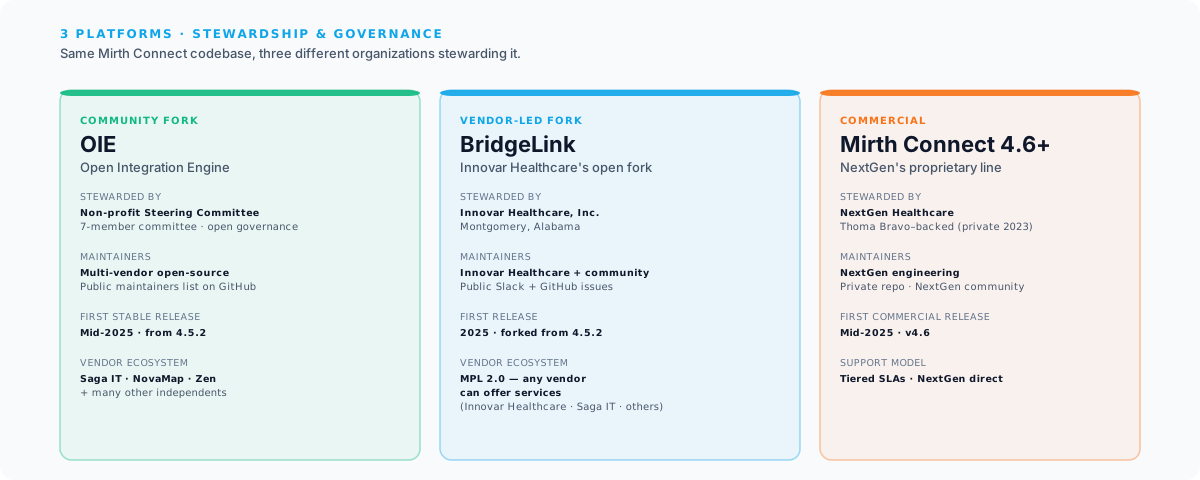
OIE is the community fork of Mirth Connect, hosted at the Eclipse Foundation with contributions from a multi-vendor open-source community. It was created to preserve the open-source healthcare integration engine that thousands of healthcare organizations relied on, explicitly positioned as vendor-neutral.
Philosophy: Continue the open-source Mirth Connect legacy. Community-driven, vendor-neutral development. No licensing fees. Transparent governance under the Eclipse Development Process, with a public committer list and roadmap.
Organization: OIE is an Eclipse Foundation project under the Eclipse Technology PMC, developed by a group of committers. Development happens openly on GitHub. A broad list of independent vendors (including Saga IT, NovaMap Health, Zen Healthcare IT, Bright Code Company, Meditecs, Doctible, MyDirectives, and others) offers commercial support and professional services around the platform.
First stable release: Mid-2025, based on the Mirth Connect 4.5.2 codebase.
BridgeLink
BridgeLink is an open-source fork of Mirth Connect maintained by Innovar Healthcare. Like OIE, it is free under the MPL 2.0 license and carries the Mirth Connect codebase forward. The two forks are technically similar; the main distinction is governance and community structure. OIE is a vendor-neutral community fork hosted at the Eclipse Foundation with contributions and services from multiple independent vendors. BridgeLink is led primarily by Innovar Healthcare, with paid services available from Innovar Healthcare for teams that want vendor backing on top of the open-source engine.
Philosophy: Continue the open-source Mirth Connect lineage under Innovar Healthcare’s stewardship, with paid services from Innovar Healthcare as the primary commercial path for teams that want vendor backing.
Organization: Innovar Healthcare, the company behind BridgeLink. Development happens publicly on GitHub. For the canonical list of BridgeLink releases, supported services, and Innovar Healthcare’s commercial offerings, see innovarhealthcare.com. Vendor product details change and the authoritative source is Innovar Healthcare itself.
Commercial Mirth Connect 4.6+
Commercial Mirth Connect is the continuation of the original Mirth Connect product under NextGen Healthcare’s new commercial-only licensing model. Version 4.6 was the first release under the new license.
Philosophy: Sustain and enhance the original Mirth Connect product with commercial investment. Vendor-backed support and guaranteed updates.
Organization: NextGen Healthcare, a Thoma Bravo–backed healthcare technology company (formerly NASDAQ: NXGN; taken private in November 2023) that acquired Mirth Connect through a series of corporate transitions: WebReach Inc. (2006) renamed itself Mirth Corporation in 2009, Quality Systems Inc. acquired Mirth Corporation in 2013, and Quality Systems rebranded as NextGen Healthcare in 2018.
First commercial-only release: Mirth Connect 4.6, released mid-2025.
Feature Comparison
This is the comprehensive comparison table. We have organized it into categories that matter most to integration teams making a platform decision.
Core Integration Capabilities
| Feature | OIE | BridgeLink | Commercial Mirth 4.6+ |
|---|---|---|---|
| Channel architecture | Same as Mirth Connect | Same as Mirth Connect | Original Mirth Connect |
| JavaScript transformers | Yes | Yes | Yes |
| HL7 v2.x support | Full (all versions) | Full (all versions) | Full (all versions) |
| FHIR R4 support | Yes (community-maintained) | Yes (community-maintained) | Yes (NextGen-maintained) |
| DICOM support | Full | Full | Full |
| X12/EDI support | Full | Full | Full |
| CDA/C-CDA support | Full | Full | Full |
| Database connectors | All major RDBMS | All major RDBMS | All major RDBMS |
| Web service connectors | REST, SOAP | REST, SOAP | REST, SOAP |
| File connectors | File, FTP, SFTP | File, FTP, SFTP | File, FTP, SFTP |
| Email connectors | SMTP, IMAP | SMTP, IMAP | SMTP, IMAP |
| TCP/MLLP connectors | Yes | Yes | Yes |
| JMS/Kafka connectors | Yes | Yes | Yes |
| Custom connector development | Yes (Java SDK) | Yes (Java SDK) | Yes (Java SDK) |
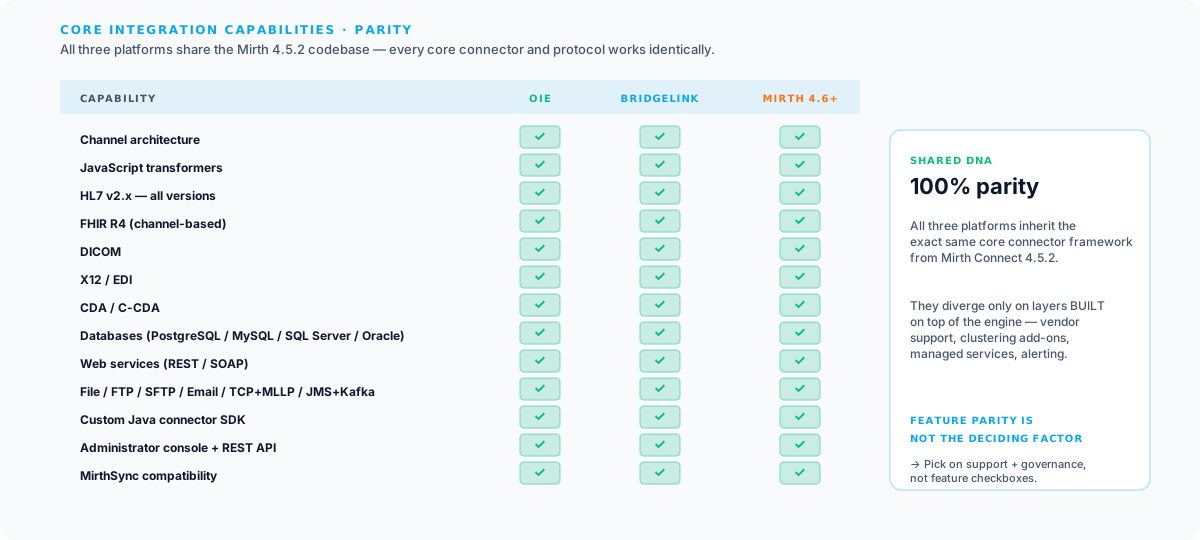
All three platforms share the same core connector framework inherited from Mirth Connect. OIE and BridgeLink both extend that framework through their community ecosystems, while NextGen maintains its own roadmap of connector improvements for commercial Mirth Connect.
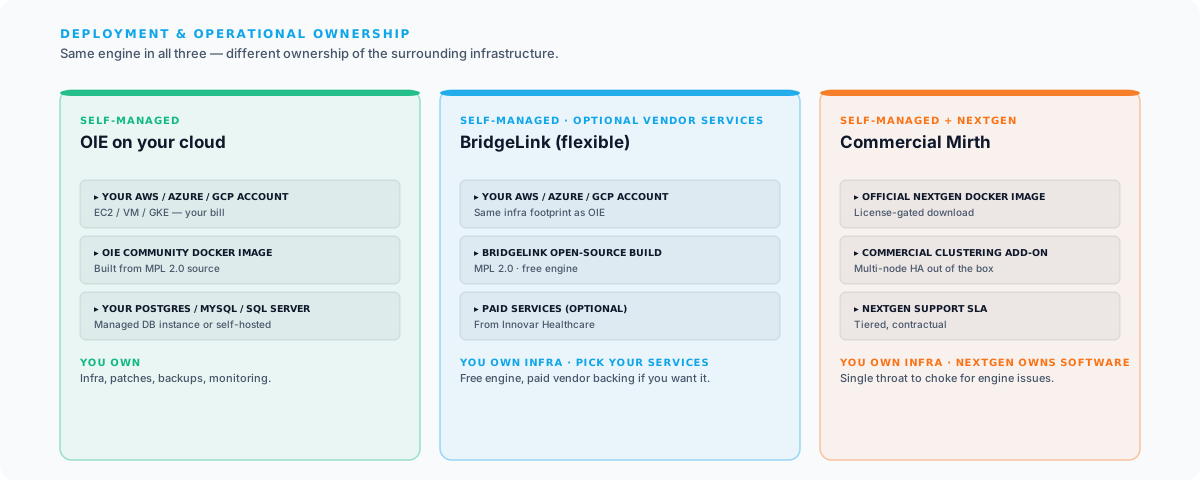
Deployment and Operations
| Feature | OIE | BridgeLink | Commercial Mirth 4.6+ |
|---|---|---|---|
| On-premises deployment | Yes | Yes | Yes |
| Cloud deployment (self-managed) | Yes (any cloud) | Yes (any cloud) | Yes (any cloud) |
| Cloud-hosted (SaaS/managed) | No | Self-managed (paid services available from Innovar Healthcare) | No |
| Docker/container support | Community Docker images | Community Docker images | Official Docker images |
| Kubernetes orchestration | Community-maintained | Community-maintained | Basic container support |
| Auto-scaling | Manual | Manual | Manual |
| High availability/clustering | Manual configuration | Manual configuration | Commercial clustering feature |
| Database support | PostgreSQL, MySQL, SQL Server, Oracle | PostgreSQL, MySQL, SQL Server, Oracle | PostgreSQL, MySQL, SQL Server, Oracle |
| Backup/restore tooling | Manual (scripts) | Manual (scripts) | Manual (scripts) + commercial tools |
| Configuration management | MirthSync, manual export | MirthSync, manual export | MirthSync, manual export |
Deployment options are broadly similar across OIE and BridgeLink. Both are self-managed open-source forks. Innovar Healthcare offers paid services for teams that want vendor backing. See innovarhealthcare.com for the current offering catalog. Commercial Mirth Connect adds NextGen’s clustering feature as its main deployment-layer differentiator.
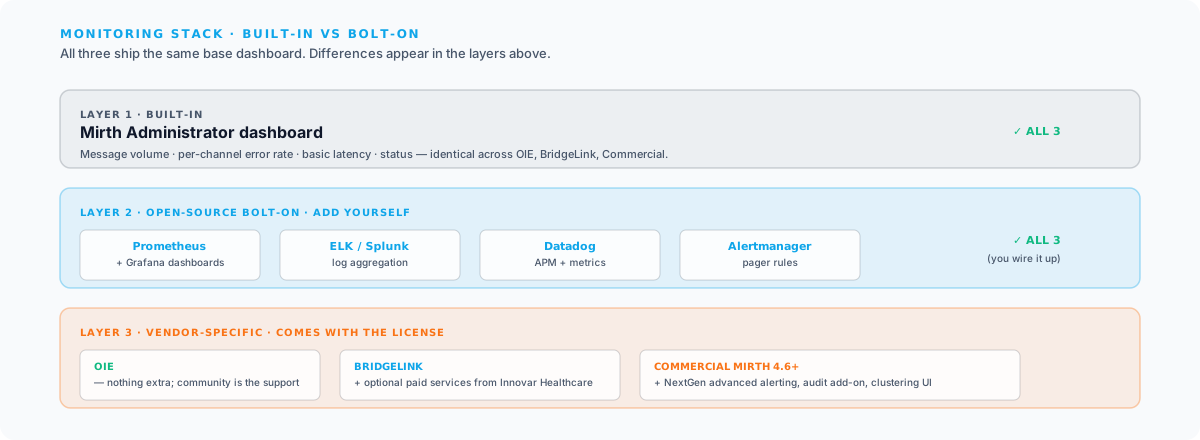
Monitoring and Observability
| Feature | OIE | BridgeLink | Commercial Mirth 4.6+ |
|---|---|---|---|
| Dashboard | Built-in (Mirth dashboard) | Built-in (Mirth dashboard) | Built-in (Mirth dashboard) + commercial add-ons |
| Message volume metrics | Yes | Yes | Yes |
| Error rate tracking | Yes (per channel) | Yes (per channel) | Yes (per channel) |
| Latency monitoring | Basic | Basic | Basic |
| Alerting | Basic (email alerts) | Basic (email alerts) | Commercial alerting add-on |
| Log aggregation | External (ELK, Splunk) | External (ELK, Splunk) | External (ELK, Splunk) |
| OpenTelemetry support | No (community WIP) | No (community WIP) | No |
| Audit logging | Basic | Basic | Basic + commercial audit add-on |
| SLA reporting | No | No (paid services available from Innovar Healthcare) | No |
All three platforms inherit Mirth Connect’s built-in dashboard. Teams on OIE and BridgeLink typically pair it with external tools (Prometheus/Grafana, ELK/Splunk, or Datadog). Commercial Mirth Connect adds NextGen’s alerting and audit add-ons. Innovar Healthcare offers paid services that can layer on top of the open-source engine for teams that want vendor backing.
Whichever engine you pick, our OpenShare integration platform works across OIE, BridgeLink, and commercial Mirth Connect: operate your servers, share channels and data with partner organizations, and monitor your whole fleet from one browser console.
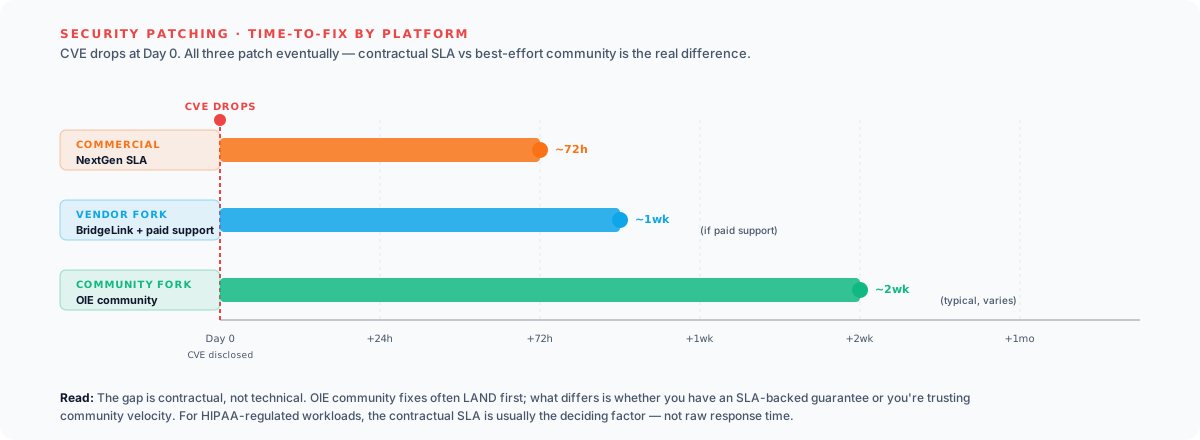
Security
| Feature | OIE | BridgeLink | Commercial Mirth 4.6+ |
|---|---|---|---|
| TLS/SSL | Full support | Full support | Full support |
| Authentication | Username/password, LDAP | Username/password, LDAP | Username/password, LDAP |
| Role-based access control | Basic (user/admin roles) | Basic (user/admin roles) | Basic + commercial RBAC add-on |
| API security | Basic authentication | Basic authentication | Basic authentication |
| Encryption at rest | Database-level | Database-level | Database-level |
| Vulnerability patching | Community-driven | Community-driven (paid support available from Innovar Healthcare) | Vendor SLA for patches |
| SOC 2 compliance | Self-managed | Self-managed | Self-managed |
| HIPAA BAA available | N/A (open source, self-managed) | N/A for the open-source engine; ask Innovar Healthcare about contract terms | Yes |
All three platforms support TLS, LDAP, and the encryption capabilities inherited from Mirth Connect. Commercial Mirth Connect offers vendor-backed security patching with SLAs from NextGen. BridgeLink and OIE rely on open-source community patching, and organizations needing contractual support can purchase that from Innovar Healthcare (for BridgeLink) or an independent partner.
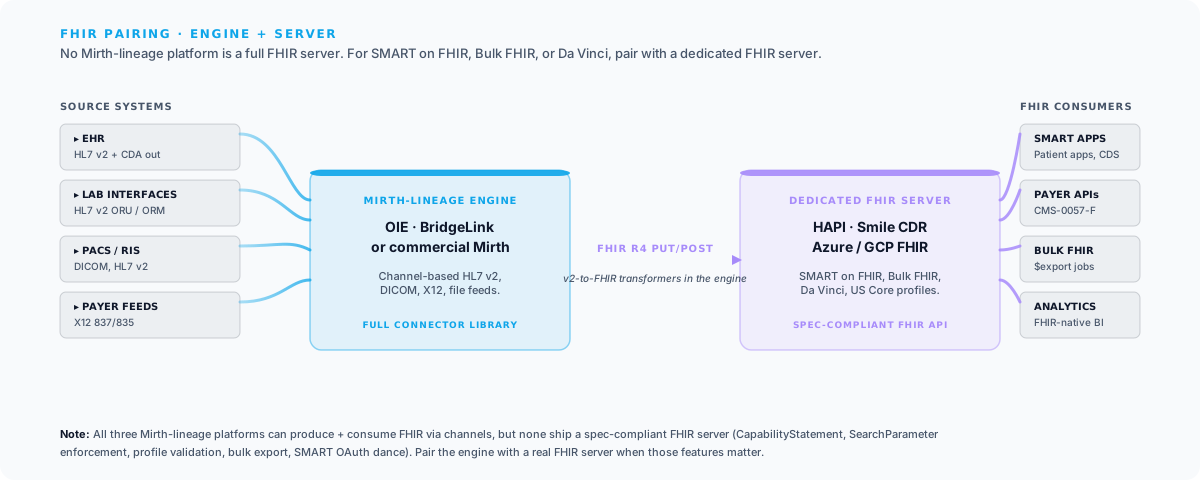
FHIR and Interoperability Standards
| Feature | OIE | BridgeLink | Commercial Mirth 4.6+ |
|---|---|---|---|
| FHIR R4 resources | Standard Mirth FHIR support | Standard Mirth FHIR support | Standard Mirth FHIR support + enhancements |
| FHIR server capabilities | Basic (via channels) | Basic (via channels) | Basic (via channels) |
| SMART on FHIR | Community plugins | Community plugins | Commercial add-on |
| Bulk FHIR | Manual implementation | Manual implementation | Manual implementation |
| Da Vinci IGs | Manual implementation | Manual implementation | Manual implementation |
| US Core profiles | Manual validation | Manual validation | Manual validation |
| HL7 v2 to FHIR mapping | Manual transformer scripts | Manual transformer scripts | Manual transformer scripts + templates |
| USCDI data class support | Manual mapping | Manual mapping | Manual mapping |
For organizations doing significant FHIR work (payer API compliance, CMS-0057-F implementation), the Mirth Connect–lineage platforms are fine for inbound/outbound FHIR via channels, but none of them ship a full FHIR server. Teams that need a FHIR facade, SMART on FHIR, Bulk FHIR, or Da Vinci IG support typically pair their integration engine with a dedicated FHIR server (HAPI FHIR, Smile CDR, Microsoft Azure FHIR, Google Cloud Healthcare API, etc.). For HL7 v2, DICOM, or X12 integration, all three Mirth-lineage platforms serve equally well.
Licensing and Cost
| Feature | OIE | BridgeLink | Commercial Mirth 4.6+ |
|---|---|---|---|
| License type | Open source (MPL 2.0) | Open source (MPL 2.0) | Commercial (proprietary) |
| Upfront cost | Free | Free | Contact sales |
| Annual cost | Free (+ self-managed infra) | Free (+ optional paid services from Innovar Healthcare) | $$$+ (on-premises) |
| Per-instance pricing | N/A | N/A for the engine; services priced per engagement | Yes |
| Volume-based pricing | N/A | N/A for the engine | Varies |
| OEM/embedding license | MPL 2.0 (open) | MPL 2.0 (open) | Available (contact sales) |
| Trial/evaluation | Full product (open source) | Full product (open source) | Evaluation available |
Both OIE and BridgeLink are free MPL 2.0 projects; your only engine cost is infrastructure (typically $200–$500/month for a single cloud instance). Organizations running BridgeLink who want vendor-backed services can buy those directly from Innovar Healthcare (BridgeLink Health Check, AWS Marketplace–activated support, certification, custom plugin development), but the platform itself has no licensing fee. Commercial Mirth Connect runs in the low-to-mid five figures annually for a single instance with standard support and scales up from there. For multi-instance deployments, the license-cost gap between commercial Mirth and either open-source fork compounds significantly.
Community and Support
| Feature | OIE | BridgeLink | Commercial Mirth 4.6+ |
|---|---|---|---|
| Vendor support | Community only | Optional paid support from Innovar Healthcare (including AWS Marketplace activation) | NextGen Healthcare support (tiered) |
| Support SLA | Best-effort community | Contract-dependent (paid support available from Innovar Healthcare) | Varies by contract |
| Community forum | Active (migrated from Mirth community) | Public Slack + GitHub issues | NextGen community |
| GitHub/issue tracker | Public GitHub | Public GitHub | Private (NextGen) |
| Documentation | Community-maintained wiki + docs | Community-maintained docs + resources from Innovar Healthcare | Professional documentation |
| Training | Community resources | Community resources + paid training from Innovar Healthcare | NextGen training programs |
| Consulting ecosystem | Available (including Saga IT) | Innovar Healthcare and independent consultants (including Saga IT) | NextGen partners + independent consultants |
| Meetups/conferences | Community meetups | Slack community | NextGen User Group Meeting |
OIE and BridgeLink both offer community support by default. Organizations running BridgeLink can purchase vendor-backed services (including support activated through AWS Marketplace) from Innovar Healthcare. Commercial Mirth Connect offers tiered vendor support from NextGen with defined SLAs. We recommend asking for customer references specific to support experiences before committing to any paid service tier.
Migration Considerations
Whichever platform you choose, migration from your existing Mirth Connect instance is the immediate practical concern. Here is what to plan for.
Channel Compatibility
All three platforms maintain compatibility with Mirth Connect channels at the XML level. You can export channels from one platform and import them into another. The underlying channel model (sources, destinations, transformers, filters, scripts) is the same across all three.
However, there are nuances:
- Global scripts and code templates: These migrate cleanly across all three platforms.
- Custom Java libraries: If your channels depend on custom JAR files in Mirth’s custom-lib directory, those JARs work on all three platforms (assuming Java version compatibility).
- Commercial plugins: If you use NextGen’s commercial plugins (advanced alerting, clustering), those plugins are proprietary and will not run on either open-source fork (OIE or BridgeLink). If you are migrating to OIE or BridgeLink, you need to replace commercial plugin functionality with community alternatives, vendor-provided plugins, or custom solutions.
- Database schema: All three platforms use a compatible database schema for the core channel and message tables. You can point a new installation at your existing database. However, test this thoroughly in a non-production environment first, and always maintain a backup.
Migration Workflow with MirthSync
The cleanest migration approach uses MirthSync to extract your channel configurations into version-controlled files and then deploy them to your target platform.
Here is a step-by-step migration workflow:
# Step 1: Pull all configurations from your existing Mirth Connect instancemirthsync -s https://current-mirth:8443/api \  -u admin -p admin \  --include-configuration-map \  pull
# Step 2: Review what was pulledls -la Channels/ CodeTemplates/ GlobalScripts/
# Step 3: Commit to Git for a clean baselinegit initgit add -Agit commit -m "Baseline: Mirth Connect 4.5.2 channel export"
# Step 4: Push configurations to your new platform (OIE, BridgeLink, or Mirth 4.6+)mirthsync -s https://new-platform:8443/api \  -u admin -p admin \  --include-configuration-map \  push
# Step 5: Verify channel deployment# Log into the new platform's Administrator console and verify all channels imported correctly
This workflow gives you:
- A complete Git history of your channel configurations.
- The ability to diff between your old and new environments.
- A rollback point if anything goes wrong.
- A foundation for ongoing CI/CD with your new platform.
Database Migration
If you want to preserve message history (not just channel configurations), you have two options:
- Point the new platform at your existing database. This preserves all message history but couples your new platform to your old database. Test compatibility thoroughly.
- Start fresh with a new database. This is cleaner and avoids compatibility risks, but you lose message history. If you need to retain historical messages for compliance, archive them separately before migrating.
For most organizations, we recommend option 2 (fresh database) with a separate message archival strategy for compliance. Historical messages can be exported from the old database and stored in long-term archival storage (S3, Azure Blob Storage, etc.) without being in the active integration engine database.
Custom Plugin Migration
If your Mirth Connect deployment uses custom plugins (developed in-house or by third parties), migration requires additional planning:
- OIE: Custom plugins built against the Mirth Connect Plugin API should work with minimal modification. The plugin API is preserved in OIE. Test each plugin in a staging environment.
- BridgeLink: Custom plugins built against the Mirth Connect Plugin API should work with minimal modification. The plugin API is preserved in BridgeLink’s fork. Innovar Healthcare also publishes its own plugins for BridgeLink and offers custom plugin development as a service.
- Commercial Mirth 4.6+: Custom plugins from 4.5.2 should be forward-compatible with 4.6+, though testing is still required.
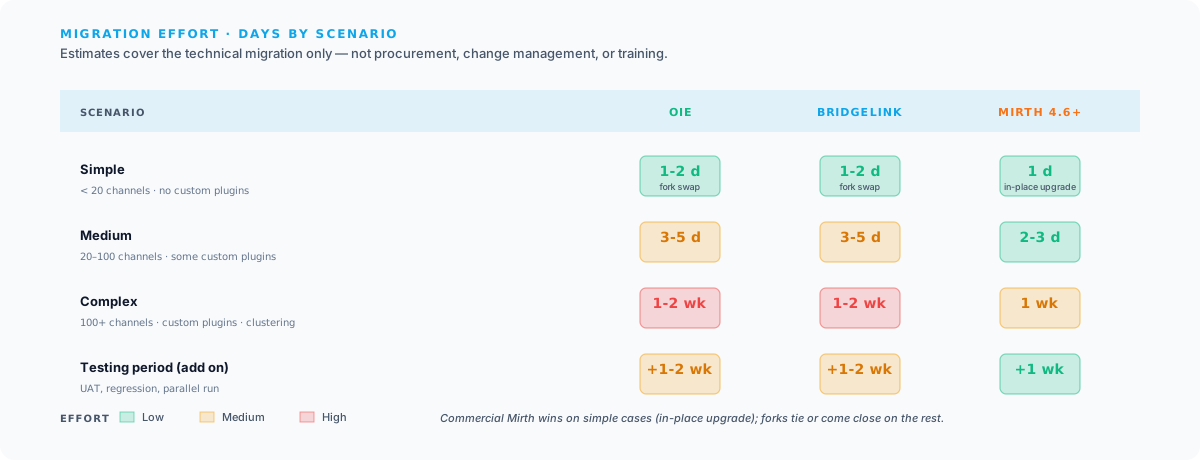
Estimated Migration Effort
| Scenario | OIE | BridgeLink | Commercial Mirth 4.6+ |
|---|---|---|---|
| Simple (< 20 channels, no custom plugins) | 1-2 days | 1-2 days | 1 day (version upgrade) |
| Medium (20-100 channels, some custom plugins) | 3-5 days | 3-5 days | 2-3 days |
| Complex (100+ channels, custom plugins, clustering) | 1-2 weeks | 1-2 weeks | 1 week |
| Testing period (all scenarios) | Add 1-2 weeks | Add 1-2 weeks | Add 1 week |
These estimates include the technical migration work but not the organizational work (procurement, change management, training). Add time for those activities based on your organization’s processes.
Decision Framework: Which Should You Choose?
Here is a structured decision framework to help you evaluate the three platforms against your organization’s specific needs.
Choose OIE If:
- Budget is a primary constraint. OIE has zero licensing costs. For organizations running multiple instances, the savings over commercial options can be substantial.
- You have strong in-house Mirth expertise. Your team can troubleshoot issues without vendor support, contribute to the community, and manage the platform independently.
- You value open-source principles. Transparency in development, community governance, and the freedom to inspect, modify, and redistribute the code matter to your organization.
- Your integrations are primarily HL7 v2, DICOM, and X12. OIE’s core integration capabilities are fully mature for these standards, and (like any Mirth-lineage platform) the FHIR support is suitable for channel-based work rather than running a full FHIR server.
- You want the lowest-risk migration path. OIE is the most compatible with existing Mirth Connect deployments. The migration is straightforward and well-documented. See our OIE consulting and migration services for the engagement model.
- You are a health IT vendor embedding an integration engine. The open-source license allows you to bundle OIE in your product without per-instance licensing fees.
Choose BridgeLink If:
BridgeLink and OIE are both free, MPL 2.0 forks of Mirth Connect with the same core feature set, so the practical difference is which fork’s community you want to align with. Because BridgeLink is MPL 2.0, any independent vendor (including Saga IT) can offer services on top of it; you are not locked to a single vendor for support. The narrow reasons to pick BridgeLink over OIE:
- You specifically want Innovar Healthcare as your integration partner. Innovar Healthcare leads BridgeLink’s development. If you’ve already engaged Innovar Healthcare or want them as your primary vendor, BridgeLink keeps your platform and your vendor aligned.
- You want a fork that’s actively shaped by a single vendor. Some teams prefer the predictability of a fork led by one company over a multi-vendor committee. BridgeLink fits that model; OIE intentionally does not.
For every other scenario (vendor optionality, multi-vendor support ecosystem, open governance), OIE delivers the same technical result with a broader community behind it.
Choose Commercial Mirth Connect 4.6+ If:
- You want the simplest possible migration. Upgrading from open-source Mirth Connect to commercial Mirth Connect 4.6+ is a standard version upgrade with minimal risk. Our Mirth Connect services cover both the version-upgrade path and the security patching that any Mirth installation older than 4.4.1 urgently needs (CVE-2023-43208 / CVE-2023-37679 are both on CISA’s KEV catalog).
- You are already in the NextGen ecosystem. If you use NextGen’s EHR, practice management, or other products, staying with their integration engine keeps your vendor relationship consolidated.
- You want a single commercial vendor backing the core engine. Commercial Mirth Connect provides NextGen-maintained source code, vendor-issued security patches with SLAs, and commercial add-ons (advanced alerting, clustering) that open-source forks do not include out of the box.
- Your team is trained on Mirth Connect and you want continuity. The Administrator console, channel editor, and operational workflows are identical to what your team already knows.
- You need clustering for high availability. NextGen’s commercial clustering feature has been production-tested for years.
Decision Matrix
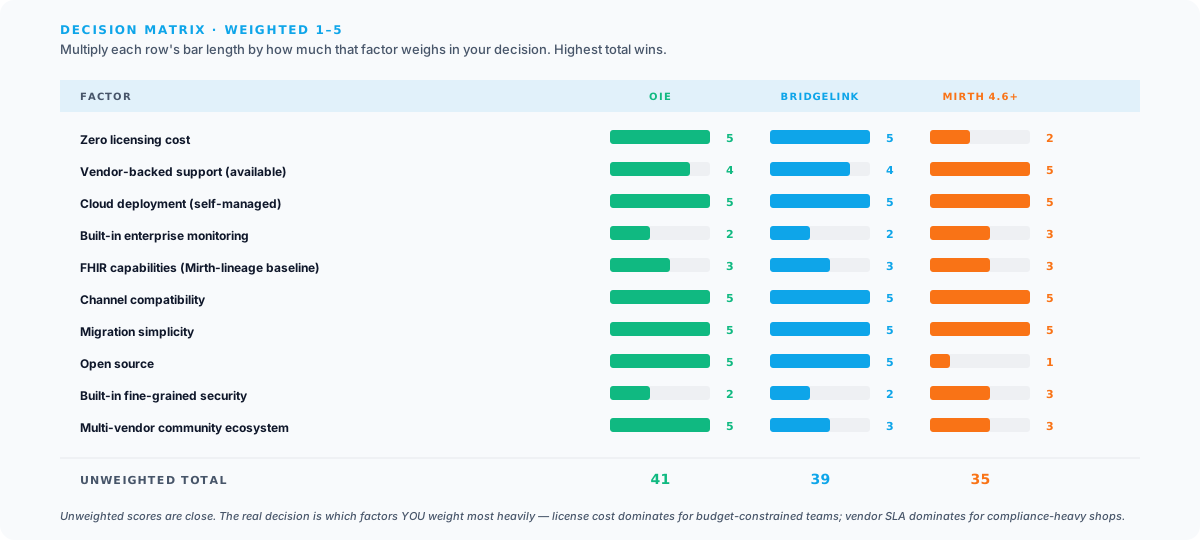
Score each factor 1-5 based on how important it is to your organization, then see which platform scores highest:
| Factor | Weight (1-5) | OIE Score | BridgeLink Score | Commercial Mirth Score |
|---|---|---|---|---|
| Zero licensing cost | ___ | 5 | 5 | 2 |
| Vendor-backed support (available) | ___ | 4 (multi-vendor ecosystem, incl. Saga IT) | 4 (single vendor: Innovar Healthcare, incl. AWS Marketplace) | 5 (single vendor: NextGen Healthcare, with contractual SLAs) |
| Cloud deployment (self-managed) | ___ | 5 | 5 | 5 |
| Built-in enterprise monitoring | ___ | 2 | 2 | 3 |
| FHIR capabilities (Mirth-lineage baseline) | ___ | 3 | 3 | 3 |
| Channel compatibility | ___ | 5 | 5 | 5 |
| Migration simplicity | ___ | 5 | 5 | 5 |
| Open source | ___ | 5 | 5 | 1 |
| Built-in fine-grained security | ___ | 2 | 2 | 3 |
| Multi-vendor community ecosystem | ___ | 5 | 3 | 3 |
Multiply each platform’s score by your weight for that factor, then sum the results. The platform with the highest weighted score is your best fit. Because OIE and BridgeLink are both MPL 2.0 Mirth Connect forks with the same core feature set, most of the scoring differences come down to community breadth and which vendor you want to buy services from.
MirthSync Across All Platforms
One of the practical benefits of the Mirth Connect ecosystem’s shared DNA is that MirthSync works identically across all three platforms. MirthSync connects to the Mirth REST API, which is preserved in OIE, BridgeLink, and commercial Mirth Connect.
MirthSync CLI
The MirthSync CLI is the core command-line tool for pulling and pushing channel configurations. It works with OIE, BridgeLink, and commercial Mirth Connect without any configuration changes. Just point it at the target platform’s API endpoint.
MirthSync Plugin
The MirthSync Plugin installs directly into the Mirth/OIE Administrator console, providing Git integration from within the GUI. It works with OIE and commercial Mirth Connect. BridgeLink compatibility depends on the Administrator console version; contact us for details.
MirthSync VS Code Extension
The MirthSync VS Code Extension provides IDE-based channel management and is available on the VS Code Marketplace. It connects to any Mirth-API-compatible platform, including OIE, BridgeLink, and commercial Mirth Connect.
CI/CD Across Platforms
Regardless of which platform you choose, MirthSync enables CI/CD workflows that are platform-agnostic. A GitHub Actions workflow that deploys channels to production works identically whether your production environment runs OIE, BridgeLink, or commercial Mirth Connect:
name: Deploy Channels to Production
on:  push:    branches: [main]
jobs:  deploy:    runs-on: ubuntu-latest    steps:      - uses: actions/checkout@v4
      - name: Deploy channels via MirthSync        run: |          java -jar mirthsync.jar \            -s ${{ secrets.MIRTH_API_URL }} \            -u ${{ secrets.MIRTH_USER }} \            -p ${{ secrets.MIRTH_PASS }} \            push
      - name: Verify deployment        run: |          # Hit the platform's API to verify channels are deployed and running          curl -k -u ${{ secrets.MIRTH_USER }}:${{ secrets.MIRTH_PASS }} \            "${{ secrets.MIRTH_API_URL }}/channels/statuses" | \            jq '.list.dashboardStatus[] | {name: .name, state: .state}'
This CI/CD approach works regardless of the underlying platform. The MIRTH_API_URL secret points to whichever platform you are running. Switching platforms does not require changing your CI/CD pipeline, only the target URL.
Real-World Deployment Patterns
Based on our work with healthcare organizations navigating this transition, here are the three deployment patterns we see most frequently. If you just want to spin up one of these locally to evaluate it, see our 2026 Docker quickstart. Five minutes to a running stack, no installer wizard.
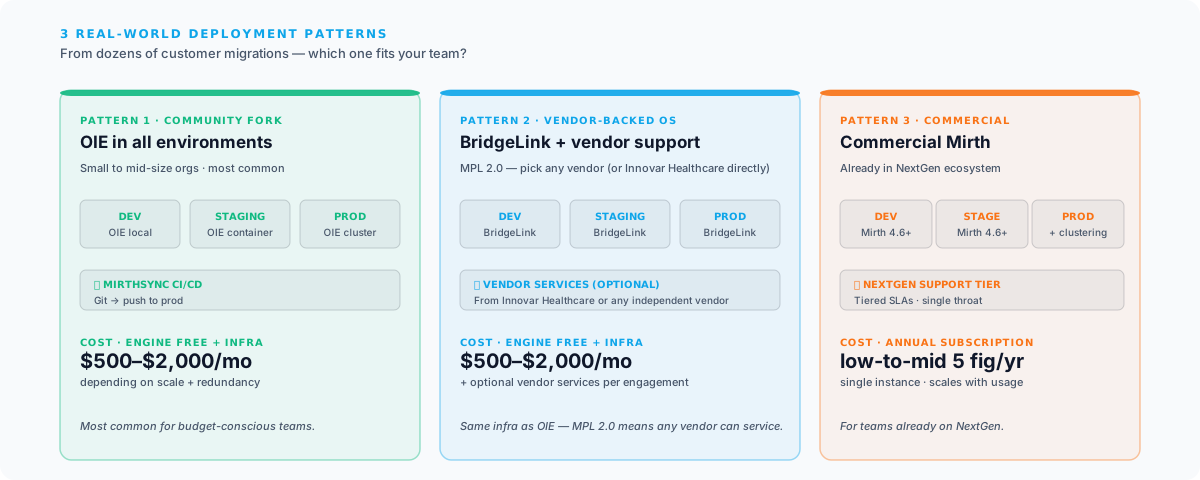
Pattern 1: OIE across all environments. The most common pattern for small to mid-size organizations. OIE runs in dev, staging, and production, with MirthSync providing CI/CD. Cost is infrastructure only, typically $500-2,000/month depending on scale.
Pattern 2: BridgeLink across all environments, with Innovar Healthcare services. Organizations that have engaged Innovar Healthcare for integration work often standardize on BridgeLink and layer Innovar Healthcare’s paid services (BridgeLink Health Check, AWS Marketplace support, certification) on top. The engine itself is still free under MPL 2.0, so cost scales with the services purchased rather than per-instance licensing.
Pattern 3: Commercial Mirth Connect everywhere. Organizations already in the NextGen ecosystem often standardize on commercial Mirth Connect across all environments. This provides a consistent experience and simplifies vendor support interactions.
Next Steps
Choosing between OIE, BridgeLink, and commercial Mirth Connect is a significant decision that affects your integration infrastructure for years to come. Here is how to move forward:
- Assess your current state. Inventory your Mirth Connect instances, channels, custom plugins, and integration patterns. Understand what you have before choosing where to go.
- Score the decision matrix. Use the weighted decision matrix above to quantify which platform best fits your priorities.
- Run a proof of concept. Set up the leading candidate in a test environment, migrate a representative subset of channels, and validate that everything works as expected.
- Plan your migration. Use MirthSync to export your current configuration, set up your target environment, and develop a testing plan.
- Execute with support. Whether you handle the migration in-house or engage a consulting partner, allocate adequate time for testing and validation.
Our Mirth Connect consulting team has hands-on experience with all three platforms and has guided organizations through dozens of migrations. We also offer specialized services for the Open Integration Engine, including deployment, optimization, and ongoing support. If the move includes rebuilding HL7 v2 interfaces, our HL7 integration services team handles interface design, testing, and cutover.
Need help choosing or migrating? Contact us for a free platform assessment and we will help you evaluate your options based on your specific integration landscape, budget, and operational requirements.