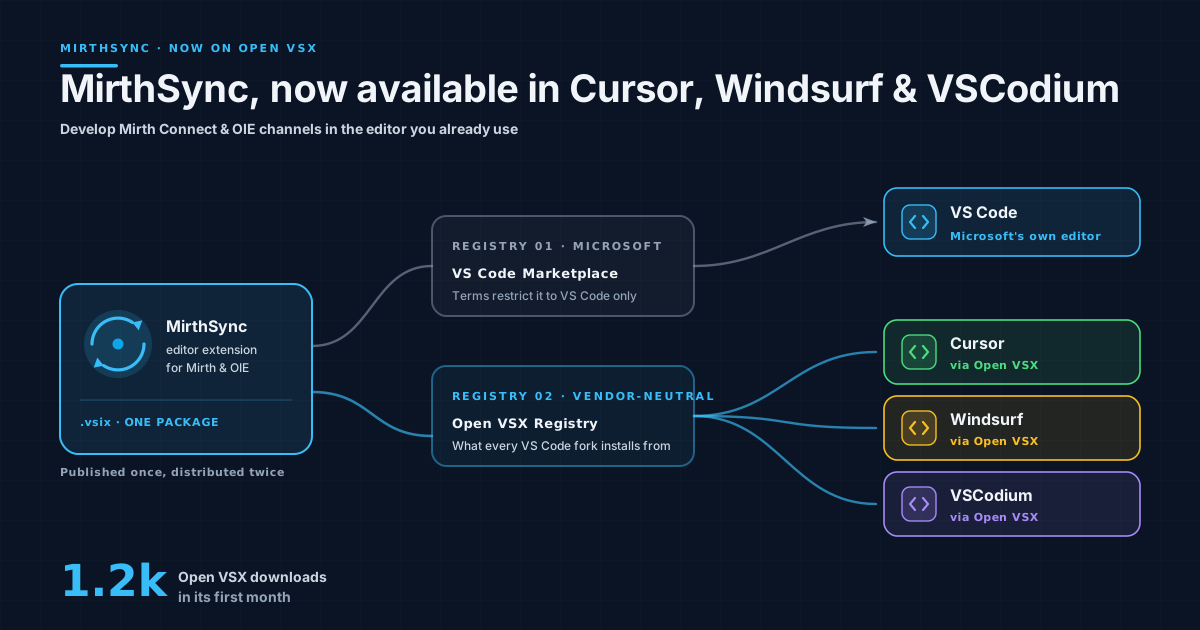
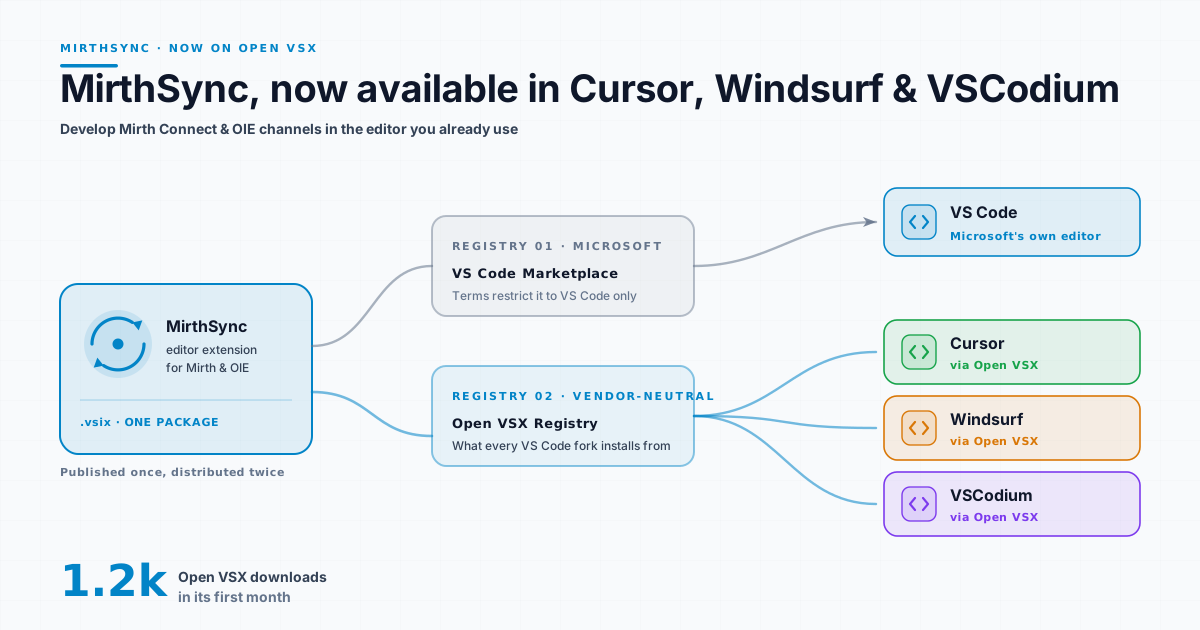
Short version: MirthSync (our extension for developing Mirth Connect and Open Integration Engine channels in a real editor) has been on the Open VSX Registry since May 2026. If you write integration code in Cursor, Devin Desktop (formerly Windsurf), VSCodium or Kiro, you can install it the normal way, straight from the Extensions panel.
That sounds like a one-line release note, but the reason it took a second marketplace is the genuinely interesting part. It explains a thing a lot of Cursor users have quietly wondered about: why some extensions are simply missing. We’ll get there. First, for anyone meeting MirthSync for the first time, the sixty-second version.
What MirthSync does, in sixty seconds
The Mirth Connect Administrator (the Java desktop app that ships with the engine) is more capable than people remember. Its JavaScript editor has autocomplete, bracket matching, code folding, and find-and-replace. The editor was never really the problem.
The problem is everything around the code. A channel lives as XML inside the engine, not as a file you can open. There’s no git history, no pull request, no diff between what’s running on the dev box and what’s in production. Promoting a change means exporting XML from one server and importing it into another by hand. And the editor you’re typing into is the one the engine hands you, not the one you’ve configured, with your extensions and your AI assistant one keystroke away.
MirthSync turns channels into files. It pulls every channel, code-template library, and configuration map out of the engine onto disk, where they become ordinary git citizens: branch them, diff them, review them, revert them. It stores a connection profile per environment (credentials in VS Code’s Secrets API, not plaintext), so dev / staging / prod sit side by side and “is staging actually in sync with prod?” becomes a one-line diff.
It also ships IntelliSense for Mirth’s JavaScript API (channelMap, globalMap, msg, the message aliases), so the engine’s globals get type signatures and hover docs in your editor. And it can stand up a complete throwaway Mirth on Docker in one command.
That’s the tour. The full feature deep-dive (diagnostics, the Java debugger, the Local Mirth Docker stack, the snippet catalog) lives in MirthSync for VS Code: a modern IDE for Mirth Connect & OIE. This post is about where you can run it.
Since this post first ran, OpenShare remote access is built in and Local Mirth starts Open Integration Engine 4.6.0.
Now on Open VSX: which is why it runs in Cursor
Here’s the part worth the detour. If you use Cursor, Devin Desktop or another VS Code fork and have ever searched for an extension that “should” exist and found nothing, this is why.
Microsoft’s Visual Studio Marketplace (the place VS Code installs extensions from) has Terms of Use that limit it to Microsoft’s own products. A VS Code fork (Cursor, Devin Desktop, VSCodium, Kiro) is not one of them, so an extension that lives only on Microsoft’s marketplace never shows up in those editors.
The forks solve this with a different registry: Open VSX, a vendor-neutral, open-source marketplace run by the Eclipse Foundation. It’s the extension source for Cursor, Devin Desktop, VSCodium, Kiro and Google Antigravity. Publishing there is how you reach those editors.
So we publish to both. The VS Code Marketplace listing covers VS Code itself; the Open VSX listing covers everyone else. If you do healthcare-integration work in Cursor (and a growing number of people do), MirthSync installs like any other extension, with the same channel sync, IntelliSense, and Local Mirth you’d get in VS Code.
Mirth, NextGen, and the Open Integration Engine
A bit of context for anyone who’s been away from this corner of healthcare IT for a year. In March 2025, NextGen Healthcare moved Mirth Connect to a commercial license starting with version 4.6; 4.5.2 was the last open-source release. The community forked that last open version into the Open Integration Engine, now an Eclipse Foundation project: a vendor-neutral, openly governed continuation of the engine a generation of integration teams already knew.
MirthSync sits one layer up from that split. It speaks the standard Mirth REST API, so it works against open-source Mirth® Connect through 4.5.2, Eclipse Open Integration Engine, and BridgeLink equally: your channels, your servers, your choice of engine. Saga IT maintains the open-source mirthsync CLI the extension is built on, and we contribute to the Open Integration Engine project alongside the rest of the community. (If you just want an engine running locally to point it at, our Docker quickstart covers the five-minute path.)
Four months on Open VSX
We pushed the first Open VSX build on May 4, 2026. It has passed 3,300 downloads since, a good sign for a tool aimed squarely at people who write Mirth channels for a living.
Try it
Open the Extensions panel in VS Code, Cursor, Devin Desktop, VSCodium, Kiro or Google Antigravity and search MirthSync, or install it directly:
- VS Code Marketplace: marketplace.visualstudio.com/items?itemName=SagaITLLC.mirthsync
- Open VSX (Cursor / Devin Desktop / VSCodium / Kiro / Antigravity): open-vsx.org/extension/SagaITLLC/mirthsync
Point it at a server, pull your channels, and commit them. For the full feature tour, see the deep-dive post or the product page; if you hit a rough edge or want a feature, the mirthsync repository is the place to tell us.
MirthSync is an independent, community-built extension. It is not affiliated with, endorsed by, or sponsored by NextGen Healthcare. Mirth® and Mirth Connect® are trademarks of NextGen Healthcare.