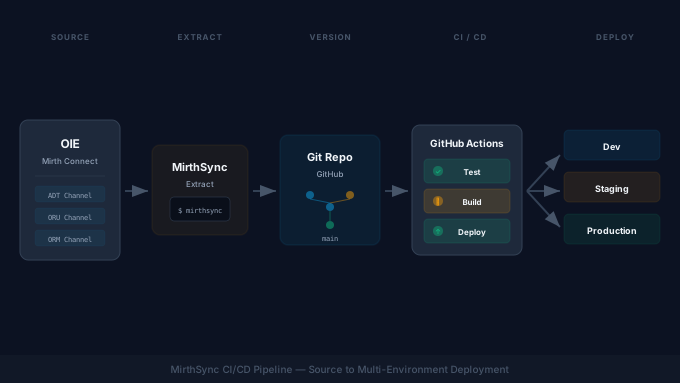
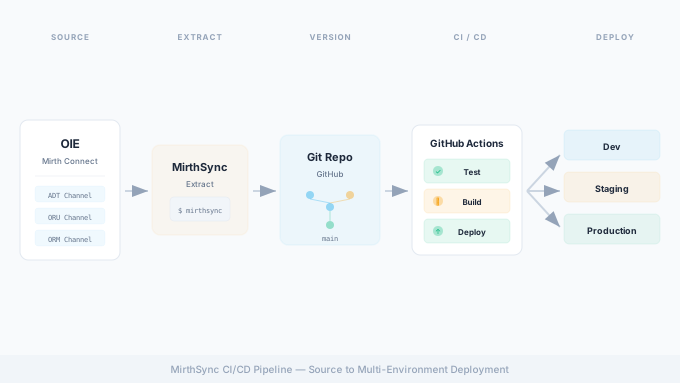
Integration engines are the backbone of healthcare data exchange. Mirth Connect, Eclipse OIE, and BridgeLink process millions of HL7, FHIR, and DICOM messages daily across hospitals, labs, and health information exchanges. But for all their power as integration platforms, these engines have a glaring gap: they lack built-in version control and CI/CD capabilities.
MirthSync bridges that gap. It is an open-source CLI tool built by Saga IT that extracts channel configurations from your integration engine into the filesystem, enabling Git-based version control, code review, and automated deployment pipelines. In this guide, we walk through setting up a complete CI/CD workflow for Mirth Connect or OIE using MirthSync and GitHub Actions, from initial setup through multi-environment promotion.
The Problem with Manual Channel Deployment
If you have managed a Mirth Connect instance for any length of time, you have experienced the pain of manual channel management. The typical workflow looks something like this: a developer makes changes to a channel in the Mirth Connect Administrator, exports the channel as XML, emails it to a colleague or drops it in a shared drive, and someone manually imports it into the next environment. At some point, someone overwrites a channel that was working fine, and there is no way to get the previous version back.
This process breaks down in several concrete ways.
No version history. Mirth Connect stores channel configurations in its database. When you modify a channel, the previous version is gone. There is no built-in mechanism to see what changed, when it changed, or who changed it. If a channel that was working yesterday is broken today, your only option is to restore a full database backup, which affects every channel, not just the one you need.
No rollback capability. Without version history, rollback means restoring a database snapshot or manually recreating the previous configuration from memory. Neither option is fast or reliable in a production incident.
Configuration drift. When channels are manually deployed across environments, each environment inevitably diverges. A filter that was added in dev but not replicated to staging. A connection string that was hardcoded for testing and never updated. These discrepancies cause unpredictable failures during production deployments.
No code review. Channel changes go directly into the running configuration without any peer review. A transformer script with a bug, a filter that drops messages it should not, or a destination that sends data to the wrong endpoint can all make it to production without anyone else looking at the change.
No audit trail. In healthcare, knowing who changed what and when is not optional. HIPAA requires audit controls for systems that handle PHI. Manual channel management makes it nearly impossible to demonstrate that integration changes went through a controlled process.
MirthSync Overview
MirthSync is an open-source command-line tool that synchronizes channel configurations between a Mirth Connect (or OIE or BridgeLink) instance and the local filesystem. It has two primary operations:
- Pull: Extracts channels, code templates, alerts, configuration maps, global scripts, and resources from a running instance into a structured directory of XML and code files.
- Push: Takes the filesystem representation and applies it to a target instance, creating or updating channels, templates, and other configurations.
This bidirectional sync is what makes Git-based workflows possible. You pull configurations into a Git repository, make changes (either directly in the files or through the Mirth Administrator), commit those changes, and push them to target environments through automated pipelines.
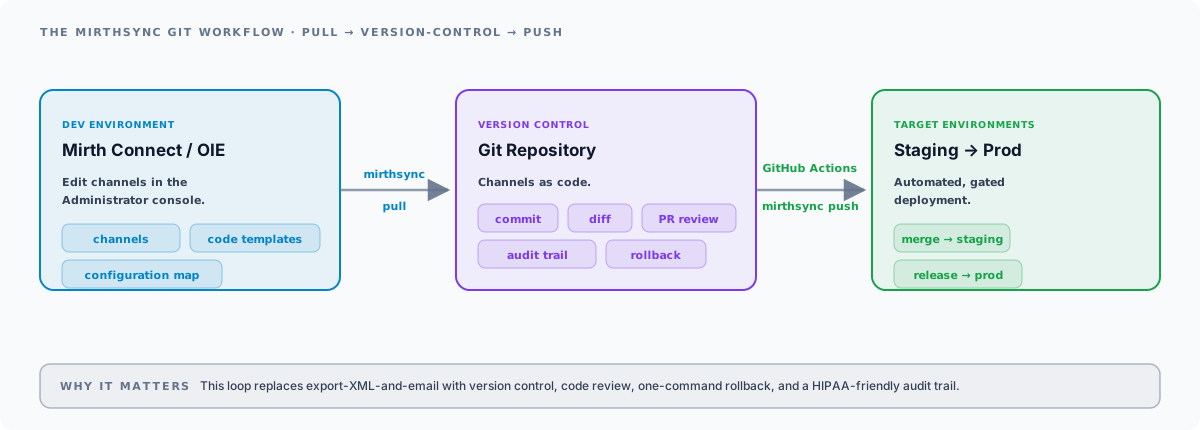
MirthSync works with Mirth Connect 3.x and 4.x, OIE, and BridgeLink. The same CLI, the same commands, the same workflows. If you are still choosing between OIE, BridgeLink, and commercial Mirth Connect after the licensing change, MirthSync ensures your CI/CD investment carries over regardless of which engine you choose.
Setting Up MirthSync
MirthSync is a JVM-based tool that ships in two convenient formats: an npm package (@saga-it/mirthsync) and a release archive on GitHub. You need Java 11 or later installed on any machine that will run MirthSync, including your CI/CD runners.
Installation
The simplest install is via npm. @saga-it/mirthsync is a thin Node wrapper that bundles the standalone JAR and exposes a mirthsync binary on your PATH:
# Install globally via npm (requires Node and Java 11+)npm install -g @saga-it/mirthsync
# Verify it runsmirthsync --help
Alternatively, download the standalone release archive from the MirthSync GitHub repository and extract it:
# Download and extract the latest release archivecurl -L -o mirthsync.zip https://github.com/SagaHealthcareIT/mirthsync/releases/download/3.7.0/mirthsync-3.7.0.zipunzip mirthsync.zipcd mirthsync-3.7.0
# Run via the wrapper script (or invoke lib/mirthsync-3.7.0-standalone.jar directly)./bin/mirthsync.sh --help
Pulling Channel Configurations
Connect MirthSync to your Mirth Connect or OIE instance and pull the current configuration into a local directory:
mirthsync \ -s https://mirth-dev.example.com:8443/api \ -u admin \ -p "$MIRTH_PASSWORD" \ -i \ -t ./src \ pullThe flags break down as follows:
-sspecifies the Mirth Connect API URL.-uand-pprovide authentication credentials.-iignores SSL certificate errors (useful for self-signed certificates in dev environments; omit in production or use proper certificates).-tsets the target directory for the extracted files.pullis the command to extract configurations from the server.
Directory Structure
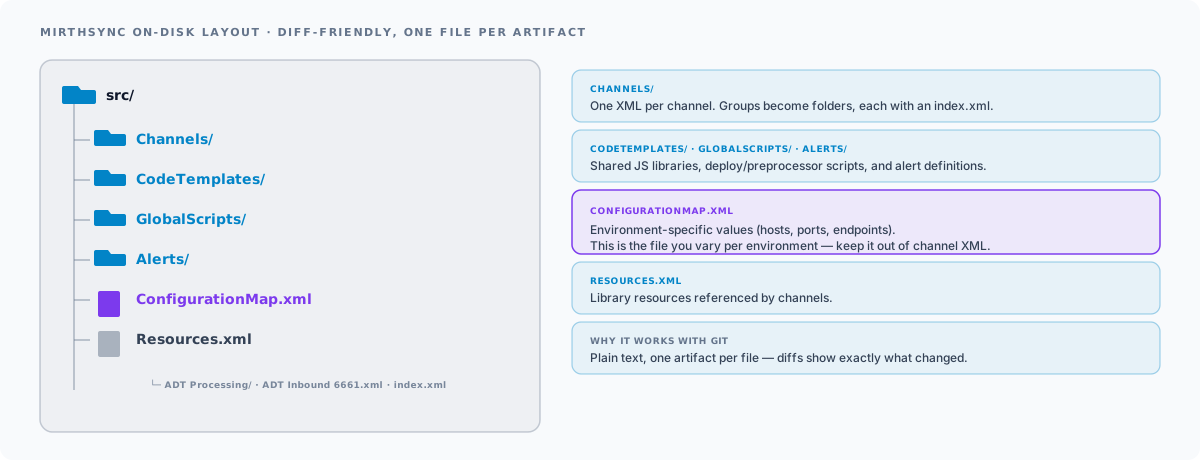
After a pull, MirthSync creates a structured directory that mirrors the organization of your Mirth Connect instance:
src/├── Channels/│ ├── ADT Processing/│ │ ├── ADT Inbound 6661.xml│ │ ├── ADT Router 6662.xml│ │ └── index.xml│ ├── Lab Results/│ │ ├── ORU Inbound 6670.xml│ │ └── index.xml│ └── Scheduling/│ ├── SIU Processor 6680.xml│ └── index.xml├── CodeTemplates/│ └── Shared Library/│ ├── index.xml│ ├── Date Utilities.xml│ └── HL7 Helpers.xml├── GlobalScripts/│ └── globalScripts.xml├── ConfigurationMap.xml└── Resources.xmlEach channel is stored as a standalone XML file. Channel groups are represented as directories with an index.xml for group metadata. Code templates, global scripts, the configuration map, and resources each have their own files. This structure is human-readable, diff-friendly, and works naturally with Git.
Git Workflow for Channels
With your channel configurations on the filesystem, you can initialize a Git repository and start treating channel changes like code changes.
Repository Setup
cd /path/to/your/mirth-repogit initgit add .git commit -m "Initial import of Mirth Connect channels"git remote add origin git@github.com:your-org/mirth-channels.gitgit push -u origin mainAdd a .gitignore to exclude files you do not want tracked:
# MirthSync working files*.log
# Environment-specific credentials.envrc.env
Branching Strategy
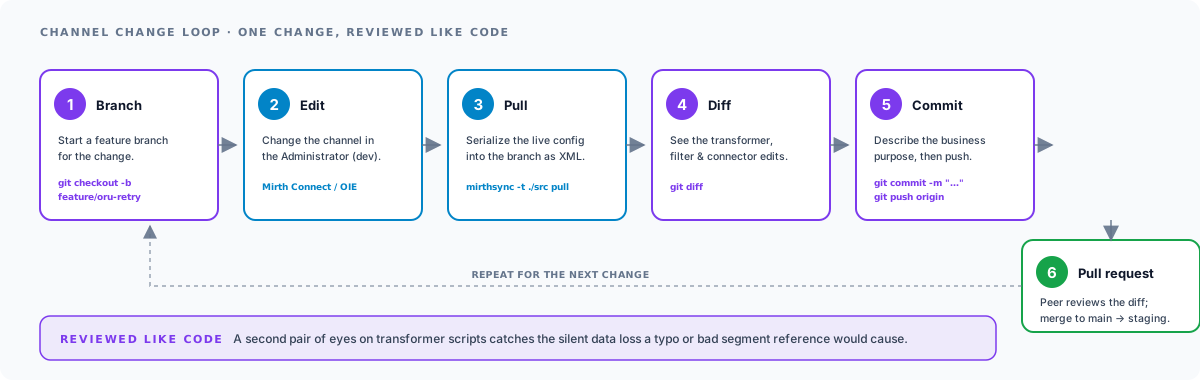
Use feature branches for channel changes, just as you would for application code:
- Create a branch for the change:
git checkout -b feature/add-oru-retry-logic - Make changes in the Mirth Connect Administrator (dev environment).
- Pull the changes with MirthSync:
mirthsync -s https://mirth-dev:8443/api -u admin -p $MIRTH_PASSWORD -i -t ./src pull - Review the diff:
git diff - Commit and push:
git add . && git commit -m "Add retry logic to ORU inbound channel" && git push origin feature/add-oru-retry-logic - Open a pull request for review.
Pull Request Reviews
Pull requests for channel changes work exactly like code reviews. Reviewers can see the XML diff showing what changed in the channel configuration. Transformer script changes, filter modifications, connector settings, and routing logic are all visible in the diff.
This is especially valuable for JavaScript transformer scripts, where a misplaced variable or incorrect message segment reference can cause silent data loss. Having a second pair of eyes on these changes before they reach production is a significant risk reduction.
GitHub Actions CI/CD Pipeline
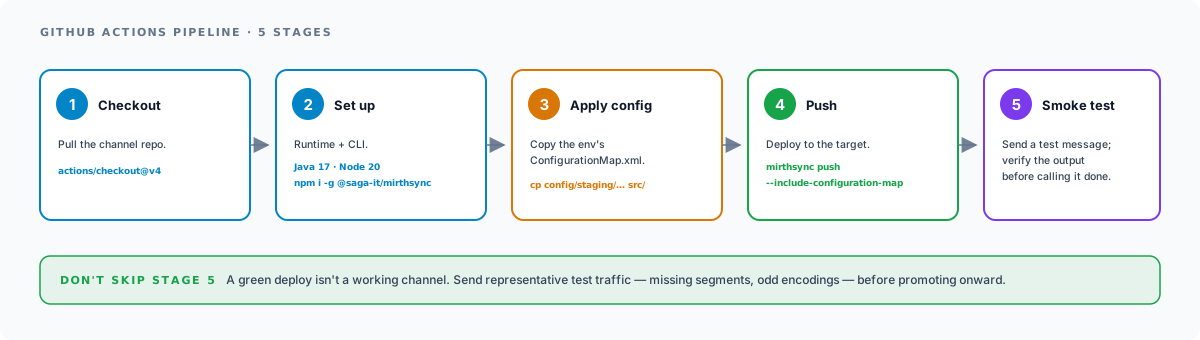
With channels in Git and a branching workflow in place, the next step is automating deployments. The following GitHub Actions workflow pushes channel configurations to your staging environment whenever code is merged to main, and to production when a release is tagged.
Workflow File
Create .github/workflows/mirthsync-deploy.yml in your repository:
name: MirthSync Deploy
on:  push:    branches: [main]  release:    types: [published]
jobs:  deploy-staging:    if: github.event_name == 'push' && github.ref == 'refs/heads/main'    runs-on: ubuntu-latest    environment: staging
    steps:      - name: Checkout repository        uses: actions/checkout@v4
      - name: Set up Java        uses: actions/setup-java@v4        with:          distribution: 'temurin'          java-version: '17'
      - name: Set up Node        uses: actions/setup-node@v4        with:          node-version: '20'
      - name: Install MirthSync        run: npm install -g @saga-it/mirthsync
      - name: Push to Staging        env:          MIRTH_URL: ${{ secrets.STAGING_MIRTH_URL }}          MIRTH_USER: ${{ secrets.STAGING_MIRTH_USER }}          MIRTH_PASSWORD: ${{ secrets.STAGING_MIRTH_PASSWORD }}        run: |          mirthsync \            -s "$MIRTH_URL" \            -u "$MIRTH_USER" \            -p "$MIRTH_PASSWORD" \            -t ./src \            push
  deploy-production:    if: github.event_name == 'release'    runs-on: ubuntu-latest    environment: production
    steps:      - name: Checkout repository        uses: actions/checkout@v4
      - name: Set up Java        uses: actions/setup-java@v4        with:          distribution: 'temurin'          java-version: '17'
      - name: Set up Node        uses: actions/setup-node@v4        with:          node-version: '20'
      - name: Install MirthSync        run: npm install -g @saga-it/mirthsync
      - name: Push to Production        env:          MIRTH_URL: ${{ secrets.PROD_MIRTH_URL }}          MIRTH_USER: ${{ secrets.PROD_MIRTH_USER }}          MIRTH_PASSWORD: ${{ secrets.PROD_MIRTH_PASSWORD }}        run: |          mirthsync \            -s "$MIRTH_URL" \            -u "$MIRTH_USER" \            -p "$MIRTH_PASSWORD" \            -t ./src \            push
How It Works
The workflow uses GitHub’s environment protection rules to gate deployments:
- Staging deploys automatically when code is merged to
main. Every approved pull request triggers a staging deployment, giving your team immediate visibility into the changes in a non-production environment. - Production deploys on release. When you create a GitHub release (which tags a specific commit), the production deployment job runs. You can add required reviewers to the production environment in GitHub settings for an additional approval gate.
GitHub Secrets Configuration
Store your Mirth Connect credentials as GitHub repository secrets. Navigate to your repository Settings, then Secrets and variables, then Actions, and create the following secrets for each environment:
| Secret | Description | Example |
|---|---|---|
STAGING_MIRTH_URL | Staging API URL | https://mirth-staging.example.com:8443/api |
STAGING_MIRTH_USER | Staging admin username | deploy-user |
STAGING_MIRTH_PASSWORD | Staging admin password | (stored securely) |
PROD_MIRTH_URL | Production API URL | https://mirth-prod.example.com:8443/api |
PROD_MIRTH_USER | Production admin username | deploy-user |
PROD_MIRTH_PASSWORD | Production admin password | (stored securely) |
Create dedicated deployment user accounts in Mirth Connect rather than using the default admin account. This limits the blast radius if credentials are compromised and provides a clear audit trail showing automated deployments versus manual changes.
Environment Promotion
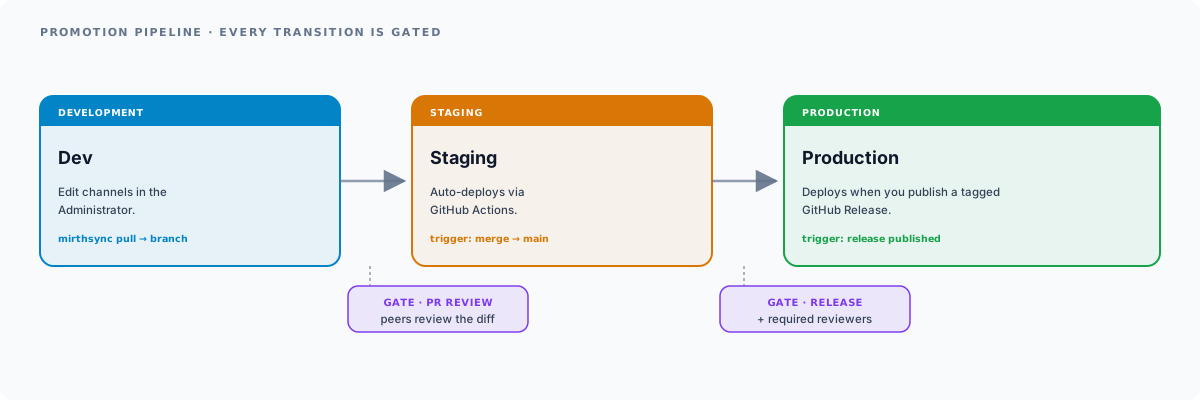
A typical healthcare integration environment has three tiers: development, staging, and production. Each environment connects to different systems (different EHR instances, different lab systems, different endpoints), which means certain configuration values must vary by environment.
Handling Environment-Specific Configuration
Mirth Connect’s Configuration Map is the primary mechanism for environment-specific values. Rather than hardcoding connection strings, ports, or endpoint URLs in channel configurations, reference configuration map entries and set different values in each environment.
In your channel transformer or connector, reference configuration map values:
var targetHost = configurationMap.get('LAB_SYSTEM_HOST');var targetPort = configurationMap.get('LAB_SYSTEM_PORT');When using MirthSync, you can manage the ConfigurationMap.xml separately from your channel configurations. One approach is to maintain environment-specific configuration map files and apply them as part of the deployment:
config/├── dev/│ └── ConfigurationMap.xml├── staging/│ └── ConfigurationMap.xml└── prod/ └── ConfigurationMap.xmlUpdate your GitHub Actions workflow to copy the appropriate configuration map before pushing. Note that MirthSync does not push the configuration map by default: you must pass --include-configuration-map (and -f to force the update past version differences) for the env-specific values to actually land:
- name: Apply environment config  run: cp config/staging/ConfigurationMap.xml src/ConfigurationMap.xml
- name: Push to Staging  run: mirthsync -s "$MIRTH_URL" -u "$MIRTH_USER" -p "$MIRTH_PASSWORD" -t ./src push --include-configuration-map -f
Promotion Workflow
The full promotion workflow looks like this:
- Develop in the dev environment. Make channel changes using the Mirth Connect Administrator.
- Pull changes with MirthSync into a feature branch.
- Review via pull request. Team members review the channel diffs.
- Merge to
main. GitHub Actions automatically deploys to staging. - Test in staging. Verify channels work with staging endpoints and data.
- Release by creating a GitHub release. GitHub Actions deploys to production.
- Verify in production. Confirm message flow and monitor for errors.
MirthSync Plugin and VS Code Extension
The MirthSync CLI is the foundation, but two companion tools make the workflow even more productive.
MirthSync Plugin for Mirth Connect
The MirthSync Plugin installs directly into the Mirth Connect Administrator console. It adds a visual interface for MirthSync operations, including the ability to see diffs between the current channel configuration and the version stored in your Git repository. This is especially useful for developers who prefer working in the Mirth Administrator rather than the command line.
MirthSync VS Code Extension
The MirthSync VS Code Extension brings channel management into your IDE. Available on the VS Code Marketplace (SagaITLLC.mirthsync), it provides syntax highlighting for Mirth channel XML, inline editing of transformer scripts, and integrated MirthSync commands. You can pull, edit, and push channels without leaving VS Code, and the built-in Git integration means your changes are version-controlled from the start.
Together, the CLI, plugin, and VS Code extension cover every workflow preference: command-line automation for CI/CD, visual administration for hands-on channel development, and IDE-based editing for developers who want to treat channels like code.
Best Practices
Channel Naming Conventions
Adopt a consistent naming convention for channels that makes them easy to identify in both the Mirth Administrator and Git diffs. A common pattern is:
[Direction] [MessageType] [System] [Port]Examples: Inbound ADT Epic 6661, Outbound ORU LabCorp 6670, Router SIU Scheduling 6680. Consistent naming makes it immediately clear what each channel does when reviewing pull requests.
Git Commit Messages
Write commit messages that describe the business purpose of the change, not just the technical modification. Instead of “Updated channel XML,” write “Add retry logic to ORU inbound for intermittent lab system timeouts.” This makes the Git log useful for understanding why changes were made, which is invaluable during incident investigation.
Testing Before Promotion
Never promote channels to production without testing in staging. At a minimum, send representative test messages through each modified channel and verify the output. For channels that transform or route messages, test edge cases: missing segments, unexpected field values, oversized messages, and character encoding variations.
Rollback Procedures
When a production deployment causes issues, rollback is straightforward with Git:
# Revert the last merge commitgit revert HEADgit push origin main# GitHub Actions deploys the reverted state to staging# Create a release to deploy the revert to productionBecause MirthSync pushes the full channel configuration, reverting a Git commit and redeploying restores the previous channel state. This is dramatically faster and more reliable than restoring a database backup.
Restrict Manual Changes in Production
Once CI/CD is in place, lock down manual channel modifications in production. Create read-only user accounts for operators who need to monitor channels but should not modify them. All changes should flow through the Git workflow: develop, review, merge, deploy. This ensures every production change is tracked, reviewed, and reversible.
Next Steps
MirthSync transforms healthcare integration management from a manual, error-prone process into a modern DevOps workflow. Version control, code review, automated testing, and controlled deployments are no longer luxuries reserved for application development teams. Integration engineers deserve the same tools.
Ready to get started? Explore these resources:
- MirthSync CLI – Open-source tool for Git-based channel management
- MirthSync Plugin – Visual diff and sync in the Mirth Administrator
- MirthSync VS Code Extension – Channel editing in your IDE
- Mirth Connect Services – Expert Mirth Connect consulting and support
- OIE Services – Open Integration Engine migration and management
If you need help setting up CI/CD for your integration engine or migrating from Mirth Connect to OIE, contact Saga IT to discuss your environment.
Frequently Asked Questions
Does MirthSync work with OIE, not just Mirth Connect?
Where does MirthSync store channels?
Channels/ (channel groups become folders, each with an index.xml) plus CodeTemplates/, GlobalScripts/, Alerts/, ConfigurationMap.xml, and Resources.xml. Every artifact is a separate plain-text file, so Git diffs show exactly what changed.How do I handle environment-specific values?
ConfigurationMap.xml, copy the right one into place during deployment, and push it with mirthsync push --include-configuration-map -f. MirthSync does not push the config map by default.How do I roll back a bad deploy?
git revert the offending commit and re-push. Because MirthSync pushes the full channel configuration, reverting in Git and redeploying restores the previous state, far faster and more reliable than restoring a database backup.Is MirthSync free, and who maintains it?
SagaHealthcareIT/mirthsync, with an npm wrapper published as @saga-it/mirthsync. There are also a Mirth Administrator plugin and a VS Code extension built on the same tool.