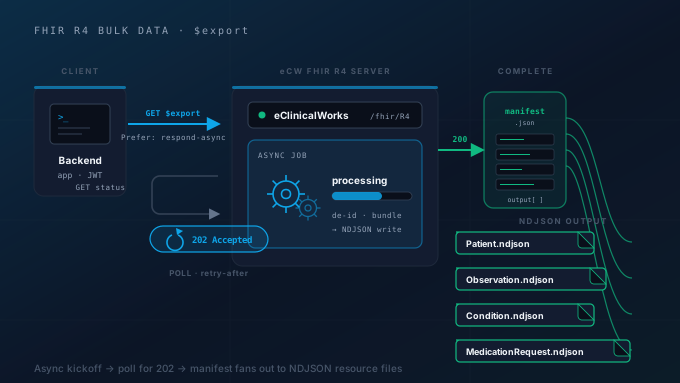
If you need to move a whole population of clinical data out of eClinicalWorks® (for a payer’s quality-measure pipeline, a population-health platform, a research data warehouse, or a clinical-registry submission), you do not want to loop over patients one FHIR® read at a time. That approach is slow, fragile, and rate-limited into the ground. The right tool is the FHIR Bulk Data Access specification (commonly called $export), and eClinicalWorks exposes it on its FHIR R4 server.
Bulk Data is a different beast from the per-resource FHIR API. It is asynchronous (you kick off a job and poll for it), it authenticates with SMART Backend Services instead of a user login, and it returns NDJSON files instead of a Bundle. Every one of those differences trips up developers who come to it expecting the synchronous REST API they already know.
This guide walks through the eClinicalWorks-specific path end to end: the ecwopendev developer program and sandbox, the Backend Services OAuth 2.0 / JWT handshake, the $export kickoff request (Patient/$export vs Group/[id]/$export), the async polling flow, retrieving the NDJSON output, and the eCW-specific gotchas that the spec does not warn you about. If you are building any kind of automated extract against eCW, this is the pattern you want.
A note on scope: eClinicalWorks is a third-party EHR. Saga IT builds and operates integrations against the eClinicalWorks FHIR API for our clients. We are not eClinicalWorks and do not speak for it. Endpoint URLs, scope availability, and onboarding details are controlled by eClinicalWorks and can change, so treat the request shapes below as the standard Bulk Data pattern and always confirm specifics against eCW’s current developer documentation and the practice’s published metadata.
What Is FHIR Bulk Data $export?
The synchronous FHIR API integration you already know answers questions about one patient or one resource at a time: “give me this patient’s conditions,” “search observations for this encounter.” Bulk Data answers a fundamentally different question: “give me all the data for a defined group of patients, as a downloadable dataset.” It is built for the population scale where a Bundle of search results would be hopeless.
Three things make Bulk Data distinct from the REST API you already know:
- It is asynchronous. You do not get your data in the response to your request. You send a kickoff request, the server returns
202 Acceptedand a status URL, and you poll that URL until the export is finished. A large export can take minutes or longer to assemble. - The output is NDJSON. Instead of a FHIR
Bundle, the server produces newline-delimited JSON files: one file per resource type, one resource per line. This format streams and parses line-by-line, which is exactly what you want for millions of resources. - It uses SMART Backend Services auth. There is no user, no browser, and no patient login. A backend system authenticates with a signed JWT and a client-credentials grant. (If your background is interactive apps, this is the non-user-facing cousin of the flow in our SMART on FHIR developer guide.)
The Bulk Data Access specification is an HL7® standard (Bulk Data Access IG, built on FHIR R4), and it is also a requirement under the ONC Cures Act Final Rule’s “standardized API” provisions for certified EHRs, which is why eClinicalWorks and the other major EHR vendors all support it. The request shapes are standardized across vendors; what differs is onboarding, scope availability, and operational limits.
Step 1: Onboard to the eClinicalWorks Developer Program
Before any code runs, you need credentials, and on eClinicalWorks that means the ecwopendev developer program. This is eCW’s open developer portal, where you register an application, manage credentials, and get access to a FHIR sandbox populated with synthetic test patients (no real protected health information).
The flow has a shape worth internalizing up front because it shapes your whole rollout:
- Sandbox is per-developer. You register your app, develop, and test against eCW’s sandbox FHIR endpoint with synthetic data. This is where you prove your
$exportjob works. - Production is per-practice. Each live eClinicalWorks practice runs on its own tenant with its own FHIR base URL. A practice must authorize your application against its environment before you can pull its data. You do not get a single global production endpoint. You get one per practice you onboard.
- Registration is per-environment. The credentials and base URL you use against the sandbox are not the same ones you use against a production practice. Plan your configuration so the base URL, client ID, and keys are environment-specific from day one.
For a Bulk Data job you register a Backend Services (system/server) application, not a patient- or provider-facing SMART app, and you upload the public key of a key pair you control. That public key is what the authorization server uses later to verify your signed token requests.
The practical consequence: the sandbox is where you build and validate, but going live always involves a per-practice authorization step. Budget for it. A common mistake is to demo a working sandbox export and assume production is a config swap; in reality each new practice is its own onboarding conversation and its own endpoint.
Step 2: Authenticate with SMART Backend Services (OAuth 2.0 + JWT)
Bulk Data exports run unattended: typically a nightly cron job, not a person clicking a button. So the authentication is system-to-system: the SMART Backend Services profile, which is OAuth 2.0’s client_credentials grant with an asymmetric, JWT-based client assertion. There is no authorization-code redirect, no patient consent screen, and no refresh token.
Here is how the handshake works.
Build a signed JWT assertion. You construct a JSON Web Token whose iss and sub are both your client ID, whose aud is the token endpoint, with a jti (a unique ID to prevent replay) and a short exp (five minutes is typical). You sign it with the private key whose public half you registered. SMART Backend Services calls for asymmetric signing: RS384 or ES384.
Exchange the JWT for an access token. POST to the token_endpoint you discovered from .well-known/smart-configuration (shown here as a placeholder, never hardcode it):
POST [token_endpoint] HTTP/1.1Content-Type: application/x-www-form-urlencoded
grant_type=client_credentials&scope=system/Patient.read system/Observation.read system/Condition.read&client_assertion_type=urn:ietf:params:oauth:client-assertion-type:jwt-bearer&client_assertion=eyJhbGciOiJSUzM4NC... (the signed JWT)
The authorization server validates the JWT signature against your registered public key and, if everything checks out, returns a short-lived bearer token:
{ "access_token": "eyJ...", "token_type": "bearer", "expires_in": 300, "scope": "system/Patient.read system/Observation.read system/Condition.read"}Use the token. Every subsequent request (the kickoff, the polling, and the file downloads if they require auth) carries Authorization: Bearer <access_token>.
A few things developers regularly get wrong here:
- Scopes are
system/scopes, notpatient/oruser/. Backend Services usessystem/[Resource].[read|*], for examplesystem/Patient.readorsystem/*.read. If you copy scopes from a patient-facing SMART app, your token request will fail or return a token that cannot read anything. Request only the resource types you intend to export. - The access token is short-lived and there is no refresh token. When it expires, you sign a fresh JWT and request a new token. For a long export, get a token, then watch the clock. Re-authenticate before it lapses.
- Clock skew kills JWTs. Because the assertion has a short
exp, a server whose clock is even a minute off from the authorization server will reject your token request. Sync your clock (NTP) and keepexpmodest but not razor-thin.
Step 3: Kick Off the Export: Patient vs Group
With a token in hand, you start the export. There are three levels of $export, and choosing the right one is the most important design decision in the whole flow.
Group-level export is the one you will reach for most often:
GET [base]/Group/[group-id]/$exportAuthorization: Bearer eyJ...Accept: application/fhir+jsonPrefer: respond-asyncThis exports data for the patients who belong to a defined Group resource: a practice panel, a payer’s attribution list, an ACO roster. It is the natural fit for population workflows because the cohort is explicit and stable. The catch is that the Group must exist on the server; you typically reference a group the practice has defined rather than inventing one.
Patient-level export drops the group:
GET [base]/Patient/$exportAuthorization: Bearer eyJ...Accept: application/fhir+jsonPrefer: respond-asyncThis returns data for all patients your authorized application is permitted to see. It is simpler (no Group needed) but gives you no panel-level filtering: you get the whole authorized cohort or nothing.
System-level export (GET [base]/$export) is the broadest scope, returning everything on the server. On commercial EHRs including eClinicalWorks it is generally not exposed to third-party applications. It is an operator-level capability. Do not design around it.
Two request headers are mandatory and frequently forgotten:
Prefer: respond-asyncis what tells the server to run an asynchronous export instead of trying to answer inline. Omit it and you will not get the Bulk Data behavior.Accept: application/fhir+jsonsets the format of the status manifest (not the output files).
You can scope the export with query parameters that all three levels accept:
_type: a comma-separated list of resource types to include, e.g._type=Patient,Condition,Observation. Always set this. Without it you get every supported resource type, which is almost never what you want and dramatically lengthens the job._since: an instant; returns only resources created or updated after it (covered in detail below)._outputFormat: must beapplication/fhir+ndjson(the default and, in practice, the only widely supported value).
A typical, well-formed kickoff looks like this:
GET [base]/Group/42/$export?_type=Patient,Condition,Observation&_outputFormat=application/fhir+ndjsonAuthorization: Bearer eyJ...Accept: application/fhir+jsonPrefer: respond-asyncIf the server accepts the job, it responds:
HTTP/1.1 202 AcceptedContent-Location: https://[base]/fhir/bulkstatus/7f3c-...That Content-Location URL is your status URL. Save it: it is the handle for everything that follows.
Step 4: Poll for Completion
The export now runs server-side while you poll the status URL. This is where a lot of naive clients go wrong by hammering the endpoint in a tight loop. Be polite and follow the protocol.
While the export is still being assembled, the status URL returns:
HTTP/1.1 202 AcceptedX-Progress: in-progress (47%)Retry-After: 120Two response headers drive your loop:
X-Progressis a human-readable progress hint (the exact text is not standardized; treat it as informational, not a value to parse).Retry-Aftertells you how long to wait before polling again, either as seconds (120) or as an HTTP date. Honor it. It is the server telling you its preferred cadence; ignoring it is the fastest way to get throttled. If it is absent, fall back to a sensible interval with backoff (start around 30–60 seconds).
When the export is finished, the status URL returns 200 OK with a JSON completion manifest in the body:
{ "transactionTime": "2026-06-24T03:14:07.000Z", "request": "https://[base]/Group/42/$export?_type=Patient,Condition,Observation", "requiresAccessToken": true, "output": [ { "type": "Patient", "url": "https://[base]/bulk/7f3c/Patient.ndjson" }, { "type": "Condition", "url": "https://[base]/bulk/7f3c/Condition.ndjson" }, { "type": "Observation", "url": "https://[base]/bulk/7f3c/Observation_1.ndjson" }, { "type": "Observation", "url": "https://[base]/bulk/7f3c/Observation_2.ndjson" } ], "error": []}A robust polling implementation:
- Caps total wait time. Set a ceiling (an export that has not finished in, say, an hour or two probably failed silently) and alert rather than poll forever.
- Handles errors at the kickoff and status stages. A
4xx/5xxat kickoff means your request was malformed or unauthorized; an error during polling is reported in the manifest’serrorarray asOperationOutcomeresources. - Records
transactionTime. You will need it for the next incremental run. More on this in Step 6.
Step 5: Retrieve the NDJSON Output
The manifest’s output array is your download list: one entry per file, each with a type (the FHIR resource type) and a url.
Download behavior to get right:
- Respect
requiresAccessToken. When the manifest saysrequiresAccessToken: true, send yourAuthorization: Bearerheader on the file downloads too. When it isfalse, the URLs are pre-signed and you fetch them without auth (sometimes from a different host, like cloud object storage). Read the flag. Do not assume. - NDJSON parses line-by-line. Each line is one complete FHIR resource. There is no enclosing JSON array and no commas between lines, so you must not
JSON.parse()the whole file. Stream it and parse one line at a time: that is the entire point of the format, and it is what lets you process files larger than memory. - A resource type can span multiple files. Notice the two
Observationentries above. When a type’s volume is large, the server splits it across several numbered files. Iterate the wholeoutputarray; never assume one file per type. error[]is separate fromoutput[]. Per-resource issues (a resource that could not be serialized, for instance) come back asOperationOutcomeresources referenced in the manifest’serrorarray, not mixed into your data files. Check it.
Once you have the files, your downstream pipeline (a data warehouse load, a quality-measure engine, a registry transform) reads them line by line. Because NDJSON is append-friendly and splittable, it slots neatly into batch and streaming tools alike, and routing those records onward through an interface engine like Mirth® Connect gives you the transformation, filtering, and replay that a raw warehouse load lacks.
Step 6: Incremental Exports with _since
Re-exporting an entire population every night is wasteful once you have a baseline. The _since parameter turns a full export into a delta export: pass an instant and the server returns only the resources created or updated after it.
The pattern is a watermark chain:
- First run, no
_since: a full baseline export. Save thetransactionTimefrom the completion manifest. Call itT1. - Next run:
$export?_since=T1. You get only what changed sinceT1. Save the new manifest’stransactionTimeasT2. - Every run after:
$export?_since=T(n-1), savingT(n)each time.
The discipline that makes this reliable:
- Watermark on the manifest’s
transactionTime, not your wall-clock send time. ThetransactionTimeis the server’s authoritative cut-off for that export. Using the time you fired the request can silently drop resources that changed during the job. Always persist and reuse the value the server gave you. - Plan for deletes.
_sincereflects creates and updates well, but a resource that was deleted simply stops appearing. It does not arrive as a tombstone in the output. If your warehouse must mirror the source exactly, you need periodic full reconciliation (or to consume deletes through whatever separate mechanism the server offers) rather than relying on deltas alone. - Keep a full-refresh cadence. Even with solid deltas, schedule an occasional full baseline (weekly or monthly) to self-heal from missed runs, schema changes, or drift.
eClinicalWorks-Specific Gotchas and Limits
The Bulk Data spec is standardized, but every vendor’s implementation has rough edges. The ones that bite teams on eClinicalWorks:
- Production access is per-practice, and onboarding is the long pole. As covered in Step 1, each practice authorizes your app against its own tenant base URL. Sandbox success does not equal production access. Build the per-practice authorization and endpoint configuration into your timeline and your data model from the start.
- Discover endpoints from
.well-known/smart-configuration. Do not hardcode token and authorization URLs. Each FHIR base URL publishes a SMART configuration metadata document ([base]/.well-known/smart-configuration) that lists thetoken_endpointand supported capabilities. Read it per environment and per practice; it is the contract for what that server actually supports. - Resource-type and scope coverage is not universal. Not every FHIR resource type is exportable, and not every
system/scope you can imagine is granted. Confirm which resource types and scopes are available for your use case rather than assuming the full USCDI set. Request narrowly with_typeand only the scopes you need. _outputFormatis effectively fixed to NDJSON.application/fhir+ndjsonis what to use; do not build around alternative output formats from the spec that may not be supported.- Exports are heavy: expect throttling and queueing. A large
$exportconsumes real server resources, so the platform may queue jobs, cap concurrency, or slow your polling. HonorRetry-After, do not run many concurrent exports against the same practice, and design retries with backoff rather than retry storms. - Test only against the sandbox. The sandbox uses synthetic patients; never point exploratory or load-test runs at a production practice’s PHI. Validate parsing, splitting, and error handling against synthetic data first.
Build for those realities (idempotent jobs, persisted watermarks, environment-specific config, polite polling, and per-practice onboarding) and an eClinicalWorks Bulk Data pipeline is dependable and low-maintenance. Skip them and you get fragile cron jobs that throttle out and quietly drop data.
How Saga IT Can Help
Bulk Data looks simple on paper and gets complicated in production: per-practice onboarding, JWT signing and key rotation, polite polling, watermark management, deletes, and NDJSON pipelines that survive multi-gigabyte exports. Saga IT builds and operates exactly these extracts against eClinicalWorks and the other major EHRs: population-health feeds, payer quality pipelines, research and registry data warehouses, and clinical analytics platforms.
Our team can help you:
- Stand up Backend Services auth: key management, JWT assertion signing, and token lifecycle against the eCW developer program
- Design the export job: choosing Patient vs Group scope,
_typefiltering, and an incremental_sincestrategy with reliable watermarking - Build a resilient NDJSON pipeline: streaming parsers, multi-file handling, error reconciliation, and idempotent loads into your warehouse
- Navigate per-practice onboarding: endpoint discovery, authorization, and environment-specific configuration
Learn more about our eClinicalWorks integration services and our broader FHIR API integration capabilities. If you are also building interactive, user-facing apps on FHIR, see our SMART on FHIR developer guide, and for the underlying resource model, our FHIR R4 implementation guide.
Contact Saga IT to talk through your eClinicalWorks Bulk Data project.
Frequently Asked Questions
What is the difference between Patient/$export and Group/$export on eClinicalWorks?
Group/[id]/$export returns data only for the patients who belong to a defined Group resource (a practice panel, attribution list, or ACO roster), which makes it the right choice when you have an explicit cohort. Patient/$export returns data for all patients your authorized application is permitted to see, with no panel-level filtering. System-level $export is broader still but is generally not exposed to third-party apps on commercial EHRs.Does eClinicalWorks Bulk $export use a user login?
client_credentials grant with a signed JWT client assertion. There is no patient or provider login, no browser redirect, and no refresh token. You register a backend app, upload a public key, and request short-lived system/ access tokens by signing a JWT with the matching private key.What format does the export return?
How do I get only changed records instead of a full export?
_since parameter set to the transactionTime from your previous export's completion manifest. The server then returns only resources created or updated after that instant. Watermark on the manifest's transactionTime (not your wall-clock send time), and run a periodic full refresh to catch deletes and missed runs, since _since does not deliver deletions as tombstones.Why is my $export request returning 200 instead of 202?
Prefer: respond-async header. That header is what tells the server to run an asynchronous Bulk Data export and return 202 Accepted with a Content-Location status URL. Without it the server may try to answer inline (or reject the operation). Also confirm you are calling a $export operation endpoint and using system/ scopes from a Backend Services token.