Why device integration is its own discipline
Connecting a medical device to an electronic health record sounds like a single task. In practice it is three overlapping problems that speak different standards, land in different parts of the EHR, and fail in different ways. A bedside monitor streams vitals over a serial cable. A lab analyzer emits HL7® v2 result messages. A CT scanner produces DICOM studies that belong in a PACS, not the chart. A connected home device wants to write patient-generated readings through a FHIR® API. Every one of those is “device integration,” and every one needs a different connection into Epic® or Oracle Health® (Cerner®).
This guide walks the full medical device integration reference architecture (how devices, modalities, and PACS reach the two dominant EHRs) and the standards each leg of the journey speaks. We cover the classic HL7 v2 order-and-result flow, the DICOM and PACS imaging path, Epic’s three connectivity surfaces (Bridges, the imaging stack, and Vendor Services/FHIR), Oracle Health’s CareAware iBus device bus, and the SMART on FHIR path for app-based device data. Throughout, we show where an interface engine sits in the middle and why almost every real program ends up needing one.
If you want the broader vendor-to-provider context first, our EHR & PACS integration guide covers the connectivity patterns and security review that gate every one of these projects.
The reference architecture
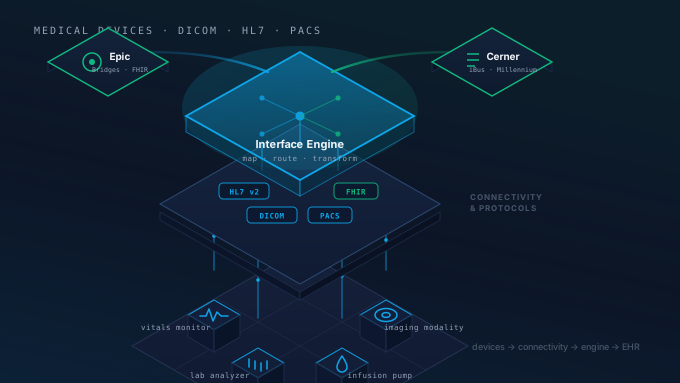
Start with the shape of the system before any one protocol. Device and imaging data flows left to right through four layers: the sources, a connectivity layer, the integration layer, and the EHR destinations.
The sources are anything that produces clinical data: physiologic monitors, ventilators, infusion pumps, lab and point-of-care analyzers, and imaging modalities like CT, MR, and ultrasound. Most of these speak one of a small set of standards (HL7 v2, DICOM, or a vendor-proprietary serial or TCP protocol), but the specifics vary by manufacturer and even by firmware version.
The connectivity layer terminates those vendor protocols. Device gateways and connectivity middleware sit close to the equipment, translate proprietary signals into standard messages, and hand them upstream. Some devices ship their own gateway; others rely on platform connectivity engines (CareAware on the Cerner side is the clearest example).
The integration layer is the interface engine. This is where Mirth® Connect, the Open Integration Engine (OIE), or a vendor’s own engine normalizes the incoming stream, maps fields to what the destination expects, routes messages to one or more downstream systems, and keeps an audit trail you can replay when something breaks at 2 a.m.
The destinations are the EHRs. Epic exposes its Bridges interface engine, its imaging stack, and its Vendor Services / FHIR APIs. Oracle Health exposes the CareAware iBus device bus, its interface engine, and its FHIR R4 / Ignite APIs, all landing in Cerner Millennium.
The standards band at the bottom is the part teams underestimate. The device-to-gateway leg might be raw serial or DICOM; the gateway-to-engine leg is usually HL7 v2 or DICOM; the engine-to-EHR leg is HL7 v2, FHIR R4, or X12. A single device’s data can change format two or three times before it lands in the record. That is normal, and it is exactly what the integration layer exists to manage.
The HL7 v2 order and result flow
The oldest and still most common device interface is the HL7 v2 order-and-result loop. A clinician places an order in the EHR; the order reaches the device; the device performs the work and sends a result back. Two message types carry the bulk of it: ORM (order message) and ORU (observation result). If you need a refresher on the message catalog, our HL7 message types explained post breaks down ADT, ORM, ORU, and the rest.
Walking the sequence: the EHR emits an ORM^O01 when an order is placed. The interface engine receives it, transforms the message into whatever the device or its worklist expects, and routes it onward. The device acknowledges, the engine relays an acknowledgement back to the EHR, and everyone’s queues stay in sync. When the device finishes (a lab analyzer completes its panel, an EKG cart captures a tracing) it emits an ORU^R01. The engine maps the result’s OBR and OBX segments to the EHR’s discrete-result fields and delivers it, so the value files as structured data a clinician can trend, not a blob of text.
Two details make or break this loop in production. First, acknowledgements matter: HL7 v2 uses application-level ACKs (AA for accept, AE for error, AR for reject), and an interface that ignores a negative ACK will silently drop messages. Second, the OBX mapping is where the clinical value lives. A result that arrives as a single free-text OBX is far less useful than one broken into discrete, coded observations. Getting LOINC® codes, units, and reference ranges into the right fields is the unglamorous work that determines whether the integration actually helps clinicians.
This is also the leg where the interface engine earns its keep. Epic and Oracle Health both have their own engines (Epic Bridges and the Oracle Health interface engine), but the device side rarely speaks their exact dialect. A neutral engine in the middle absorbs the per-device quirks (non-standard segments, off-spec date formats, vendor Z-segments) without forcing changes inside the EHR.
The DICOM and PACS imaging path
Imaging is its own world. Pixels do not travel as HL7 v2; they travel as DICOM, and they live in a PACS (Picture Archiving and Communication System) or a vendor-neutral archive, not in the EHR database. The EHR’s job is to order the study, file the report, and launch the images in context, not to store the images itself.
The flow starts with an order in the EHR that becomes a DICOM Modality Worklist (MWL) entry. The modality (a CT or MR scanner) queries the worklist with C-FIND, pulls down the patient demographics and accession number, and the tech scans without retyping anything (which also prevents the demographic mismatches that cause lost studies). After acquisition, the modality pushes the images to the PACS with C-STORE (the classic DIMSE service) or STOW-RS (the HTTP-based DICOMweb equivalent). The PACS then signals completion: Modality Performed Procedure Step (MPPS) plus an HL7 ORU status routed through the interface engine, so the EHR knows the study is done.
The payoff comes when a clinician opens the chart. The EHR launches an enterprise or zero-footprint viewer through an IHE® Invoke Image Display (IID) link or a DICOMweb WADO-RS retrieve, and the images appear inline without a separate login or a context switch. That “view in context” experience is the whole point of imaging integration, and it depends on the order, the report, and the study UID all lining up, which is why the HL7 leg and the DICOM leg have to be designed together.
DICOM has two generations of services worth knowing. The classic DIMSE services (C-FIND, C-MOVE, C-STORE) run over the DICOM upper-layer protocol on dedicated ports. The newer DICOMweb services (QIDO-RS to query, WADO-RS to retrieve, STOW-RS to store) run over plain HTTPS, which is far friendlier to cloud deployments, firewalls, and modern web viewers. Most hospitals run a mix; a cloud product or AI tool usually prefers DICOMweb. Our medical imaging integration service covers both, and for the security layer, Mirth Connect with DICOM over TLS shows how to encrypt the classic DIMSE traffic an engine brokers.
Epic’s three connectivity surfaces
Epic does not have one front door for device data: it has three, and choosing the wrong one wastes weeks. The right surface depends on what the data is and how it needs to behave once it lands.
Path one: Epic Bridges (the classic interface). Bridges is Epic’s own interface engine, fed over Epic Interconnect. This is the home of high-volume HL7 v2: lab results, device readings, ADT, orders. If a device produces a steady stream of ORU or ORM messages, Bridges is almost certainly where they belong, and your external interface engine hands off to it. This path is mature, well-understood, and the default for anything that looks like a traditional interface. Our Epic integration service and the deeper Epic FHIR and HL7 v2 reference cover the Bridges and Interconnect mechanics in detail.
Path two: the imaging stack. Studies land in the PACS or VNA and are surfaced through Epic Radiant (radiology) or Cupid (cardiology) and the enterprise viewer. Epic does not warehouse the pixels; it stores the order and report and launches the images via IID or WADO-RS. If your device is a modality or your product consumes imaging, this is your surface, and it is governed by DICOM and IHE profiles, not by HL7 interface specs.
Path three: Vendor Services and FHIR. For app-based and device-app data, Epic exposes FHIR R4 APIs. An app registers through the Epic on FHIR developer program and Vendor Services, authorizes with SMART on FHIR, and reads or writes discrete resources. This is the right path when the data needs patient or user context, when it is patient-generated, or when a SMART app needs to run inside the chart. It is the wrong path for a firehose of real-time bedside vitals. That is still Bridges territory.
The practical rule: Bridges for high-volume HL7 v2 interfaces, the imaging stack for DICOM, and Vendor Services/FHIR for app-based data with identity and consent context. Many programs use two or three of these at once, and an interface engine in the middle lets you route a single device’s data to whichever surface fits.
Oracle Health (Cerner) and CareAware iBus
Oracle Health’s device story centers on CareAware, and specifically the CareAware iBus: a dedicated device-integration bus that sits between bedside equipment and Cerner Millennium. Where Epic leans on Bridges plus a separate imaging stack, Cerner’s medical-device connectivity is concentrated in this purpose-built bus.
The topology is hub-and-spoke. Bedside devices (monitors, ventilators, infusion pumps, and other point-of-care equipment) connect through CareAware device drivers running on connectivity engines or appliances near the bedside or on the unit. Those drivers terminate the vendor-specific protocols (serial, proprietary TCP, HL7 v2) and feed the iBus, which does the heavy lifting: it normalizes the protocols, performs patient–device association, and validates and rates the incoming data before it enters the record. From there, validated observations flow three ways: into Cerner Millennium and the patient chart, into CareAware ICU and other clinical-surveillance applications, and out to an interface engine and downstream systems as HL7 v2 or FHIR.
The piece worth emphasizing is patient–device association. Binding a device to the correct bed and patient is the safety-critical step the iBus owns. Get it wrong and a vital sign files on the wrong chart, a genuine patient-safety event, not just a data-quality nuisance. Location awareness and association workflows are precisely why CareAware exists as a layer between the bedside and Millennium rather than wiring devices straight into the record.
For a third-party product, the integration question is usually: do you connect at the device-driver level (becoming part of the CareAware fabric), or do you consume the normalized output downstream via the interface engine, HL7 v2, or FHIR? The latter is far more common for cloud products and is where our Oracle Health integration work typically lands: taking the validated, patient-associated stream the iBus has already produced and routing it where the product needs it.
The SMART on FHIR device-app path
The newest path (and the one growing fastest) is app-based device data over FHIR. This suits patient-generated data, connected-home devices, and any product that ships as an app rather than a classic interface.
The connected device or its gateway posts readings to a vendor cloud or device app. That app is registered with the EHR’s developer program (Epic on FHIR plus Vendor Services on the Epic side, the equivalent developer program on the Oracle Health side) and authorizes against the EHR using SMART on FHIR. There are two authorization flows, and picking the right one matters:
- SMART App Launch uses the OAuth 2.0 authorization-code flow to obtain patient and user context. A clinician opens the app inside the chart and it inherits the open patient. This is the flow for user-facing apps.
- SMART Backend Services uses a signed JSON Web Token (JWT) for system-to-system access with no user present. This is the flow for unattended device-data syncs: a home monitor uploading readings overnight, for example.
With a token in hand, the app reads and writes discrete FHIR R4 resources (Observation for readings, Device for the equipment itself, DiagnosticReport for structured results, DocumentReference for documents) through the EHR’s FHIR R4 API, and the data lands in the patient record. Both flows are scoped: the app only ever sees the resources and patients the EHR administrator and granted OAuth scopes allow. Our SMART on FHIR guide walks the launch sequences in depth, and the HL7 vs FHIR comparison explains when to reach for FHIR versus the v2 interface path.
The honest framing: FHIR is not a replacement for the HL7 v2 interface path: it is a complement. FHIR shines for app-based, patient-generated, and context-sensitive data. HL7 v2 through the interface engine remains the workhorse for high-volume, real-time bedside, lab, and modality feeds. Most mature device programs run both, and the interface engine is what lets a single architecture serve both worlds.
Where the interface engine sits, and why you want one
It is tempting to wire a device straight into Epic or Cerner and skip the middle layer. For a single device at a single site, you sometimes can. But the moment you have more than one device, more than one site, or any need to transform, route, or audit, a point-to-point connection becomes a liability. The interface engine (Mirth Connect, the Open Integration Engine, or a commercial equivalent) gives you four things a direct connection does not:
- Transformation between HL7 v2, DICOM, FHIR, and proprietary formats, so the device side and the EHR side never have to match exactly.
- Routing and filtering, so one device’s data can fan out to the EHR, a data lake, and a monitoring dashboard from a single source.
- Audit, error queues, and replay, so when a downstream system is offline you can hold and resend messages instead of losing them.
- Security controls (TLS, certificate management, and access control) applied consistently across every interface.
Saga IT builds and operates exactly this layer for healthcare product companies and provider organizations. As an independent Mirth Connect and OIE consultancy, we sit between your devices and the EHR, design the order-and-result flows, stand up the DICOM and DICOMweb paths, and handle the Epic Bridges, Vendor Services/FHIR, and CareAware iBus connections on the EHR side. We are an independent integration consultancy, not a reseller of any EHR, which means we design the connection that fits your device and your customers’ systems, not the one that sells the most licenses.
If you are planning a device or imaging integration, start with the architecture: identify what each data source produces, which EHR surface it belongs in, and where the interface engine routes it. Then build the legs one at a time, testing the acknowledgements and the discrete-data mapping at each step.
How Saga IT can help
Whether you are connecting a single modality to a hospital PACS or building a device platform that has to work across dozens of Epic and Oracle Health sites, the hard part is never the happy path: it is the per-site quirks, the patient-association edge cases, and the operational tooling that keeps the interfaces healthy. We can help you:
- Design the reference architecture: map every device and modality to the right EHR surface and the right standard.
- Build the HL7 v2 order-and-result flows with discrete, coded results that clinicians can actually use.
- Stand up DICOM and DICOMweb imaging paths, including Modality Worklist, storage, and view-in-context launch.
- Connect the EHR side: Epic Bridges, Vendor Services and FHIR, and Oracle Health CareAware and FHIR.
- Operate the interface engine: monitoring, error handling, and replay on Mirth Connect or the Open Integration Engine.
Explore our medical imaging integration, HL7 integration, Epic integration, and Oracle Health integration services, or read the companion EHR & PACS integration guide for the vendor-to-provider connectivity patterns.
Contact Saga IT to scope your medical device, DICOM, or PACS integration.